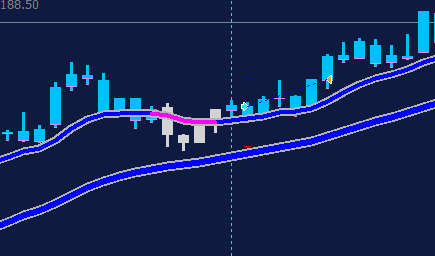
To elaborate, I don't have the MQL4 source file for the indicator in my picture and I find it hard to import them into my indicators with just the ex4 file, however the indicator is the exact same I just have the source file for it, making it easy for me to put into FxDreema
J
Posts made by jbeast24
-
RE: How to have the blocks activate one at a timeposted in Questions & Answers
-
RE: How to have the blocks activate one at a timeposted in Questions & Answers
Are you referring to the candle color and the visual of the moving average? The indicator that I am using in my current project that I shared is a different indicator that lacks the colors but is easier to set up in the "My Indicators" section, but I wanted to use the colors to better illustrate for you what I am looking for. It is still the same indicator signal wise and I am able to take trades with the 2 buffers, it is working as expected
-
RE: How to have the blocks activate one at a timeposted in Questions & Answers
That's just something I put together in hopes that it would be correct, it clearly is not as it is shows 4 lines when put through the strategy tester and is clearly not what I would like to do and would like some help with the program. The 2 lines image is what I would like to put into FxDreema and coded.
-
RE: How to have the blocks activate one at a timeposted in Questions & Answers
I want the 30 SSL to act as the main trend. The 10 SSL must be in the same direction as the 30 SSL, reverse direction, and then enter a trade when the SSL 10 flips back to the original trend direction. For an example, the 30 SSL is blue, the 10 SSL turns blue, then flips pink, and then enters a trade when it flips back to blue. I can make normal strategies with Fxdreema but I don't know how to set up a sequence of events that must take place before the next step is undertook
-
RE: How to have the blocks activate one at a timeposted in Questions & Answers
ssl-channel-chart-alert-indicator.mq4
Here is the indicator that I am using -
RE: How to have the blocks activate one at a timeposted in Questions & Answers
It is not repainting at all. It also has clearly defined buffers that work perfectly fine in Fxdreema. I just want to know how to set up the blocks so that my strategy can be automated, or if I have to use a different function that just linking the blocks together
-
How to have the blocks activate one at a timeposted in Questions & Answers
Hey everyone, I'm having a little trouble figuring out how to set up what I want to do and would appreciate the help. What I would like to do is have a 30 SSL (the thicker line) be my baseline direction guide and to take trades off of it. The 10 SSL (the smaller line) must be in the same direction of the 30 SSL, give an opposite color, and then take an entry when the indicator flips back to the original trend direction. I've attached a picture of what I am looking for. As you can see the thick SSL is blue, the smaller SSL was blue, flipped to the opposite signal, and then an entry happened when it changed back to blue. Do I need to set my blocks up differently in order to achieve this?