Creo que sólo puedes importar aquellos EAs construidos con fxDreema.
I think only fxDreema projects can be imported into the builder.
J
Posts made by josecortesllobat
-
RE: importar mql4 desarrollado con alphadvisorposted in Questions & Answers
-
OnTrade section: Close detection by TP does not work correctlyposted in Bug Reports
Hello
It seems that the "Position closed" block in OnTrade section does not work as expected when it is choose "Closed by Take-Profit"
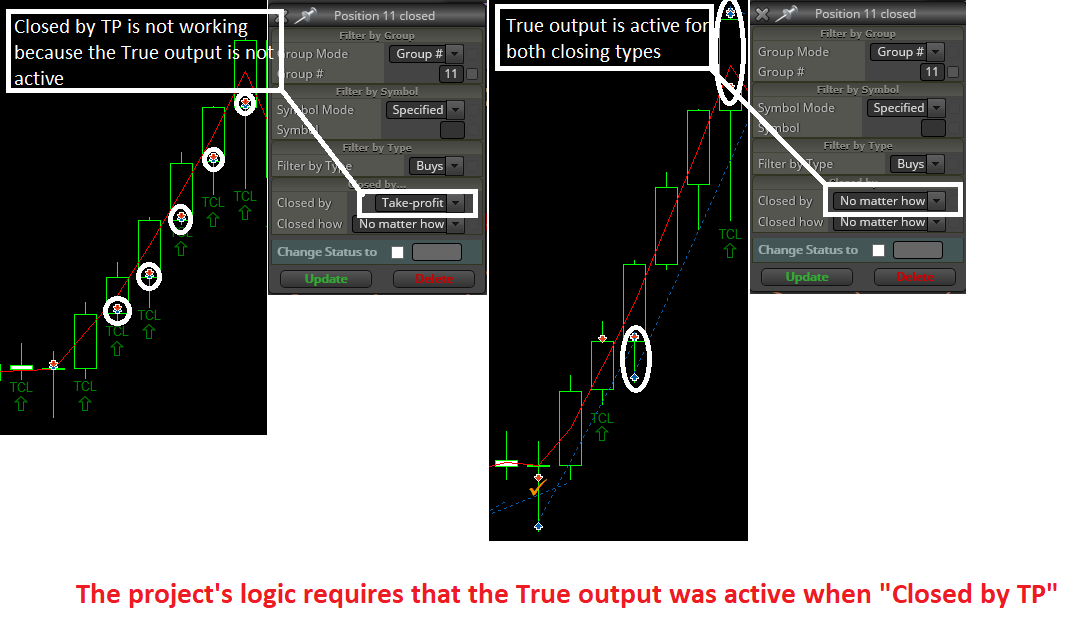
Might be a bug?
Thanks
-
RE: MARTINGALEposted in Questions & Answers
Do you mean with a lot size depending on Risk% or anything like that?
-
RE: On Trade issueposted in Questions & Answers
Hi @fxDreema
Here you have the simpliest project I can built respecting the logic of the whole Project.
https://fxdreema.com/shared/TmBsxyCze
But I just need that you check if the pink "modify stops" block &/or the blue "Modify stops of the positions" block work when they are placed in the "OnTrade" section of the project when the EA is running in a demo account. In the Tester there is not any issue and both work well.
Thanks
-
RE: On Trade issueposted in Questions & Answers
Hi @fxDreema
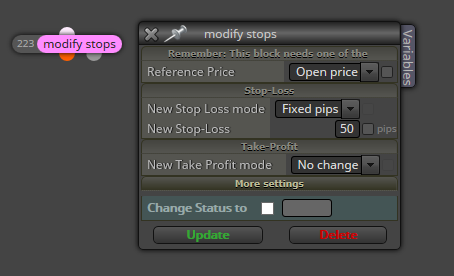
Might be there is another option but I am using so many "For…" blocks because I wanted to use the pink block called "modify stops" for all the trades with No change in TP (i just want to move the SL) but when the modify was sent, the TP of each trade was modified to 0.00000.
-
RE: On Trade issueposted in Questions & Answers
Hi @fxDreema
For me, a "position" is one order opened and a "trade" is all the exposure to the market. So, you are right and I am wrong with the meaning of those words.
The idea is:
- if the conditions to open orders are met, I am opening 4 orders each time. Let's called 11,12,13,14 and each one has its own lot size (i.e. 0.01, 0.07, 0.01, 0.01, LotSize = 0.1) .
I understand that you are suggesting to use "close (partially)" block and I think I used it but it did not work as I expected. I can work on this idea and see what is happening with this way.
Anyway, what I am trying to figure out is why the SL level are not modified when I am running the EA in a demo account. This is what I would like you be so kind to take a look. Because it works pretty well in the Tester but not in a demo account. I have been testing the EA in 4 different brokers and in none works as in the tester. The logic is: Order closed (OnTrade) -> move SL (% of TP).
Thanks for your help and suggestions
-
RE: On Trade issueposted in Questions & Answers
Hi @fxDreema
I will write a simpliest one.
The idea is: 4 positions opened per trade (same SL, each position has its own TPi)
-
when TP1 is reached and Pos1 is closed, move SL (Pos2, Pos3, Pos4) by closing detection in "OnTrade" section. TP2, TP3 and TP4 are kept.
-
when TP2 is reached and Pos2 is closed, move SL (Pos3, Pos4) by closing detection in "OnTrade" section. TP3 and TP4 are kept.
-
when TP3 is reached and Pos3 is closed, move SL (Pos4) by closing detection in "OnTrade" section. TP4 is kept.
That is the main idea about the position management.
Thanks for helping
-
-
RE: Warning from condition blockposted in Questions & Answers
Could you share a screenshot showing the content of that block?
-
RE: Hello to everyone,help pleaseposted in Questions & Answers
That block called "Account Profit >= 10$" is a "Condition" block that is checking out the account's profit.
You can not use the examples as I showed to you because I don´t know the logic of your Project. As @roar said, you should start the closing condition Branch using a "For each postion" or "If position" block. Like this
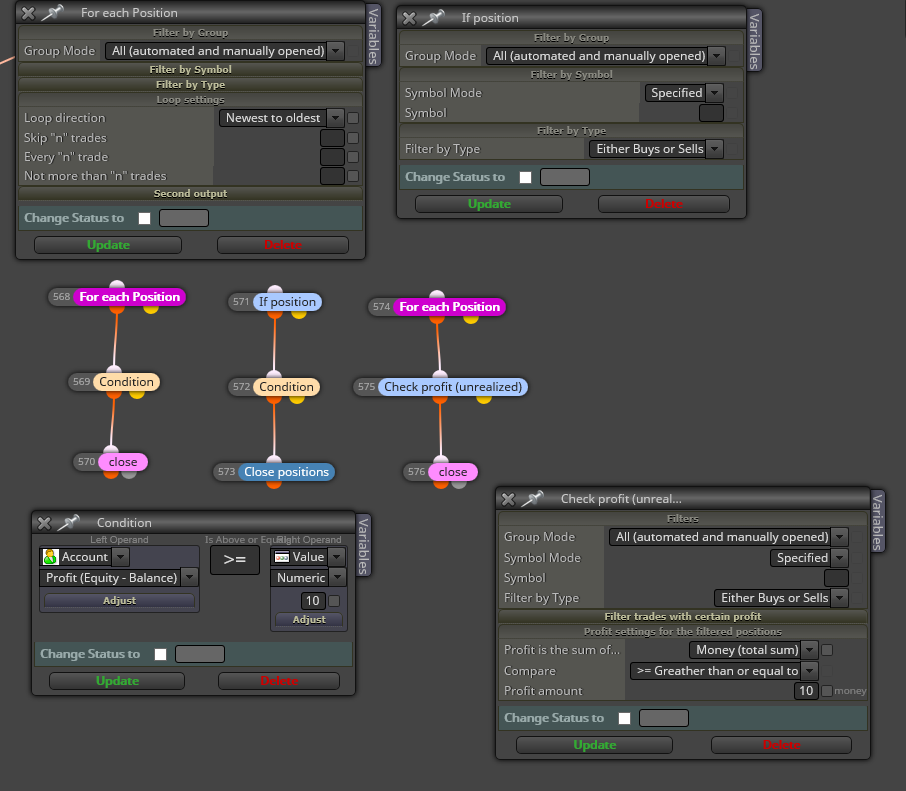
At least one of them should work. Their logic are: if profit (account or unrealized) is >=10$ -> Close all the positions
-
RE: Hello to everyone,help pleaseposted in Questions & Answers
This is other option that you could check up
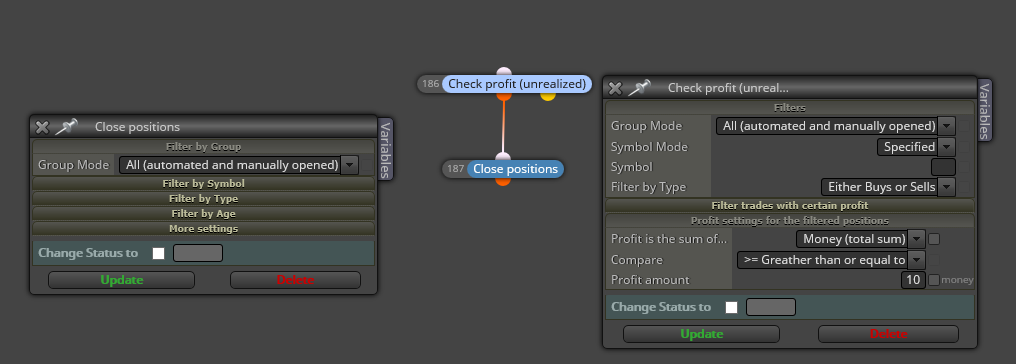
-
RE: Hello to everyone,help pleaseposted in Questions & Answers
Sorry @Eray-Dursun
I don't understand what you want to say. Can you clarify your question?
-
RE: Buy Limit & Stopposted in Questions & Answers
Hi
You can use "OCO: One Cancels Other" option that is available in the Buy/Sell pending order block:
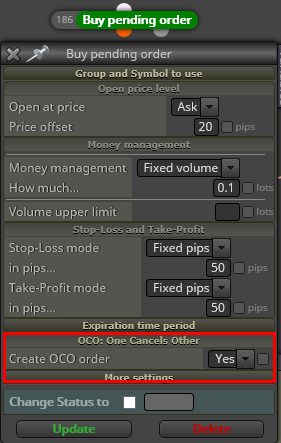
-
RE: On Trade issue posted in Questions & Answers
-
RE: EAs removed by themselvesposted in Questions & Answers
Hi @fxDreema
About this topic, there is no error logged at the terminal journal. What I found is just what you can see in the picture above. There is no reason apparently for the EAs removing. So, I don't know why is happening that. But I don't think it is related to the code. It is not happening when there is only one EA in one chart not a portfolio.
What I am doing right now is to copy the EA to MQL4 and check it out with a MT4 demo account with the same broker where I have the MT5 demo accounts. It is easy with fxDreema.
The other issue that I am trying to figure it out is one that you are aware of.
Thanks
-
RE: EAs removed by themselvesposted in Questions & Answers
Thanks @roar for helping.
But I am not able to understand it. If an EA is removed by itself from a chart due to an error in the code, why is not doing that in all charts? Because the same EA is attached to 23 charts (same MT5 terminal, same demo account) but not in all of them is removed. If it was a code's error, should not it be removed in everyone?
That EAs portfolio is loaded by selecting a profile. In order to check the EAs performance in diferent conditions, I loaded the same profile in two more demo accounts. But the EAs removed in one demo account are not the same in the other accounts.
I am having some different issues using MT5 and MT5 demo accounts and I think that not all of them are related to the EA's code.
-
EAs removed by themselvesposted in Questions & Answers
Hello
I don't know why some of the EAs attached to different charts (same EA, different MagicNumbers) are themselves removed.
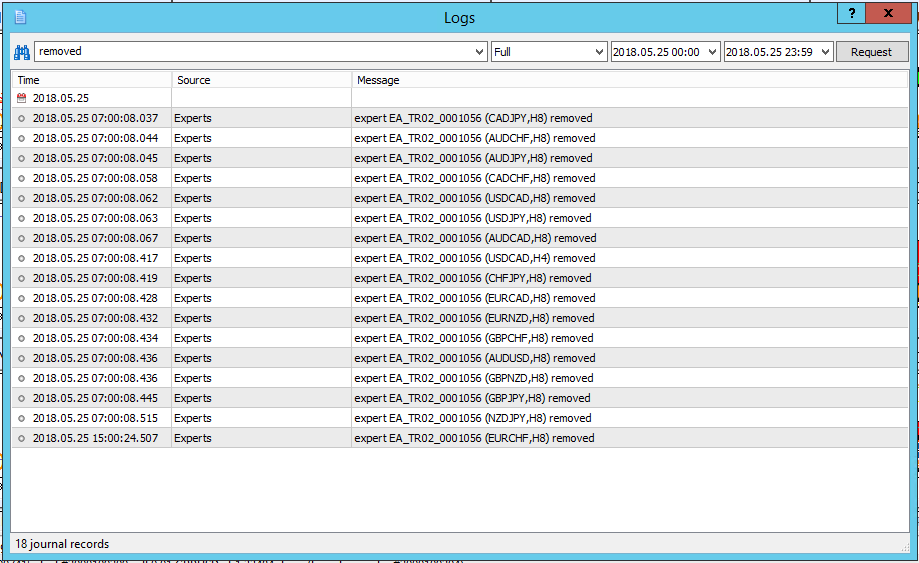
They are working together in a demo account at the same terminal.
Any idea about which is the reason of that?
Thanks
-
RE: On Trade issueposted in Questions & Answers
Hi @fxDreema
I am running the EA with the modifications that you suggested but it does not work. SL is not moved by closing position dectection following the rules given at the "OnTrade" section of the EA and I don't get any arrow drawn:
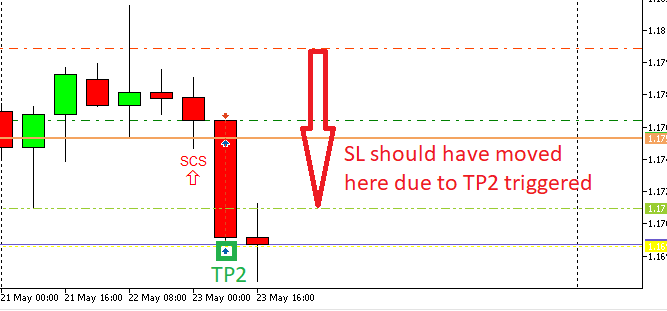
At that point, do you think might be an issue with the "Position Closed" block in the "OnTrade" section? Is there anybody using the "OnTrade" section with the "Position Closed" block having any kind of issue (MT5/Demo account)?
Thanks for helping
-
RE: Multi-Candle patternsposted in Questions & Answers
Take a look at this tutorial made by @miro1360
https://fxdreema.com/forum/topic/4321/tutorial-08-candle-formations
It has been really useful for me.