fxDreema

    • Register
    • Login
    • Search
    • Back to the main page
    • Categories
    • Recent
    • Tags
    • Popular
    • Search
    1. Home
    2. max c
    3. Posts
    • Profile
    • Following 0
    • Followers 4
    • Topics 21
    • Posts 140
    • Best 4
    • Controversial 2
    • Groups 0

    Posts made by max c

    • RE: Time Bomb Job

      Explanation: by grok ai
      Initialization: levl_last and time_last are static variables, meaning they retain their values across function calls, allowing us to keep track of the last checked price and time.
      Current Data Capture: We get the current time with TimeCurrent() and the current ask price with SymbolAsk(SYMBOL).
      Movement Check:
      levl_diff calculates how many pips the price has moved since the last check (toPips() converts price difference to pips).
      time_diff calculates how much time has passed since the last check.
      Condition for Triggering:
      The block checks if the price has moved up by at least PipsInTime within TimeToWait seconds. If so, and if the current price is higher than the last checked price, it sets next = true.
      If the time limit (TimeToWait) is exceeded without the required movement, reset is set to true to start tracking again from the current price and time.
      Reset or Move Forward: If reset is true, we update levl_last and time_last to the current values to start a new tracking cycle. If next is true, it signals to move to the next block in the strategy; otherwise, it might loop back or move to an alternative path.

      posted in Questions & Answers
      max c
      max c
    • RE: Time Bomb Job

      jeez i wish i read this , before i got all exited . dam

      posted in Questions & Answers
      max c
      max c
    • RE: Are you interested in a 5 months proven trasrecord EA?

      i would if you could spell transaction correctlya1.png

      posted in Questions & Answers
      max c
      max c
    • RE: help with trading times :)

      @jstap https://fxdreema.com/shared/DXWx8ngfe

      do you think this will work with the same magic number to delay the other EA from working at these times.

      posted in Questions & Answers
      max c
      max c
    • RE: help with trading times :)

      @max-c https://fxdreema.com/shared/Ctereftlb

      will this work perhaps if the magic numbers the same

      posted in Questions & Answers
      max c
      max c
    • RE: help with trading times :)

      @jstap yes its and EA trading forex

      with this custom code do i put this in a custom mql code block then im not sure,

      Just want to turn off auto trading at 23:30 Then turn back on at 01:00 as i can not think of any other ways to interact with this other EA other than to just toggle the autotrade at that time , thanks

      posted in Questions & Answers
      max c
      max c
    • RE: help with trading times :)

      @max-c its the veinox harmonic scanner thing on mql5 market place i purchased a while back but now its free- anyway im not sure but i dont want to be up at midnight all the time thanks

      posted in Questions & Answers
      max c
      max c
    • RE: help with trading times :)

      @biztet how though

      posted in Questions & Answers
      max c
      max c
    • help with trading times :)

      Hi everyone , so i have a harmonic pattern EA working well but it doesn't have any time filters,

      So is there any way i can make a separate EA to disable AUTO trading around midnight and then turn it back on say 1hr after midnight , it just that the spreads get wild around then.

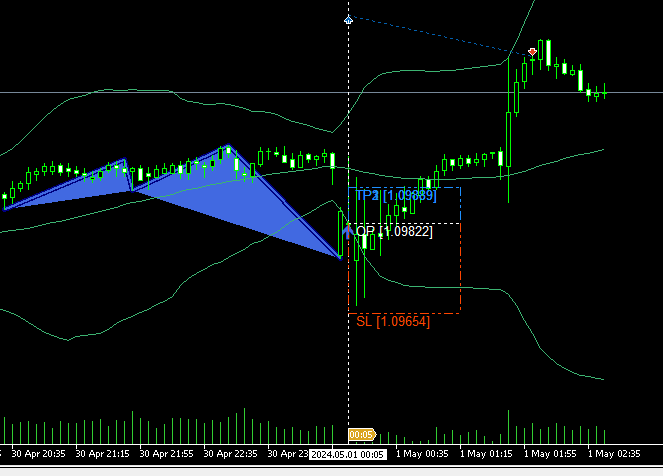
      image here shows a 40 pip spread which ive never seen and ended up closing at a loss even though it went my way , annoying azz

      ![2024-05-01 09_49_03- - ThinkMarkets-Live - Hedge - TF Global Markets (Aust) Pty Ltd - AUDNZD,.png

      posted in Questions & Answers
      max c
      max c
    • RE: counter pass issue

      @fxpim its working exactly how i want on the sell side, i just dont understand why the buy side wont work aswell.

      only need it to pass once any time i attach to chart

      trying to create a manually input price range i can use with my other harmonic pattern indicator.

      posted in Questions & Answers
      max c
      max c
    • RE: counter pass issue

      https://fxdreema.com/shared/5IWXp2yud

      this is similar for an engulfing bar , and once again the buy side will NOT work. what the hecks going on ?

      if i isolate each side , disconnect then it works fine , just not both arms , i believe there is a coding issue here

      posted in Questions & Answers
      max c
      max c
    • counter pass issue

      Hi everyone , i cant seem to wrap my head around why this will sell but not buy,

      its designed to buy or sell only in a manually input price range , but no buy trades ever open, i have done everything and its the pass counter on the buy wont work once ? any idea whats going on here . thanks peeps

      https://fxdreema.com/shared/KVjuhAene

      posted in Questions & Answers
      max c
      max c
    • RE: How can I apply this condition, sell then buy then sell and then buy

      check trading conditions blocks , check type last closed block could help you.

      posted in Questions & Answers
      max c
      max c
    • RE: ı forgot password.ı can not get new pasword

      @emreizmir

      https://fxdreema.com/contact

      posted in Questions & Answers
      max c
      max c
    • RE: Time of day filter

      @helicoptermike

      https://fxdreema.com/shared/h1LyLgeAb
      like this.
      also make sure to use candle ID 1 for your condition blocks
      and a once per bar block, as a standard practice.

      posted in Questions & Answers
      max c
      max c
    • 1
    • 2
    • 3
    • 4
    • 5
    • 6
    • 7
    • 1 / 7