fxDreema

    • Register
    • Login
    • Search
    • Back to the main page
    • Categories
    • Recent
    • Tags
    • Popular
    • Search
    1. Home
    2. maxsydney
    3. Posts
    M
    • Profile
    • Following 0
    • Followers 0
    • Topics 1
    • Posts 5
    • Best 0
    • Controversial 0
    • Groups 0

    Posts made by maxsydney

    • RE: Move confirmed with breakout above moving average of volume

      @miro1360
      While I'm trying to use your mq5 file, it doesn't seem to be working?

      0_1648808798173_8dd05b9d-56ac-426b-8667-eba16dc21bcf-image.png

      Have there been any updates on MT5 since you wrote it?

      I'm trying to use it to find occassion where vol(1) > average volume (13) (well ideally 20 but that's an easy change)

      Here's how I'm structuring it:
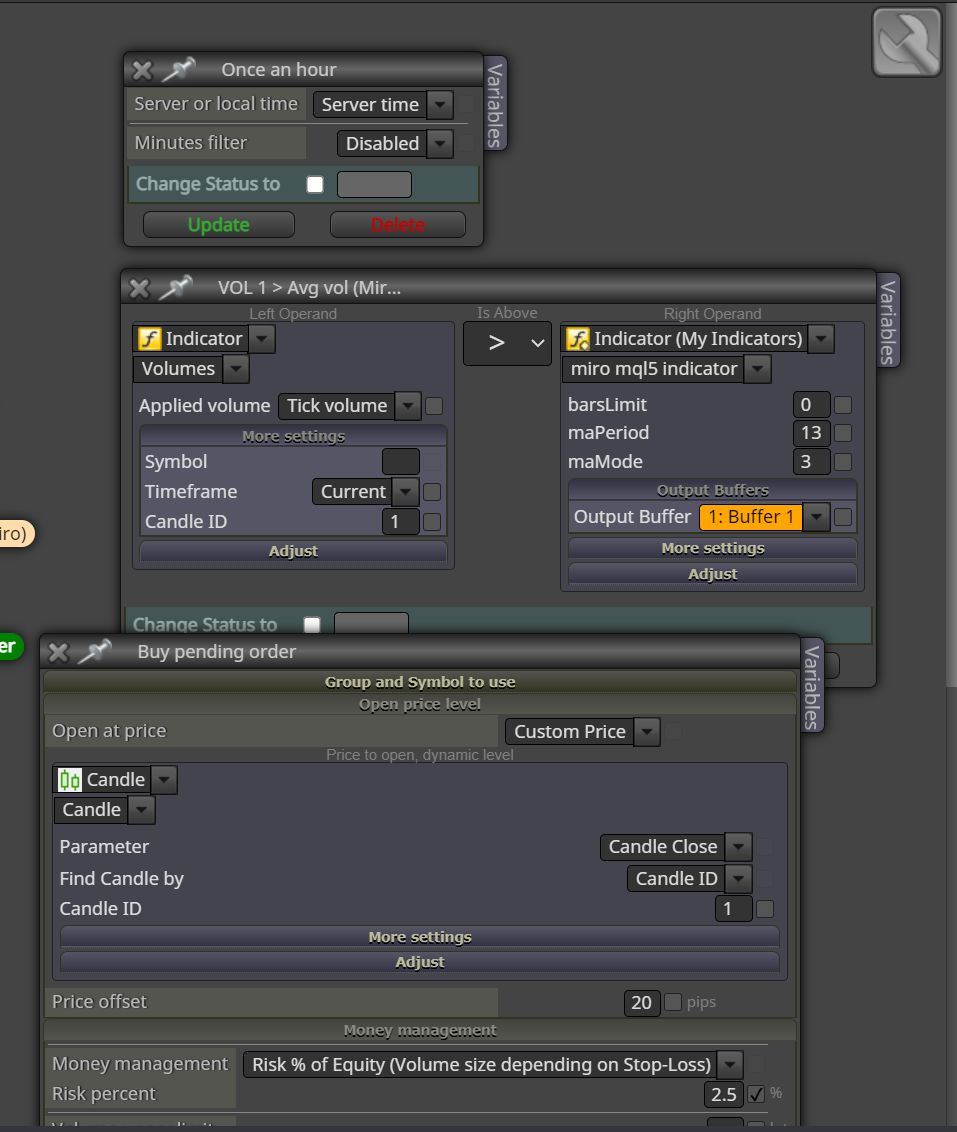
      0_1648808910582_3299cc5e-154a-432d-8689-ed20ef20793a-image.png

      posted in Questions & Answers
      M
      maxsydney
    • RE: Deleting all my objects rather than just 2

      Using the daily chart at the moment, however I want to be running my entries on the 4hour (and 1h) so I've specified the close needs to be below the daily time frame close

      Here's the shareable link - not much changed since the first one being stuck at this point

      https://fxdreema.com/shared/Snx5Ya9ue

      posted in Questions & Answers
      M
      maxsydney
    • RE: Deleting all my objects rather than just 2

      Thanks for the recommendation, but I have bad news sadly, it still didn't work out

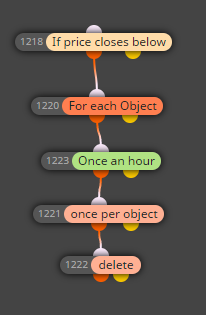
      0_1616679724979_44d74f8b-914c-46a5-bae7-4c6180e7885c-image.png
      This one delete everything as soon as there's a close below (I do specify max objects to be delete in for each object as 2)

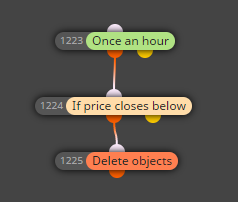
      0_1616679851453_b5c5019a-3f04-4915-9755-f92ff933d893-image.png

      This one has the same result, it deletes everything

      Thanks for helping folks, but yep no luck so far sadly

      posted in Questions & Answers
      M
      maxsydney
    • RE: Deleting all my objects rather than just 2

      Thanks for the idea, but it doesn't seem to work sadly

      I've tried to add the condition above the :

      "delete" (it doesn't delete anything)
      "once per object" (it deletes everything)
      "for each object" (it deletes everything)

      If you have any other ideas that'd be amazing, created like 30 versions yesterday with counters / variables / etc and still haven't figured it out ahah

      posted in Questions & Answers
      M
      maxsydney
    • Deleting all my objects rather than just 2

      Hi guys, I've been playing around with this software for a while now and I manage to create the zones I'm interested in - however my problem comes in the fact that I want to keep those zones until they are broken - until a candle closes below them.

      I have managed to create the condition for the objects to be deleted - however it deletes every object rather than only 2 of them as instructed?

      Am I missing something?

      Here's my project:
      https://fxdreema.com/shared/wSQdoUx1b

      The block being an issue is I'm guessing 1188 but... I do specific the max objects to be delete as 2? So I don't know

      Cheers

      posted in Questions & Answers
      M
      maxsydney
    • 1 / 1