Hello
I want to put a button in the chart that has a cross so that whenever I click on that button, the expert will be deleted.
But I don't know how to delete the expert
Is there a solution???
M
Posts made by mhmd
-
delete expertposted in Questions & Answers
-
RE: order ticketposted in Questions & Answers
@l-andorrà
I want the tickets to be placed in the buttons and a button to be made for each order, of course, it only fetches the ticket of the last transaction and does not recognize the ticket of other orders.
![25118481-945f-44a6-a532-89b1df71e3c8-61267182_ RoboForex-Demo - Demo Account - RoboForex Ltd - [GBPUSD,M5] 08_06_2024 6_44_59 pm.png](/forum/assets/uploads/files/1717859995414-25118481-945f-44a6-a532-89b1df71e3c8-61267182_-roboforex-demo-demo-account-roboforex-ltd-gbpusd-m5-08_06_2024-6_44_59-pm.png)
-
RE: order ticketposted in Questions & Answers
@l-andorrà said in order ticket:
@mhmd I guess you mean you need just one only specific ticket number, right? You can find the most recently open one this way:
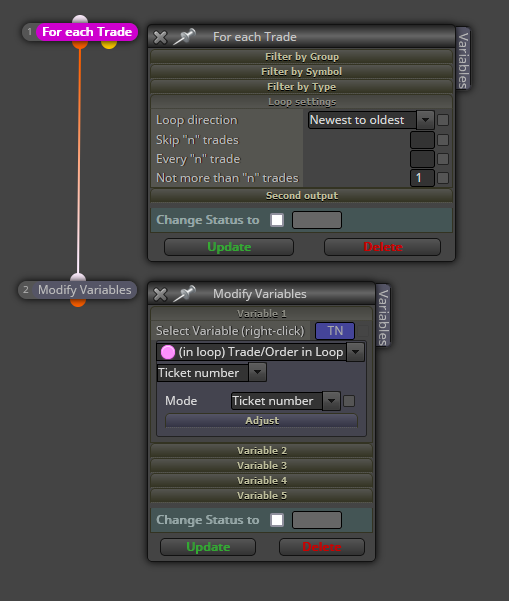
No, I don't want the last order ticket, I want the ticket of all opened orders to be placed in buttons on the chart that I can do something with.
-
RE: current price lineposted in Questions & Answers
@Xeta50 said in current price line:
@mhmd This combine with proper logic will solve your problem I think.
If it's not, just shared the project.
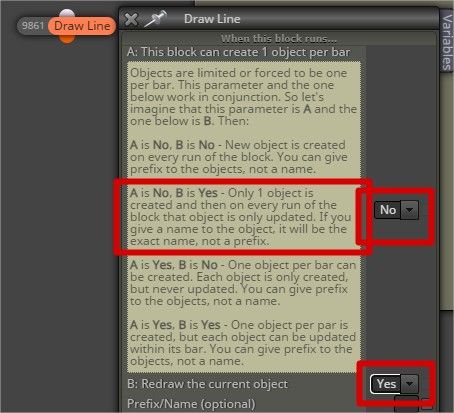
thank you
-
current price lineposted in Questions & Answers
Hello
I want to put a line on the current price and the line will be updated at any moment and it will be on the current price, but when I put the line, the line does not move.
Is there a solution???? -
edit fieldposted in Questions & Answers
Hello
I drew two lines in the chart and calculated the distance between the two lines with a pip and put it in the comment
And now I want to manually enter the distance between two lines in the chart. I used the edit field, but when I change the number in the chart, the lines do not change.
Is there a solution???
https://fxdreema.com/shared/CYpr7C4ub -
RE: line textposted in Questions & Answers
It is but it's just a line, if you get stuck just ask.
Yes, Sure
Of course, I would be grateful if you send a link -
RE: line textposted in Questions & Answers
This for eg can be added via text code input to a variable, "Text "+variable1+" Text "+variable2, or you can put things straight into the box using ""variable1+" Text "+variable2+"Text "
Hmmm...
So I have to code
I will try -
RE: line textposted in Questions & Answers
@jstap It's true, there is only one problem that you can only drop one text and you can't drop several. If you find the answer, please tell me
-
RE: line textposted in Questions & Answers
@jstap It's true that sometimes it doesn't work for me and I don't know where the problem comes from
-
RE: line textposted in Questions & Answers
I am glad this has done what you want. Doesn't add text to the line though.
Yes, it has been answered
![1548609_ AMarkets-Demo - Demo Account - AMarkets LLC - [GBPUSD,M5] 25_02_2024 5_49_01 pm.png](/forum/assets/uploads/files/1708870843993-1548609_-amarkets-demo-demo-account-amarkets-llc-gbpusd-m5-25_02_2024-5_49_01-pm.png)
It's true that sometimes it doesn't work for me and I don't know where the problem comes from
-
RE: line textposted in Questions & Answers
I am glad this has done what you want. Doesn't add text to the line though.
Yes, it has been answered
-
RE: line textposted in Questions & Answers
Do you mind sharing your link, So I can see what you mean?
-
RE: line textposted in Questions & Answers
@jstap The solution is modify text
I tried and it worked -
RE: line textposted in Questions & Answers
@jstap Thank you for your time
I am working on what you said -
RE: line textposted in Questions & Answers
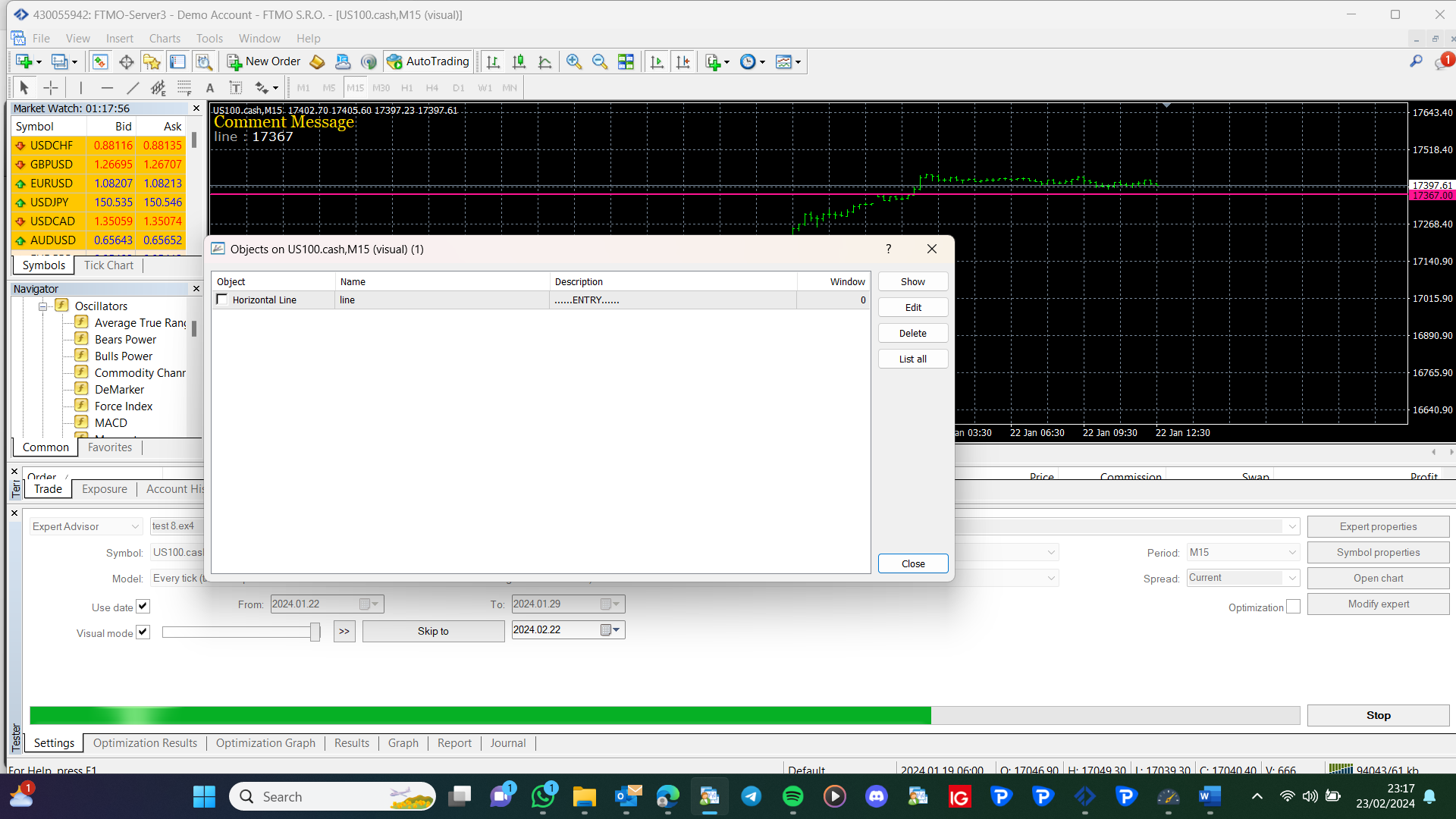
What I have said will do this, create a project drawing a line, then add the text, if it is not how you want add a shared link. The text in that picture is created via text code input, but get it working before working on that.
-
RE: line textposted in Questions & Answers
Depends on how the line is drawn, but basically draw on the same value, but slightly offset.
Because line and text are two separate objects, and I tried what you said, but nothing interesting happened
I want something like this
![6459993 - AMarkets-Demo_ Demo Account - Hedge - AMarkets LLC - [GBPUSDb,M30] 23_02_2024 12_51_19 am.png](/forum/assets/uploads/files/1708637104462-6459993-amarkets-demo_-demo-account-hedge-amarkets-llc-gbpusdb-m30-23_02_2024-12_51_19-am.png)
-
RE: line textposted in Questions & Answers
Depends on how the line is drawn, but basically draw on the same value, but slightly offset.
Because line and text are two separate objects, and I tried what you said, but nothing interesting happened