fxDreema

    • Register
    • Login
    • Search
    • Back to the main page
    • Categories
    • Recent
    • Tags
    • Popular
    • Search
    1. Home
    2. mlnaumann
    M
    • Profile
    • Following 0
    • Followers 0
    • Topics 7
    • Posts 11
    • Best 1
    • Controversial 1
    • Groups 0

    mlnaumann

    @mlnaumann

    Learning MT4 Coding

    0
    Reputation
    170
    Profile views
    11
    Posts
    0
    Followers
    0
    Following
    Joined Last Online
    Location Allen Texas Age 63

    mlnaumann Unfollow Follow

    Best posts made by mlnaumann

    • Execute MQL4 Script from EA in fxDreema

      Hi all,

      Is there a way to run a custom MQL4 script from an EA in fxDreema?

      I’d like to use the Time Filter (Once per Bar) block to trigger something like CloseAllChart.mq4.

      Also, I’m trying to set up a scheduler that automatically opens 5 charts and closes 5 charts once a month. Ideally, this would be handled directly in fxDreema or by triggering an external script.

      Has anyone done something similar or found a good workaround?

      Thanks!

      posted in General Discussions
      M
      mlnaumann
    • Auto Trader working with Current/Historical Data

      If the condition "Candle ID 5 > Candle ID 3" is met, does the Auto Trader on MT4 need to run for 5 days before it can execute a buy or sell trade? Additionally, does the Auto Trader only execute trades based on future conditions as they are met, or can MT4 compare historical data (e.g., Candle ID 5 with Candle ID 3) to make a decision if the program is loaded today, for example?

      posted in General Discussions
      M
      mlnaumann

    Latest posts made by mlnaumann

    • RE: Execute MQL4 Script from EA in fxDreema

      Thanks I will give it a try

      posted in General Discussions
      M
      mlnaumann
    • Execute MQL4 Script from EA in fxDreema

      Hi all,

      Is there a way to run a custom MQL4 script from an EA in fxDreema?

      I’d like to use the Time Filter (Once per Bar) block to trigger something like CloseAllChart.mq4.

      Also, I’m trying to set up a scheduler that automatically opens 5 charts and closes 5 charts once a month. Ideally, this would be handled directly in fxDreema or by triggering an external script.

      Has anyone done something similar or found a good workaround?

      Thanks!

      posted in General Discussions
      M
      mlnaumann
    • RE: Help with Automated Template Loading for Open Charts in MT4

      "Thanks for your reply. I’ve tried using 'Apply Template' in many different ways, as well as all the other forum suggestions — still no luck. I’m wondering if it’s a folder property issue. If anyone has a simple working process, I’d like to test it on my PC to pinpoint where the problem is."
      Thanks,
      MarkO

      posted in General Discussions
      M
      mlnaumann
    • Help with Automated Template Loading for Open Charts in MT4

      Hi all,

      Has anyone successfully automated the process of loading templates onto multiple open charts in MT4?

      I've read through many suggestions on this forum and tried several approaches, but haven’t found a working solution. I had ChatGPT generate a script that opens three charts and applies a template to each, but the templates fail to load.

      ChatGPT reviewed the code and confirmed it’s syntactically correct. However, it also pointed out that the issue may be due to the Templates folder being set to “read-only” (as seen via File -> Open Data Folder -> templates -> Properties). This could be preventing the templates from being applied.

      Has anyone figured out a reliable method to open multiple charts and apply a specific template to each one successfully?

      Here’s a simplified snippet of the code I’m using to apply the template:

      mq4
      Copy
      Edit
      #property strict

      void OnStart()
      {
      string templateName = "MarkO";
      string path = TerminalInfoString(TERMINAL_DATA_PATH) + "\templates\" + templateName + ".tpl";

      if (!FileIsExist(path))
      {
      Print("Template not found at: ", path);
      return;
      }

      if (!ChartApplyTemplate(ChartID(), templateName))
      Print("Failed to apply template to current chart.");
      else
      Print("Template applied to current chart.");
      }
      Any ideas or working examples would be much appreciated.

      Thanks,
      MarkO
      posted in General Discussions
      M
      mlnaumann
    • RE: Auto Trader working with Current/Historical Data

      I use the MT4 Oanda AutoTrading to execute my trades.

      posted in General Discussions
      M
      mlnaumann
    • RE: Auto Trader working with Current/Historical Data

      Thanks! I'm trying to figure out why the Auto Trader isn't executing my trades. The EA works fine in the Strategy Tester, but when I load it into the Auto Trader, the trades fail to execute.

      posted in General Discussions
      M
      mlnaumann
    • Auto Trader working with Current/Historical Data

      If the condition "Candle ID 5 > Candle ID 3" is met, does the Auto Trader on MT4 need to run for 5 days before it can execute a buy or sell trade? Additionally, does the Auto Trader only execute trades based on future conditions as they are met, or can MT4 compare historical data (e.g., Candle ID 5 with Candle ID 3) to make a decision if the program is loaded today, for example?

      posted in General Discussions
      M
      mlnaumann
    • Time Filter Question

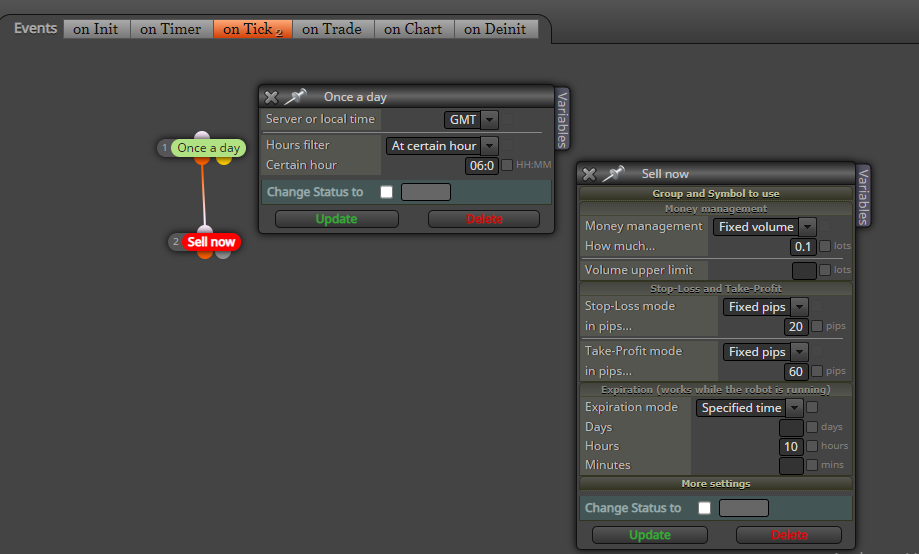
      I have 5 trades to execute at 6:00 AM, is it better to place this on the Daily Timer or Hourly Timer, or something else? The reason I ask is I have 5 different currencies on the Daily Timer, and 3 executed of the 5 currency pairs. Should I be using a different Time Filter?

      0_1626108607236_cb92d99c-6ec7-4a1d-ae99-cd8f9556a5a7-image.png

      posted in Questions & Answers
      M
      mlnaumann
    • “Once a day” Not working for me in MT4

      “Once a day” Time Filter works for me on the MT4 tester perfectly, but when I use it live the EA will not execute the trade. I placed on the AE program on the 1 Day graph.
      My question, let say I want to buy at 6:00 AM. Which time process is the most appropriate to use “Once A day”, “Time Filter” or some other. In addition, if I want to execute at 6:00 AM which time frame graph would be the best to place my AE on: hourly, daily?

      posted in General Discussions
      M
      mlnaumann
    • How long is a X> active?

      I’m trying to figure out the following when using the Once A Day Timer: if a moving average crosses another moving average (5 Day X> 20 Day = BUY) on July 1 then is the trade executed for a profit or loss on July 10? Now on July 11 will the July 1 (5 Day X> 20 Day) execute again, or does a new (5 Day X> 20 Day) have to occur?
      It seems like the July1 condition is still active. Is there a way to only allow for new (5 Day X> 20 Day = BUY) execute only once?
      NoTrade->Condition->OnceADayTimerFilter->Buy

      posted in Questions & Answers
      M
      mlnaumann