fxDreema

    • Register
    • Login
    • Search
    • Back to the main page
    • Categories
    • Recent
    • Tags
    • Popular
    • Search
    1. Home
    2. moreirajbn
    M
    • Profile
    • Following 0
    • Followers 1
    • Topics 11
    • Posts 64
    • Best 5
    • Controversial 0
    • Groups 0

    moreirajbn

    @moreirajbn

    5
    Reputation
    1710
    Profile views
    64
    Posts
    1
    Followers
    0
    Following
    Joined Last Online

    moreirajbn Unfollow Follow

    Best posts made by moreirajbn

    • RE: USING THE TESTERWITHDRAWAL() FUNCTION FOR MODELING THE WITHDRAWALS OF PROFIT

      @vinicius-pereira

      I haven't tried it, but you can add a custom optimization criteria to your EA.... if you set that to "profit minus withdrawal" you'll probably get what you need.

      CREATING CUSTOM CRITERIA - https://www.mql5.com/en/articles/286

      I'm not a programer and haven't had enough time to dig into and it to my EA's, but it's something I'm interested in as well (also trade BMF in Brazil). So if you know how to add it to the EA code, I really appreciate if you could show me the way...

      thanks a lot.

      posted in Questions & Answers
      M
      moreirajbn
    • RE: Condition not working

      @leksand

      This is not a bug... just a technical glitch in your logic.

      It happens because it's technically impossible to have an "Ask" quote below the lowest price from candle ID 0 to candle ID 10. In Forex candles are in most cases constructed with "Bid" quotes, and because "Ask" is always above Bid, it's impossible that any Ask quote in candle 0 goes below the lowest Bid price. If candle 0 makes a new low of the last 11 candles (from 0 to 10 we have 11 candles), the lowest price will be a "Bid" quote... so even if you choose Bid, it will never be below the lowest price.... So, the lowest Bid will be equal to (but not lower than, "<") the lowest price..

      On the other hand, the ">" signal works because the Ask quote can be above the highest price, because the highest price comes from a "Bid" quote and, again, Ask is always above Bid..

      I suggest you to choose candle IDs from 1 to 10, not from 0 to 10... then it should work

      posted in Bug Reports
      M
      moreirajbn
    • RE: Time bomb back testing

      @fxdreema

      Hello.. you say "The lowest timeframe is 1 Minute and all ticks inside that minute are generated", but in MT5 we can in fact use real ticks from the broker in strategy tester, so I assume we can actually trust time bomb blocks as long as real ticks are used. What do you think?

      As far as I noticed, the real ticks have millisecond resolution, matching the exact time they occurred in the market, and also account for spread changes. See image below:

      0_1523573638080_Screen Shot 2018-04-13 at 00.53.06.png

      posted in Questions & Answers
      M
      moreirajbn
    • RE: Lines and Pending orders

      @steffen31

      this should work

      0_1527361605364_Screen Shot 2018-05-26 at 21.06.25.png

      posted in Questions & Answers
      M
      moreirajbn
    • RE: How do i get the parabolic sar to work on 3 candles?

      @vin135

      Make a condition (Parabolic SAR > candle high) that will change a variable (+1) when it passes, then make another condition that passes (and executes the trade) when the variable hits 3. If the "Parabolic SAR" condition doesn't pass, the variable is reset to zero.

      posted in Questions & Answers
      M
      moreirajbn

    Latest posts made by moreirajbn

    • RE: PositionCloseBy function

      @miro1360

      Excellent Miro...

      I got the concept... my problem was with the initial code. 🙂

      Thanks a lot again.

      posted in Questions & Answers
      M
      moreirajbn
    • RE: PositionCloseBy function

      @miro1360

      Awesome miro... that's exactly what I needed.

      Thank you so much.

      posted in Questions & Answers
      M
      moreirajbn
    • RE: How do I rename a project?

      @msjtipping

      just click on the project's name on the upper left side of your screen... edit the name and click "Done"

      posted in Questions & Answers
      M
      moreirajbn
    • RE: Having trouble creating a strategy into an EA.

      @spicynote

      there are many examples and tutorials here: https://fxdreema.com/examples and here: https://fxdreema.com/tutorial

      try to start there and post specific doubts here, then you'll get lots of help. 🙂

      posted in Questions & Answers
      M
      moreirajbn
    • RE: How simultaneosly Open Opposite Pending Orders

      @ginogeorge

      Use Buy/Sell pending orders with custom price (you'll find candle high/low within the block settings) in "OnTick"

      ... then, in the "onTrade" tab you add a block "Position created" that after passing will delete pending orders (use "Delete Pending order" block)

      with that logic the sell order will be deleted when a buy position is opened (or vice-versa).

      posted in Questions & Answers
      M
      moreirajbn
    • RE: how can i delete pending order in price level

      @elkamouni

      that project will work if you put the block in the "OnTIck" tab

      posted in Questions & Answers
      M
      moreirajbn
    • RE: pending order open price

      @santony

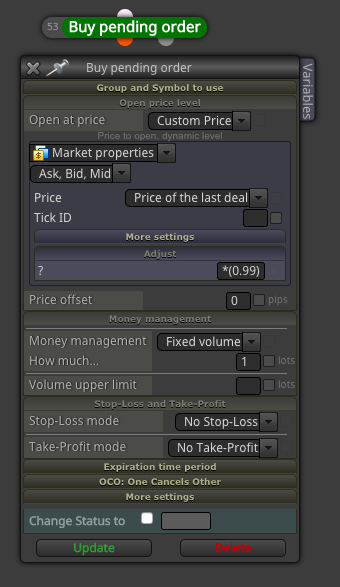
      If you already have a percentage you will use forever (let's say 1%), then you can just use 0.99 (1% below market) or 1.01 (1% above market) in the Adjust field. However, if you want to optimize it or plan to change it in the future, it will be much more convenient if you have a constant you can change without the need of changing the source code.

      Your choice !

      Cheers.

      posted in Questions & Answers
      M
      moreirajbn
    • RE: pending order open price

      @santony

      See image below.. in the example, a buy limit order will be place 1% below the market (see the "Adjust" field, where it says *(0.99), that means current market price minus 1%).. then you can create a constant with the value you want and choose how far, in %, the order will be from current market price.

      0_1547487816980_Screenshot 2019-01-14 at 15.43.16.png

      posted in Questions & Answers
      M
      moreirajbn
    • PositionCloseBy function

      Hello,

      I would like to implement the function PositionCloseBy on a custom block (Custom MQL code). This function closes a position with an opposite position. For example: if there is one buy and one sell position open, the function will be able to close the buy with the sell position (or vice-versa), without the need of executing two new orders to exit both positions. Here is the MQL information: https://www.mql5.com/en/docs/standardlibrary/tradeclasses/ctrade/ctradepositioncloseby

      I know this is done automatically in MT5 "netting" accounts, but I need to use it on a regular "hedging" account.

      I have tried very hard to make it work, but couldn't. I was hoping I could get some help.

      @miro1360 , would you be so kind to have a try? I have seen you do the impossible with fxdreema blocks 🙂

      You could perhaps use this simple project, that will open 2 buys + 1 sell position: https://fxdreema.com/builder/shared/dfo4SBX2e

      My goal is to be able to leave only one buy position open (the newest).

      Thanks a lot

      posted in Questions & Answers
      M
      moreirajbn
    • RE: If I purchase a subsricption, are the EA's I've created forever mine or do thex expire?

      @jwgevers

      After you export the EA (source code (.mq4/.mq5), or .ex4/.ex5 file) it is 100% yours, will work "forever" and have nothing else to do with your subscription.

      However, you won't be able to edit the EA in fxDreema after the subscription expires, so if you need to change anything you'll have to do it manually in the source code.

      posted in Questions & Answers
      M
      moreirajbn