The way you have made it will only give you the possebility to change the color of your specific object an this option would be added automatic In your settings without the possibility to move this setting in the order or to assign it to other objects.
If you want to manage your settings by order or want to adress your setting to multiple Objekts you need to define your own constant but here is also a problem. You cann only define a datatype int to use color. If you define as exable ClrRed it will be interpreted als a Number 255. In your Settings you will only see this number und you can only change this number with an other number to define an other color.
O
Latest posts made by oliverhinrichs
-
RE: Description or constant.posted in Questions & Answers
-
RE: Transfering EA Panel from mq4 to mq5posted in Questions & Answers
Update!
I tried my expert on a Demo account and i get the errormessage that my expert tried to place an order with 0 lots.
So i think the whole think with these input fields seems to be not working on MT5.
-
RE: Transfering EA Panel from mq4 to mq5posted in Questions & Answers
Hi Carpenter!
I changed the variables from double to int and ich changed the input field values from numeric to text code input to get numbers without .0
but it still don´t work.
When I click into the input field i can see that the startvalue is highlighted blue and flickers which I think could be the reason that the metatrader 5
walks thru this field on every tick.
But when I change the value of the input field the field is empty and the metatrader use only the startvalues.

I have no idea how to fix this
-
Transfering EA Panel from mq4 to mq5posted in Questions & Answers
Hi!
I made an expert adviser for the mt4.
There I made a input panel to adjust ordervalues and everything works.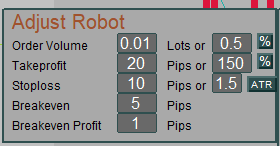
After copy and paste the panel to mq5 the values changed from numbers to numbers.0 (Example from 20 to 20.0)
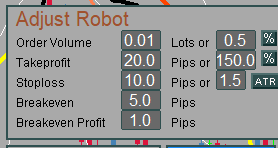
and if I want to change the values the field shows nothing and my adviser don´t recognize the new values.
It looks like that at stoploss :

As i have done it at mq4 I placed the field at the on init section with a startvalue in specific properties, gave it the same name as my variable.

In tick section it looks like that :

As I said....it works at mq4 but not at mq5.
Does anyone have a solution ?
-
I think the change of the field startvalues from a number like 10 to 10.0 could be the definition as a numeric value.
If I would change this to text code input it should be fixed.....
Or would this be wrong? -
The start values of the drawn fields are successfully transfered into the variable, but every change of the values
won´t be transfered and the field is empty and don´t show the new value...... all trades use only the start values .
Maybe the fields don´t have to be placed into the on Init section at mq5 ?
I hope someone can help to fix this problem.
By the way.....I think it would be good to make a seperate forum for mq5 to have a better overview an because
mq4 and mq5 often needs different solutions.Thanks
Oliver from Germany -
-
RE: Re-Initialize after settings changeposted in Questions & Answers
@mantadiver Hi!
Yes you are right.....it is a problem.
Especially if you have objects at event init where you want to change the font size thru constants.
I´m currently working with a button which starts "run block", but it would be much better if it would work automatically on change. -
RE: How can I get ea to trade buy /sell zones and lines that I manually draw on the charts?posted in Questions & Answers
Hi pippusher!
I think you can solve your problem when you just place your line and give it individual name like buy/sell/close
and if you want to place more than 1 line for buy and sell then give the lines names like buy1 / buy2 etc.Then just take in the tick-area the modul select Object by name an 2 conditions for cross up or down to buy or sell
like shown in the pic.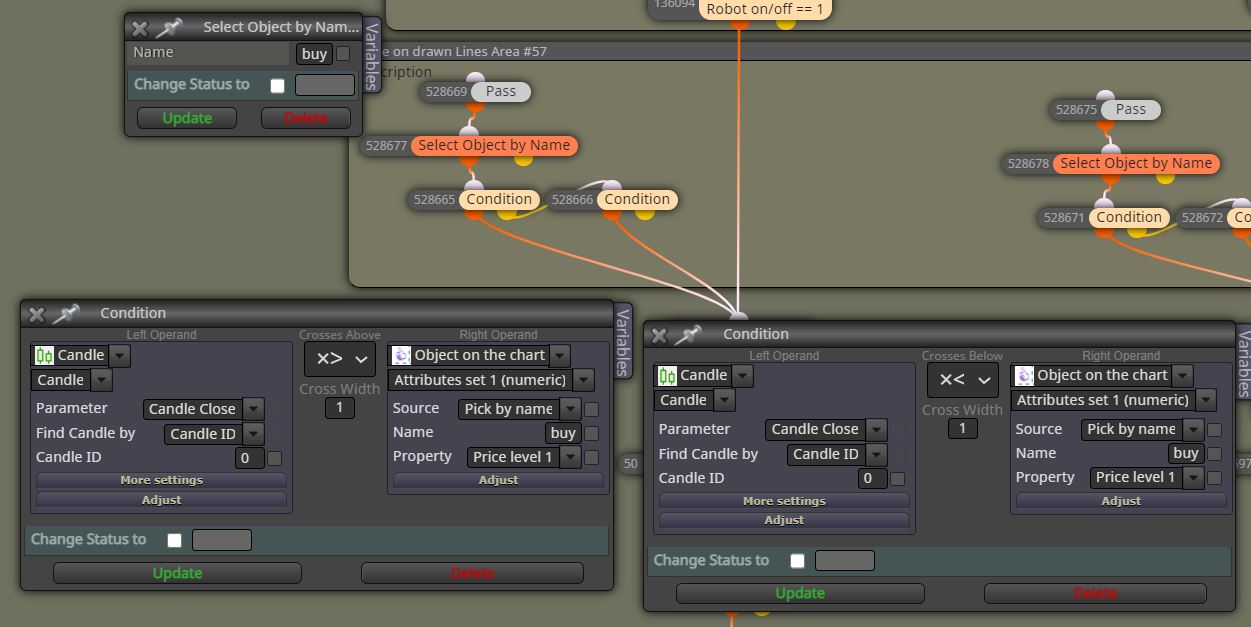
and conect it to buy/sell/close modul.
The stoploss and the takeprofit maybe could be defined the same way in the buy or sell modul itself or you define the close funktion (stoploss or takeprofit) the same way like the pic, but make shure you gave ever buy or sell order a specific group number if you want more than 1 order so that your stoploss or taktprofit lines only close the wanted orders.
For example : Draw line with name buy3 / create select Object Name:buy3 then conditions / then buy-modul give it Group no. 3
then draw line takeprofit or stoploss with Name: takeprofit3 or stoploss3 / then conditions / connect to the modul close trades filter by Group no. 3
I think this should work for you...
bye
Oliver from Germany -
RE: Can't close trade manuallyposted in Questions & Answers
@ttu22 place a button in the init section that you can switch on/off your EA
