Haha awesome!

@seb-0 well, I do optimize some times, but much less than before.
To my experience, with optimization you can make any EA look super good. Whats the point... the performance will not repeat in live trading.
So, if the EA doesnt look promising with random inputs backtest, I dont usually bother to force it look good with optimization.
Its 98% about the strategy itself, 2% about the input values.
I can't test the .ex5 right now, got an optimization running..
Please use the windows snipping tool to put a picture, or share a copy of the project:

@DanZig55 I have used those 3 bullet points in many EAs.
@spicynote
This will need some fixing. Remember that the ea algorithm runs on every new tick (as we are "on Tick").
Now it checks every tick if the candle is above MA 60, and if that is TRUE, then it buys.
It will not open new buys (even if price is above MA) before we wait 2 bars, that's what the "every n bars" does.
You shouldn't put any closing conditions after the opening condition - that means that you want to close the trade on the same second you open it.
I'll make a working example in a minute
@l-andorrà I just used them for troubleshooting, should have removed from the shared version
@spicynote
Here: https://fxdreema.com/shared/Y3lUXgVrb
Moving backwards in time is best done with the candle ID.
ID 0 = current, updating candle
ID 1 = latest completed candle
ID 2 = 2nd completed candle
etc.
Connecting blocks vertically means "AND".
I connected 2 blocks with condition: "candle close is above 60 MA", with different candle IDs, so the combination reads as "latest candle is above 60 MA, AND the one before it is also above 60 MA"
@BBMess MA method is always an enumeration by itself, that might cause problems.
https://www.mql5.com/en/docs/constants/indicatorconstants/enum_ma_method
Please send a shared link of your example
Use the block "modify variables" and from there select candle -> candle total pips
@richard96816 Agreed, fxdreema has some very versatile functions. It's very good to see other's ideas too, avoiding "tunnel vision" with the alone development.
Some say that sharing good eas doesn't happen because nobody would give away free money like that. I don't believe that approach at all - no matter how profitable your system is, there is always a risk present with trading, and the risk is higher if you don't even know the system you are using. So you have to learn the system, and thus you can also develop it further. Collaborative effort is the way to go
@jennifer
You can put custom code pretty much everywhere in fxdreema, like this for example
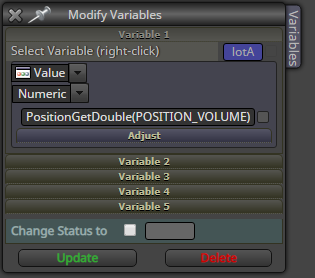
@moon
We update the PreviousBalance variable at the point when there is no trades.
When there are some trades, compare the current equity to the previous balance. If it is 100 units bigger, close trades
How to troubleshoot an error like this:

Hmm, inp43 = problem is block 43, left operand, something about timeframes...
Lets check the block in fxdreema:

Hmm, maybe I should untick the timeframe box:

voilà, no error anymore! To the next error ->

This error can be more confusing, as the stop-loss doesnt seem to use any timeframe:

But it is hiding in the drop-down menu, "Custom (pips)". Uncheck that timeframe box. No error!

@l-andorrà I wish I was a real programmer lol. I don't even know the basics of mql.
I just copy from mql4 articles, try and fail and try again until I get my result.
Thats the beauty of this program, you can teach yourself
@zackry It is to filter how far your trade is from the break even point.
If you set 0, the break even will always be set if your trade is on profit.
If you set 10, the SL will move to break even only if youre 10 (or more) pips on profit
@zackry ok, just set it to 0, so the amount of profit will not matter.
You can't set a breakeven on a losing trade
@zackry Yes, that should work, now just test it with visual backtest 
