@jstap I actually got the same result with a "once per bar" candle and set the timeframe to weekly. I was wondering why the block was removed from the block library.
R
Best posts made by rouzbehali
-
RE: "Once per Week" Block is removed from fxdreema?posted in Questions & Answers
-
RE: Save variables/constants if terminal closes/crashesposted in Tutorials by Users
@tswaldi https://fxdreema.com/shared/srfHv6Ksc
Here's a link to an example project. When EMAs cross up, this EA buys, and when they cross down, it sells. After the buy trade, it assigns the variable "Buy". After selling, it assigns the variable "Sell" and creates a text far away from the corner (1000000 pixels). This text stores the variable value. If your metatrader crashes or you accidentally remove the ea from the chart, simply reload the ea. On init, ea looks for the text. If the text is discovered, ea fills retrieves the variable by checking into the text description. -
RE: How to Add Output Variable in Custom Blocks?posted in Questions & Answers
@jstap Thank you for your response. My query is about "Custom Block," which is developed in Custom Block Studio. What I am asking for is a way to include output variables in "Custom Blocks." In other words, how do I create a custom block in custom block studio and then set a variable as output, similar to the field I previously shown for the "Modify Variable" block? I hope everything is clear now.
Latest posts made by rouzbehali
-
RE: Custom Block Studio Stopped Working!posted in Bug Reports
@fxDreema Yes it is working. Thank you for the fix

-
Custom Block Studio Stopped Working!posted in Bug Reports
It looks like the Custom Block Studio has stopped working. I'm no longer able to create new blocks or add custom functions. My previously created blocks and functions are still there, but I can't make any more. Could other people please check and see if this is a widespread issue affecting them as well? Thanks.
-
RE: How to check bucket of Profitable Tradeposted in Questions & Answers
do this don't forge to do "+Sum_Profit" in the 2nd Modify variable
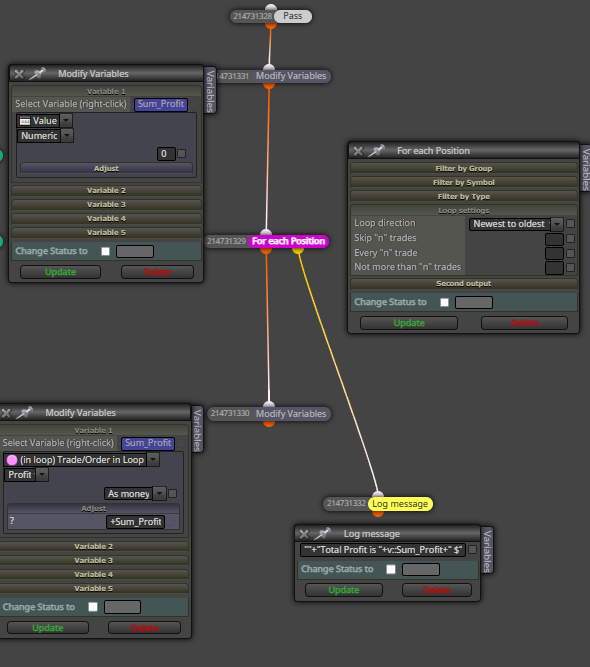
Explanation:
Start by resetting the variable to 0. Then create a loop that goes through each trade. In every iteration, the script calculates the profit for that individual trade and adds it to the Sum_Profit variable. Once all trades have been processed and their profits have been accumulated, the yellow output activates, allowing you to log the message and print the total sum. -
RE: گروه روبومستر سلیمانی خواهposted in Questions & Answers
@Ho3ein-sh
این روش اشتباهه و بیشتر برای مبتدی ها خوبه دلیلش اینه که اگه اینترنت شما قطع بشه یا متاتریدرتون کرش کنه و این وسط چندتا کندل بگذره اون وقت ربات نمیتونه اون تعداد رو بشماره چون ربات فعال نبوده. از طرفی اگر ربات شما سهوا از روی چارت حذف بشه و دوباره لودش کنید روی همون چارت, شمارنده ریست میشه و صفر میشه
بهترین راه حل اینه که زمان رسم خط رو توی دیسکریپشن یا تولتیپ ذخیره کنیم و ربات همیشه اون رو بخونه و هر موقع بیشتر از ده کندل ازون زمان گذشته باشه بیاد خط رو حذف کنه. ایننجوری حتی اگه شما این وسط به اندازه 5 کندل هم رباتتون غیرفعال باشه باز درست میتونه سر 10 کندل خط رو پاک کنه -
Output Feature for Custom Blocksposted in Questions & Answers
I'm building a custom block in Fxdreema and want to replicate the variable selection feature of the native "Modify Variable" block. Specifically, I want a field in my block where users can right-click to choose a target variable from a list, and my block will then store its output (e.g., an extracted string) into that variable.
How can I implement this right-click variable picker in a custom block? I've attached images for reference.
Currently The right-click menu on any custom block's input currently works in "read" mode (blockinput = v::output_save). I need to change this to "write" mode (v::output_save= blockinput).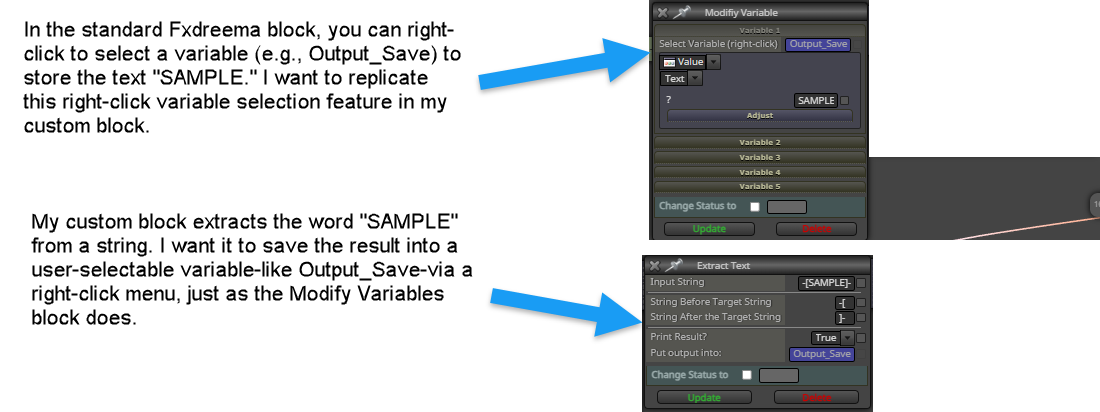
-
RE: what is the problem with this errorthis array out of rangeposted in Questions & Answers
This can happen when you work with custom-created arrays. Do you have a custom MQL block that is filled with array codes? If the answer is no, do you have Market Properties Bid/Ask somewhere in the blocks?
-
RE: How to Add Output Variable in Custom Blocks?posted in Questions & Answers
@jstap Thank you for your response. My query is about "Custom Block," which is developed in Custom Block Studio. What I am asking for is a way to include output variables in "Custom Blocks." In other words, how do I create a custom block in custom block studio and then set a variable as output, similar to the field I previously shown for the "Modify Variable" block? I hope everything is clear now.
-
How to Add Output Variable in Custom Blocks?posted in Questions & Answers
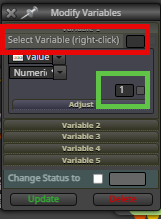
Is it possible to define an output field that stores a value in a variable in Custom blocks? Currently, we can only specify input variables while creating a custom block. But I am looking for what we have in the "Modify Variable" block. I am seeking for the red box, as I already know how to add the green box. Any help would be appreciated.
-
RE: Save variables/constants if terminal closes/crashesposted in Tutorials by Users
@tswaldi https://fxdreema.com/shared/srfHv6Ksc
Here's a link to an example project. When EMAs cross up, this EA buys, and when they cross down, it sells. After the buy trade, it assigns the variable "Buy". After selling, it assigns the variable "Sell" and creates a text far away from the corner (1000000 pixels). This text stores the variable value. If your metatrader crashes or you accidentally remove the ea from the chart, simply reload the ea. On init, ea looks for the text. If the text is discovered, ea fills retrieves the variable by checking into the text description. -
RE: "Once per Week" Block is removed from fxdreema?posted in Questions & Answers
@jstap I actually got the same result with a "once per bar" candle and set the timeframe to weekly. I was wondering why the block was removed from the block library.