i hope a programmer would bypass here and clarify this issue if it could be added .. thanks again
S
Posts made by saeed 2
-
RE: Option to Add at Applied Price if that possibleposted in General Discussions
-
RE: Option to Add at Applied Price if that possibleposted in General Discussions
@l-andorrà I wish if FXdreema can add this option .. thanks a lot
-
Option to Add at Applied Price if that possibleposted in General Discussions
Good morning Sir
Applied price at included indicators has options (open / close / median etc )
Is it possible to Add " current Price " at applied price ? im struggling to find a way to apply this option at indicators to achieve a target
thanks for your time and assistance
-
RE: Trail stop clarificationposted in Questions & Answers
@l-andorrà thanks sir .. u alwyz assist me
-
Trail stop clarificationposted in Questions & Answers
please correct me if these parameters at trail stop block for this example is right:
lets say TP 30 pips ... SL 50 pips
IF ... price is 10 pips in profit ... SL should be adjusted tp BE
IF ... price is 20 pips in profit ... SL should be adjusted to BE+10So,
trail start ... "pips from open price" = 10 pips
trail step ... 10 pips
trail stop ... 10 pipsthanks for your time
-
RE: How to Import an EA and Just Lock it with Account ID and name of Userposted in Questions & Answers
@bablaasnani hard to find trusted decompiler ..
-
RE: View earnings for today, last week, last month, last yearposted in General Discussions
i need this one too and can't figure it out so far
-
RE: How to Import an EA and Just Lock it with Account ID and name of Userposted in Questions & Answers
@l-andorrà can we decompiled EA here at FXDREEMA ?
-
RE: Candle IDposted in Questions & Answers
@miki
now its clear .. i need to change the correlationthanks for bypass and assistance
-
RE: Candle IDposted in Questions & Answers
a certain candle formation based on wick and body pips size im looking to see for the next candle (-1) if current tick conditions met .. not haiken ashi
so if i specify in condition (-1) candle and specify the condition im looking for while the current tick already matched with given conditions ... the EA will wait for next candle (closed price ) with the formation detail i specify then it will open a trade ? correct ?
thanks for assistance and time
-
Candle IDposted in Questions & Answers
if candle ID is 0 .. it means the current tick
if its 1 .. it means the previous one
so.. if its ( - 1 ) ... does that means the candle right after the current one ?
thanks
-
RE: How to open a new trade if existing one still active ?posted in Questions & Answers
sorry for late reply sir, i found it and its working now
thanks a lot for your time and assistance
-
RE: How to open a new trade if existing one still active ?posted in Questions & Answers
i just finished this correlation .. i will check if it works
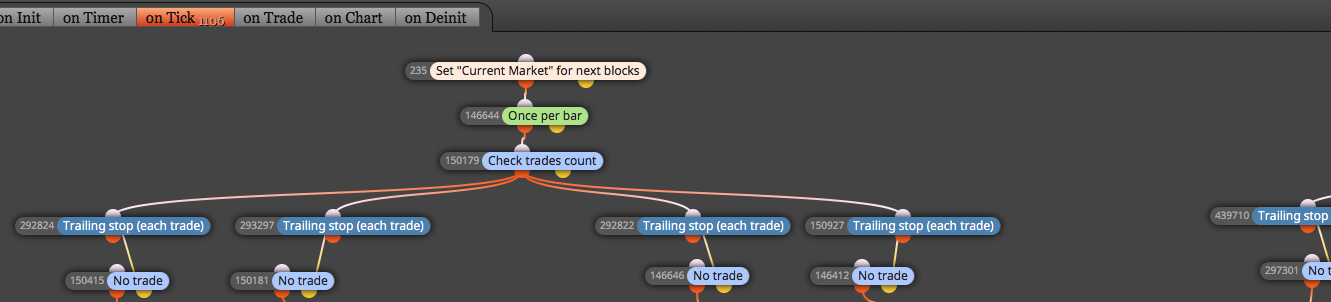
see its like that ..
- current market >> EURUSD
- once per bar >> 1
- check trades count >> less than 3
each with different parameters and conditions
i have one more question .... regarding trailing stop (stop loss ) >> i need to apply this concept >> if equity % is less than 20%, soft stop loss will be adjusted to another far pips ..
example .. initial SL = 80 pips ... equity % less than 20% .. when price hit initial SL .. trailing stop will shift the SL to 160 pips from open price distance
how can i apply it ?
thanks a lot sir for your assistance and time .. you helped me a lot in this discussion .. thanks
-
RE: [Custom Block Release] Send a message or screenshot to Telegram Blocksposted in Tutorials by Users
wow .. thats so impressive .. thanks a lot for such an amazing tutorials .. can i havethe modified file for telegram sending signals as shown in this tutorials .. im not a programer
thanks a lot for this tutorial
-
RE: How to open a new trade if existing one still active ?posted in Questions & Answers
@ambrogio shared/8ADleW5Mb
what im trying is to have this concept :
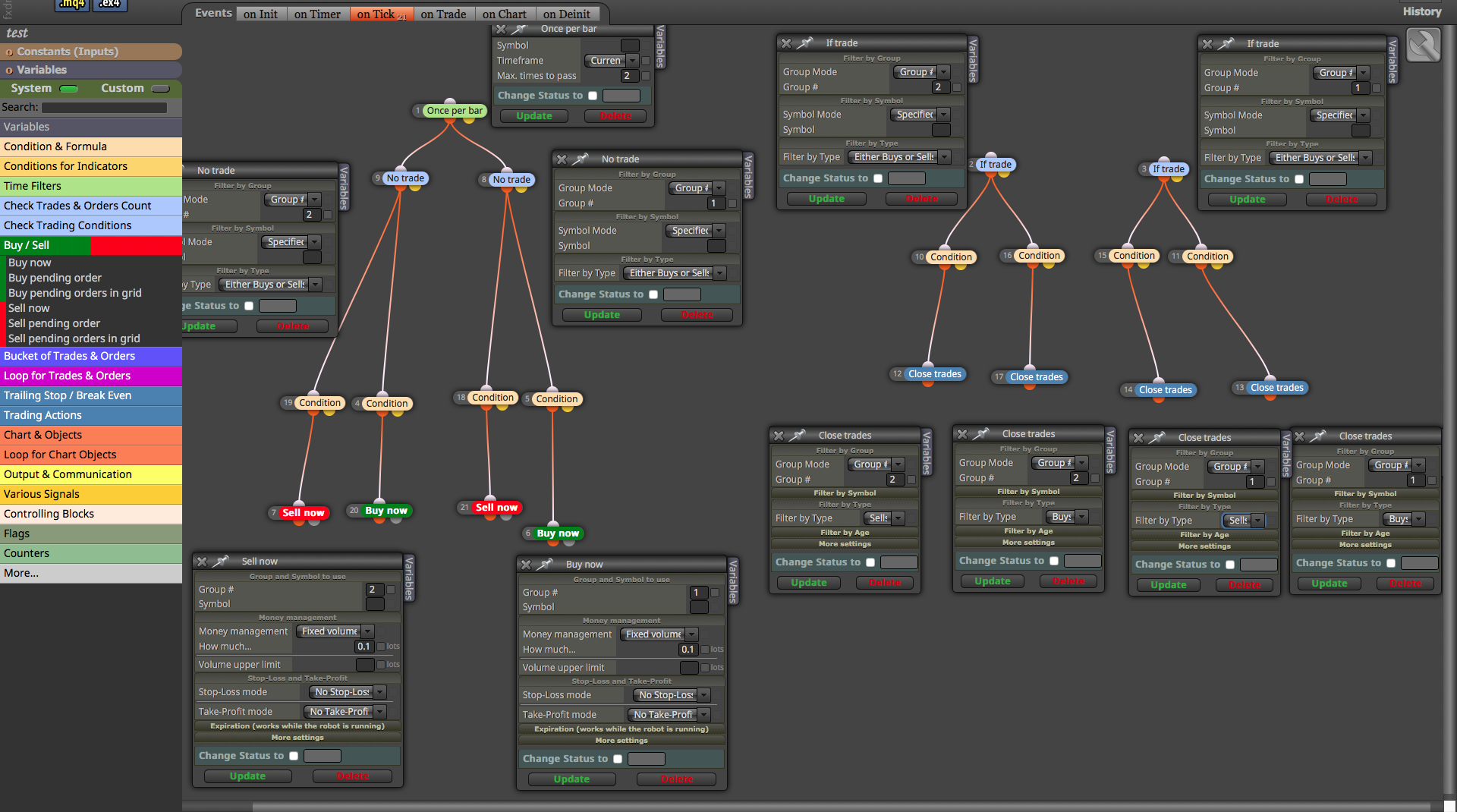
here i have group 1 2 3 4 .. when EA start operating .. when any of these conditions met .. EA will open a ( only one )trade ..
- IF first trade still open and conditions met for any of them .. second trade will open .. so now i will have two open trades
*IF first and second trades are "same" type "buy buy or sell sell " AND both of them still active AND conditions met for remaining groups .. third trade will open as opposite type " if first second active trades are buy .. the third one will sell if conditions met.
IF first trade is buy type and second trade is sell trade .. EA will not open any new trades until one of opened trades closed
please check the attached file and try to assist me .. thanks a lot for your time and assistance
-
RE: How to open a new trade if existing one still active ?posted in Questions & Answers
@ambrogio said in How to open a new trade if existing one still active ?:
If you put one per candle and specify passes 2 times, he puts two orders on the same candle, and then another two on another candle if the condition is met. Is that what you want? no , what i want is to have a maximum open trade (2) for specify symbol ... lets say conditions met to buy for "EURUSD" .. the trade is active foe couple of hours and suddenly the trend reverse and sell conditions met .. so i need EA to open a sell trade .. in this scenario i need only maximum two open trades and don't want to open anymore unless one of these closed ..
it could be the opposite .. buy trade EURUSD is active for couple of hours and conditions met again to open another buy trade EURUSD ... so here i have two buy trades and i don't want to have any more trades till one of them closed.
i guess if i remove "once per bar" for attached picture .. i can have only two trades and it will work .. i will try when market opens
regarding specify the pair currency .. can i use " symbol specified " at "NO TRADe" ? or i have to use "set current market" ?
thanks a lot for your time and assistance
-
RE: How to open a new trade if existing one still active ?posted in Questions & Answers
so by using once per bar the connections between blocks will be like this .. correct ? Maximum times to pass ( 2 ) because i need only two active trades
also a question sir .. i want to specify 12 pair currency only .. each with different parameters .. so in this scenario two things i need to follow:
- If trade / buy now & sell now / no trade .. Symbol mode ( specified ) and i fill in the specified symbol ( lets say EURUSD )
Note ... if the account is standard and using "m" like EURUSDm .... if i specified in symbol (EURUSD) the EA will recognize the pair ? or i need to add "m" ?
- i need to have 12 different structure combination connection same as the attached picture .. each with different parameters and specified symbol ?
Note .... Group # ... since i will have 12 difference structure and each with specified symbol .. do i need to have 24 Group# in total since each structure needs two .. or since each structure is specified by certain symbol i can use only group# (1) and group #(2) ?
thanks a lot for your time and assistance again .. appreciated
-
RE: How to open a new trade if existing one still active ?posted in Questions & Answers
so i need two " NO TRADE " and one " IF TRADE "
First " no trade " will be group (1) and all ( buy now and sell now ) is group (1)
Second " no trade " will be group (2) and all ( buy now and sell now ) is group (2)
IF trade .. no need to assign group (1) and group (2)
correct ?
thanks for your quick reply and assistance
-
How to open a new trade if existing one still active ?posted in Questions & Answers
By using Check Trade " no trade / if trade " .. in this scenario only can have one open trade
how can i open a second trade while the first trade still active under certain condition .. and the maximum active trade will be two only
ex. No trade has " buy now and sell now " .. EA based on conditions trigger the "buy now" and now i have one active trade .. after few hours the "buy now" is still active but conditions of "buy now OR sell now" is matched but because of "no trade" i can't open a second trade
how can i let the "NO TRADE" open the second trade while first trade still active ... and no way to open a third trade till one of these open trades closed BASED on "If Trade"