@uchiha
The indicator is not found probably because it has been put in a folder ("Free Indicators") under the indicator folder. Try copying the indicator to the indicator folder (i.e. 1 level of above the original folder)
S
Posts made by sktsec
-
RE: Working with MT5 Donchian Channelposted in Questions & Answers
-
RE: Problem with changing internal values on blocksposted in Questions & Answers
@FED
Don't think that is the case.But the response time actually varies when you double click to open a block. The response might be so slow that you "felt" that was not working. The problem may be from your ISP / location. In my case, all my connection to fxdreema requiring VPN / Proxy connection. But it is good for other ISPs, so it seems not geo-location problem. Maybe some protocol blocked by my ISP, I really don't know the exact reason.
-
RE: Check profitposted in Questions & Answers
@Michaelgstrainjr
You profit is selected in terms of pips, not money.Is that what you need ?
-
RE: How do I make my EA into a demo?posted in Questions & Answers
You don't need it in most cases. Any EA you created do work on both Demo / Real account
-
RE: High and lowposted in Questions & Answers
@MT4stefano
It is the price of the candle on your chart. Seems bid price. -
RE: Experts & Indicators can't be attached to chart ? error [538] !!posted in Questions & Answers
This error code means licensing problem. That happens when upgrading Windows and your EA / indicator is from Market. Just remove all and re install them from Market.
-
RE: custom indicator error 4802posted in Bug Reports
According to your error message, the error at line 1.
-
RE: When do I set the parameters to appear in the MT4 testing test and do I have to set them for sales and purchases or just once?posted in Questions & Answers
@miguel33
If you are talking about the optimized parameters in backtest, entering those in your running EA will work until you remove the EA from the chart.You need to save the EA setting or chart as template or all charts as profile so that you are reunse them without re-input the parameter values
-
RE: Robot doesn't work.posted in Questions & Answers
Try remove the topmost Block : if position / order
-
RE: Buy only Sell only MT5posted in Questions & Answers
@jstap
I see. Just refer to his condition, it may read the enumeration as int rather than Text.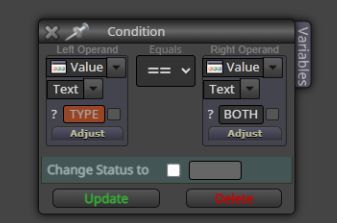
-
RE: Buy only Sell only MT5posted in Questions & Answers
@merajmusic
May try int as data type rather than text -
RE: Why is my robot losing money on the real account?posted in Questions & Answers
It is all about differences in trading condition. The spread, execution speed, or even any trick by broker
-
RE: Where are comments printed now?posted in Questions & Answers
It seems that in MT5 :
Items in the Experts Tab is saved only if you right click and select "open". A list of folder will be listed in Windows File Explorer, the latest one is the saved file.According to the manual:
The following commands can be run from the context menu of this tab:Open "Open" — open the folder that contains the journal log files. Besides that, when this command is executed, all current journal entries are saved in log files. The platform log files are stored in the Logs directory, and Expert log files are saved in MQL5\Logs. File names correspond to the date of journal generation — YYYYMMDD.LOG
-
RE: Where are comments printed now?posted in Questions & Answers
First check if it prints out inside the Experts tab within terminal Window
-
RE: Blocks for "bidding price"posted in Questions & Answers
You probably mean trailing stop. Try the Trailing Stop block
-
RE: Multitimeframe confirmationposted in Questions & Answers
Your condition block use > or < rather than crossover, do you actually mean crossover ?