AHA! Thank you so much!!
U
Posts made by uchiha
-
RE: Working with MT5 Donchian Channelposted in Questions & Answers
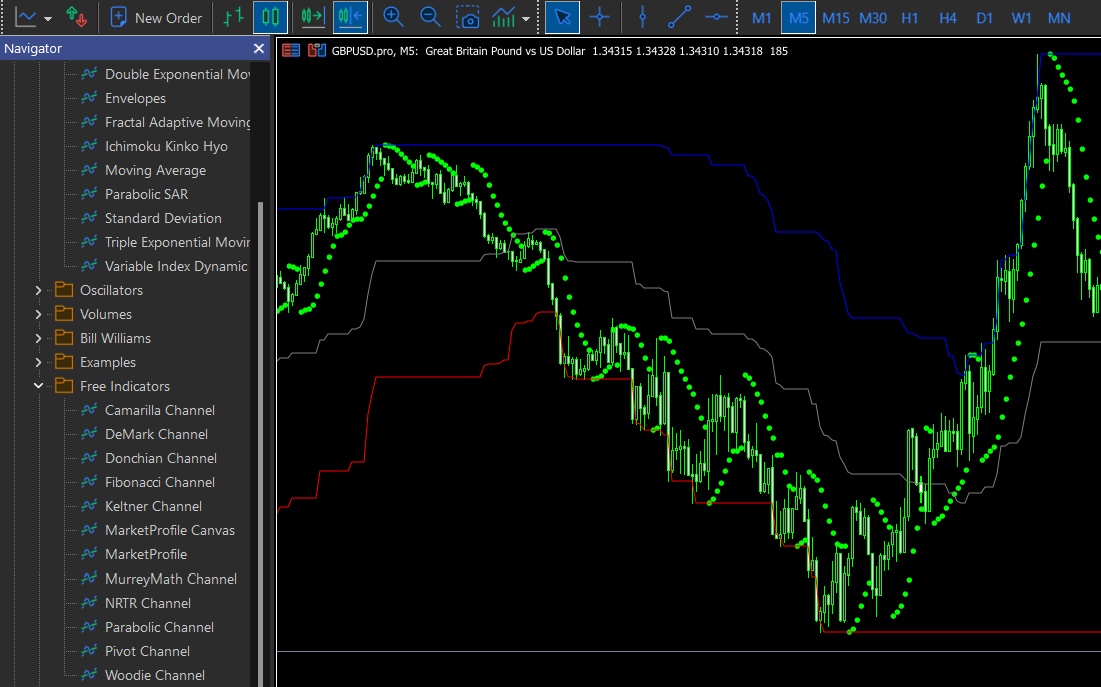
@ambrogio here it is, Donchian Channel.mq5
You can also find it in the customs indicator part in your own mt5 terminal.
-
RE: Working with MT5 Donchian Channelposted in Questions & Answers
Yes, I've used a value of 1 and even 2, nothing shows up in the tester. I'm confused.
Please if you have MT5 can you try and replicate?
-
Working with MT5 Donchian Channelposted in Questions & Answers
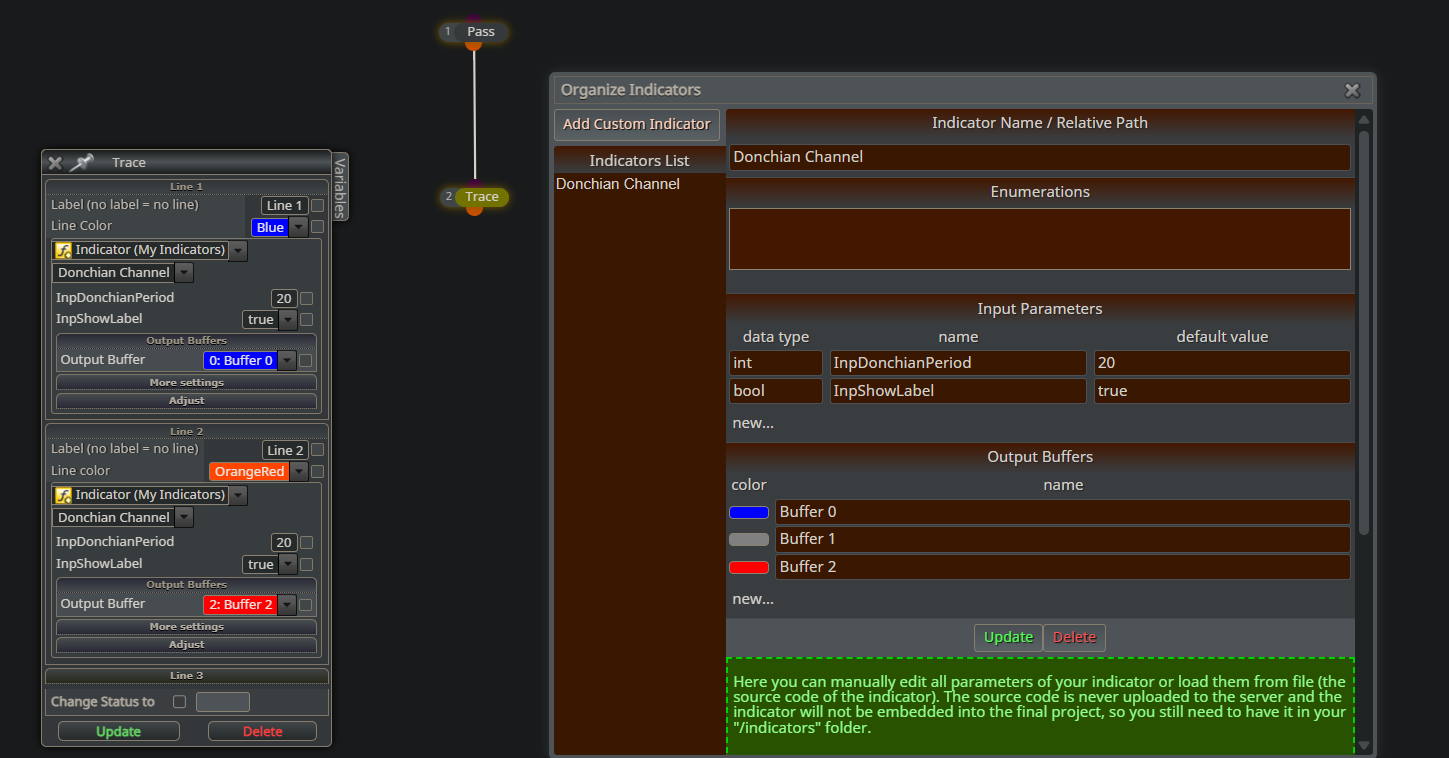 Hello all,
I hope someone can help me here, I've tried to use the inbuilt custom mt5 version of the Donchian channel, but there is no output at all. Followed all the instructions for loading custom indicators; i.e got indicator path from "data folder" made sure the name is consistent.
Here is the a tracer EA which shows no output.
https://fxdreema.com/shared/pQxtDTuEc
Can anyone help resolve this? Thank you.
-
RE: Close partially at X pips not working well for MT5posted in Bug Reports
Thanks for your efforts
changing that has no effect whatsoever, if you do have the time, try and implement it yourself so you see exactly what I am talking about.
-
RE: Close partially at X pips not working well for MT5posted in Bug Reports
Still no update on this ? @fxdreema
-
RE: Close partially at X pips not working well for MT5posted in Bug Reports
Thanks a lot but if you test it you'd see that it does not work as expected.
See the code on the right for the expected behaviour (the problem being it does not work for multiple running trades
-
Close partially at X pips not working well for MT5posted in Bug Reports
Hello
I wish to close a trade partially every x pips in loss in mt5,
Example:BUY Lot = 1,
@ -10 pips, close 10% (0.1); lot = 0.9
@ -20 pips, close 10% (0.09; lot = 0.81
@ -30 pips, close 10% (0.081); lot = 0.31 etcusing the examples template in MT5 doesn't work as expected
-
RE: Condition Checkposted in Questions & Answers
@jesse22 Use the [Check Consecutive Losses] block, then follow it with the [Turn OFF blocks] and [Turn ON blocks] to turn on and off the condition blocks you want.
-
RE: EA makes the Pending Orders more than it shouldposted in Questions & Answers
Put this above your pending order blocks, see if it works
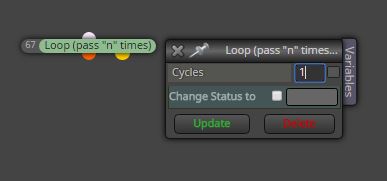
or use the [counter] and [counter reset] blocks...
- set counter to 1, place above your pending order blocks.
- put [counter reset] block below your close trades block and reset the [counter] block
-
RE: What is the difference between these 2 blocks?posted in Questions & Answers
@yalgaar Pink works under the [For EACH trade], BLUE works with [Bucket of trades] and others
-
RE: Rearranging blocks in a certain orderposted in Questions & Answers
Open [Constants] window, drag each variable to the position you require.
-
RE: EA makes the Pending Orders more than it shouldposted in Questions & Answers
-
Everyone who has gone through fxdreema examples know this rule: Do not connect blocks after buy/sell blocks.
-
Immediately after your pending orders are triggered they become buy and sell orders and your current code will create new pending orders again, Also use the [No trades block].
This is as much advice as I can give, I do not know what you want to do.
-
-
RE: My Project has disappearedposted in Questions & Answers
Okay, I can understand the complex nature, luckily I had a close version backed up, but I will go through the history points
-
My Project has disappearedposted in Questions & Answers
@fxdreema My project has just disappeared! Nothing I've done brings it back, woriking on windows 8.1 google chrome

-
RE: Best way to get pips from ATRposted in Questions & Answers
I did this once, unfortunately I deleted the project, but it was something like the picture below, which would then work for broker and pair alike:
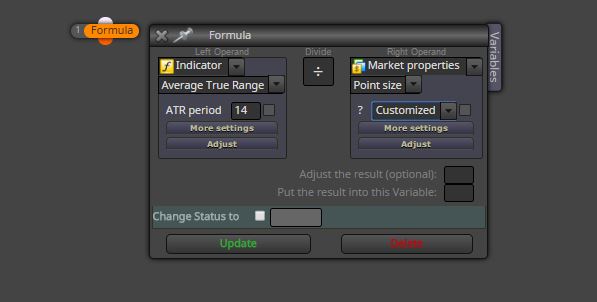
Google ATR to pips conversion and mimic it with the (point size) stuff in the picture. Too busy to do the research for you but its not hard. Maybe Miro can help you on from here.
-
RE: Loop through bucket of tradesposted in Questions & Answers
@miro1360 Thanks. I have found that I am able to do a quick modification of fxdreema's mql4 export file to accommodate more columns (add more columns to the blocks manually)... not sure I can do the same for other values.
Ahh, I had no idea one could not work outside the mql4 folders, now I know

-
RE: Loop through bucket of tradesposted in Questions & Answers
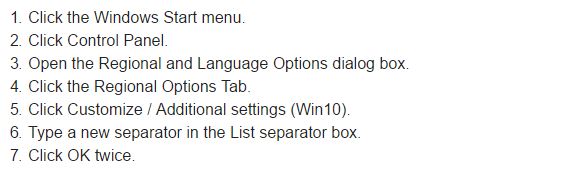
@uchiha solved number 2 by changing my computers default list separator (see picture). Number 1 and 3 are still being stubborn
-
RE: Loop through bucket of tradesposted in Questions & Answers
@fxDreema Hello I currently have to issues
-
I want to write more than 10 columns of data to an excel file, [write to file] has a max 10. How to extend it?
-
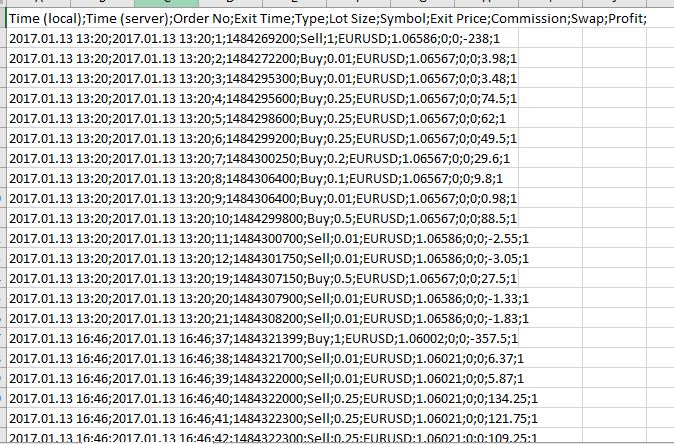
When I write to file it displays all the information in one column (Excel 2016). See picture. How to fix?
-
Can I specify the folder I want to write the file to?
-