@l-andorrà Yes just disconnected and not what i was looking for.

@l-andorrà Yes just disconnected and not what i was looking for.
Please help to do the buy orders and I will figure sell. Thanks in advance
@l-andorrà Please see the link https://fxdreema.com/shared/Z1j2zvz0b
Please check and advice
@l-andorrà Please see the attached screenshot. In the strategy tester, I can see a horizontal line appears per day but no order is placed.
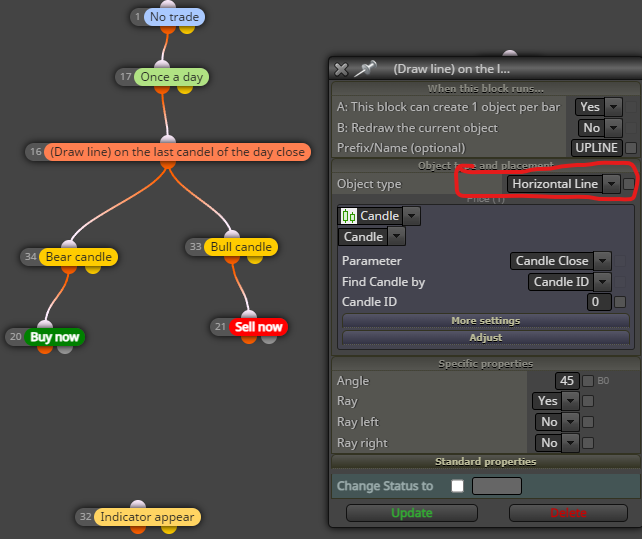
@l-andorrà I want to make another EA with strategy below:
Draw a line on the last candle of the day close.
Buy: If cross above line (closed candle) buy and SL when cross below the line (closed candle).
Sell: If cross below the line (closed candle) sell and SL when cross above the line (closed candle).
I hope this will be very profitable.  Thank you in advanced
@l-andorrà Thanks so much for getting back to me Yes I want to see the line just like MA.
Please note: MA moves but I wan a fixed line without moving. Else I would have use a Simple MA.
Thanks a so sir
@l-andorrà Thanks for getting back to me however, I have adjusted my strategy please see below link https://fxdreema.com/shared/qFLg8Bc7e
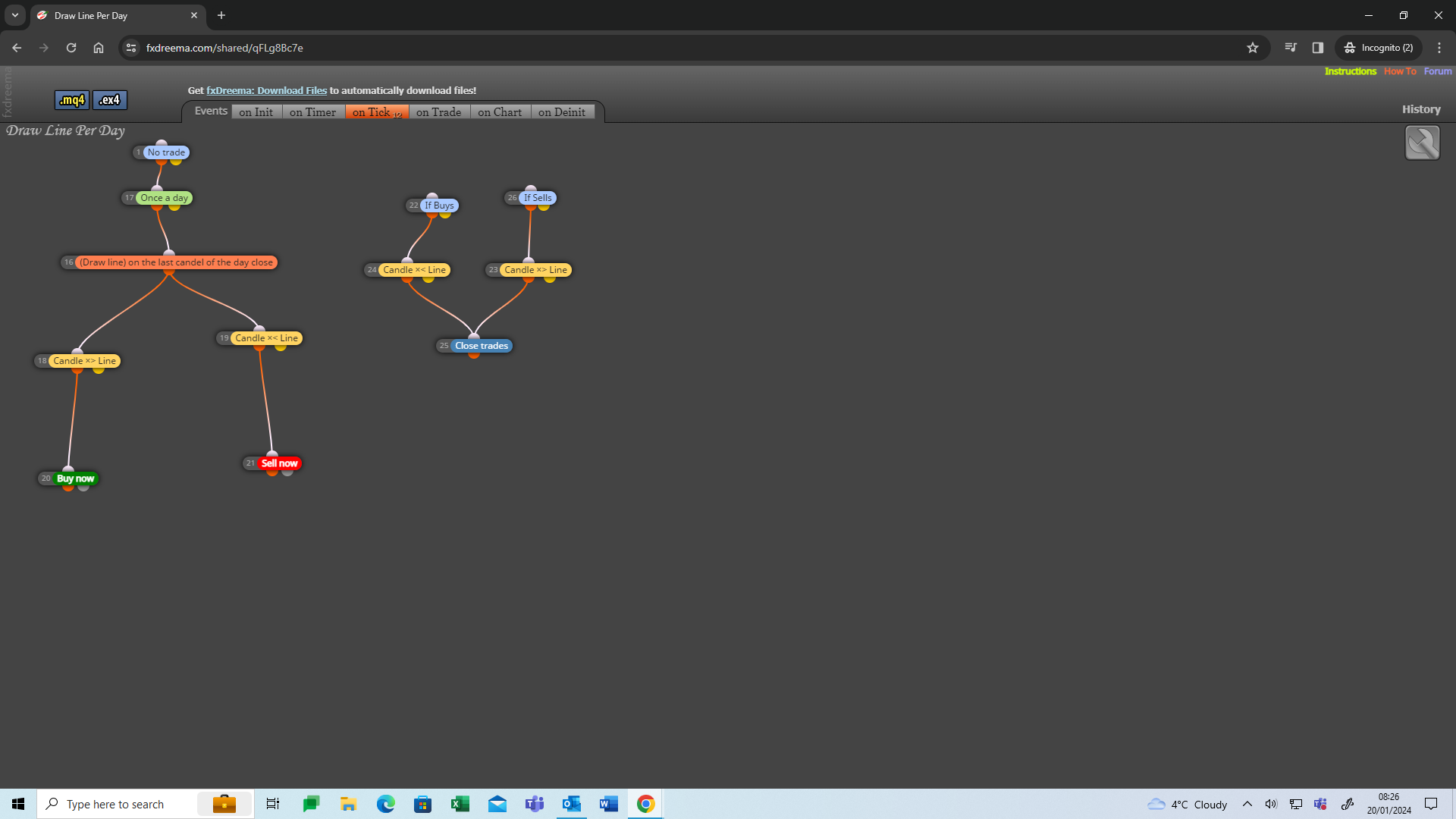
I am trying to draw a line when the market opens and close when the market closes. And open again once the market is open and so on......
Sell: When crossing above the line and 0.01 lot on each Bull candle close. Close all sell orders when crossing below the line with a bear candle closed.
Buy: When crossing below the line and 0.01 lot on each Bear candle closed. Close all buy orders when crossing above the line with a bull candle closed.
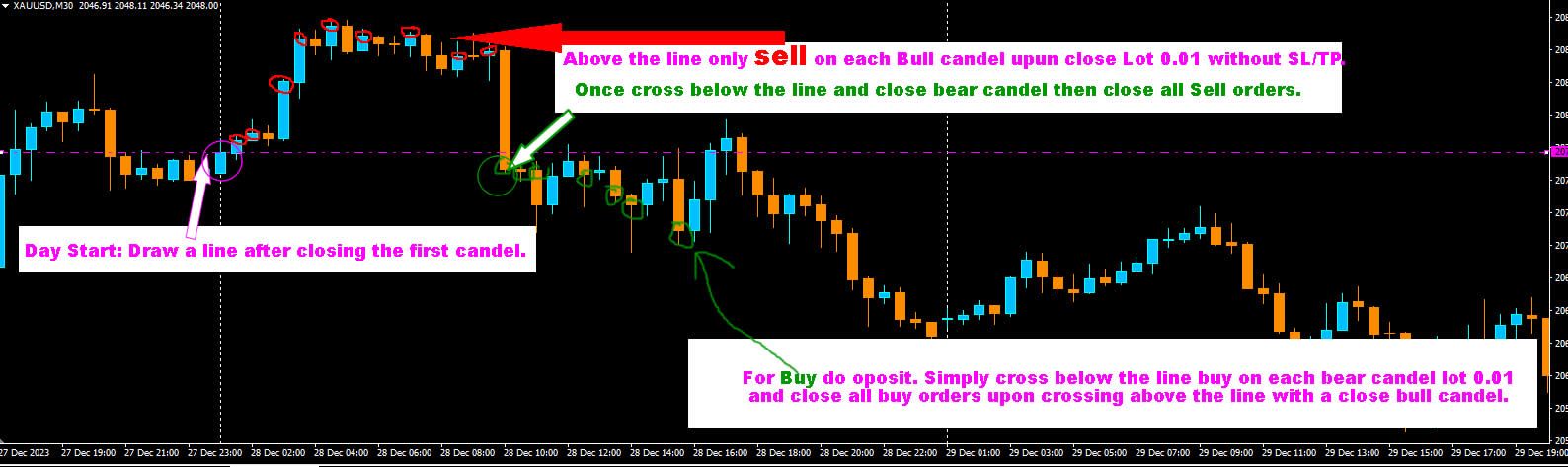
Thank you but not every bar working properly. Thank I am happy overall test
Hello everyone,
I am testing an EA that places orders both ways per Candel with the below conditions:
Any Candel Forms place Buy & Sell Bothway.
TP: 100 Pips
SL: NO (Close Buy Order when Bear Candel forms. Close Sell Order when Bull Candel forms).
Please note: Once TP or SL hits EA must need to wait for the current candle to be closed.
Here is my Test Project https://fxdreema.com/shared/gfIfC5QTd
Thank you
Only works in strategy test. Please see codes below:
input double InitialLotSize = 0.01;
input int MaxOrders = 3;
input bool UseMartingale = true;
input double MartingaleMultiplier = 2.0;
input bool StartWithBuy = true;
bool IsBuy = true;
int TradeCounter = 0;
double LastBarClose = 0.0;
double LotSize = InitialLotSize;
void OnStart()
{
LastBarClose = iClose(Symbol(), 0, 1);
if (!StartWithBuy)
{
IsBuy = false;
}
}
void OnTick()
{
// Check if the current bar is closed
double currentBarClose = iClose(Symbol(), 0, 0);
if (currentBarClose != LastBarClose)
{
LastBarClose = currentBarClose;
    // Close open orders
    CloseOrders();

    // Check if we reached the maximum number of orders
    if (TradeCounter == MaxOrders)
    {
        // Switch direction
        IsBuy = !IsBuy;
        TradeCounter = 0;
    }

    // Place new order if no order is placed
    if (TradeCounter < MaxOrders)
    {
        PlaceOrder();
    }
}
}
void CloseOrders()
{
for (int i = OrdersTotal() - 1; i >= 0; i--)
{
if (OrderSelect(i, SELECT_BY_POS, MODE_TRADES))
{
if (OrderSymbol() == Symbol() && (OrderType() == OP_BUY || OrderType() == OP_SELL))
{
bool closed = OrderClose(OrderTicket(), OrderLots(), MarketInfo(OrderSymbol(), IsBuy ? MODE_BID : MODE_ASK), 0, clrNONE);
if (!closed)
{
Print("Order close failed: ", GetLastError());
}
else
{
if (closedInProfit(OrderTicket()))
{
// Reset the lot size to the initial value after closing in profit
LotSize = InitialLotSize;
}
}
}
}
}
}
void PlaceOrder()
{
double price = IsBuy ? Ask : Bid;
int ticket = OrderSend(Symbol(), IsBuy ? OP_BUY : OP_SELL, LotSize, price, 0, 0, 0, "", 0, clrNONE, 0);
if (ticket > 0)
{
    TradeCounter++;
}
else
{
    Print("Order send failed: ", GetLastError());
}

// Update the lot size for the next trade if using Martingale
if (UseMartingale)
{
    LotSize *= MartingaleMultiplier;
}
}
bool closedInProfit(int ticket)
{
if (OrderSelect(ticket, SELECT_BY_TICKET))
{
double profit = OrderProfit();
return profit >= 0.0;
}
return false;
}
Thanks for replying but I am not a paid member. However, is it same as what I want as below:
Trade 2 (normal Martingale value)+ I added Lot size from Trade 1 = 0.01
Trade 3 (normal Martingale value)+ I added Lot size from Trade 2 = 0.03 +Trade 1= 0.01
Trade 4 (normal Martingale value)+ I added Lot size from Trade 3 = 0.10 + Trade 2= 0.03 + Trade 1 = 0.01
And so on....
Hello everyone, I came up with an excellent idea for a quick recovery system.
Normal Martingale Lot:
0.01
0.02
0.04
0.08
I want as follows:
0.01
0.03
0.10
0.34
So basically, it's a normal Martingale but I just added previously lost trades.
For example:
Trade 2 I added Lot size from Trade 1 = 0.01
Trade 3 I added Lot size from Trade 2 = 0.03 +Trade 1= 0.01
Trade 4 I added Lot size from Trade 3 = 0.10 + Trade 2= 0.03 + Trade 1 = 0.01
And so on....
Thank you in advance.
Hello,
Can someone help me check and download the EA and share please as I can not download.
Link: https://fxdreema.com/shared/Ix3auNxBd
Please this is basic and help me learning
Thank you
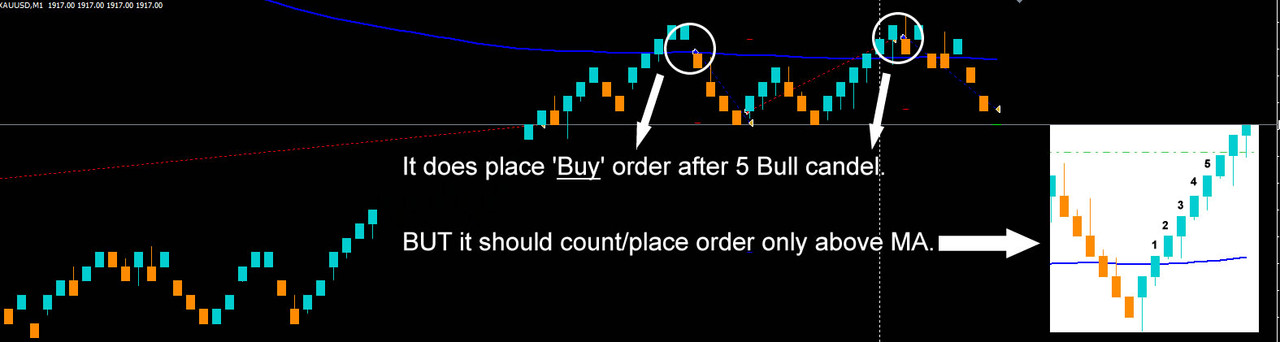
Please see attached image. Sometimes it starts counting from below MA. Same thing for the opposite sell.
@l-andorrà said in How to '3 Bull in a Raw' x> '13EMA':
You need to specify candle ID 1 on block 5 and then the respective candle ID on the right operand on the three previous blocks.
How about if I want to increase/decrease BULL in a row (Say I want 5 bull in row). Does it mean I have to add another two more condition?
Not placing any orders. Just back tested
Please see image below for better understanding. Thanks
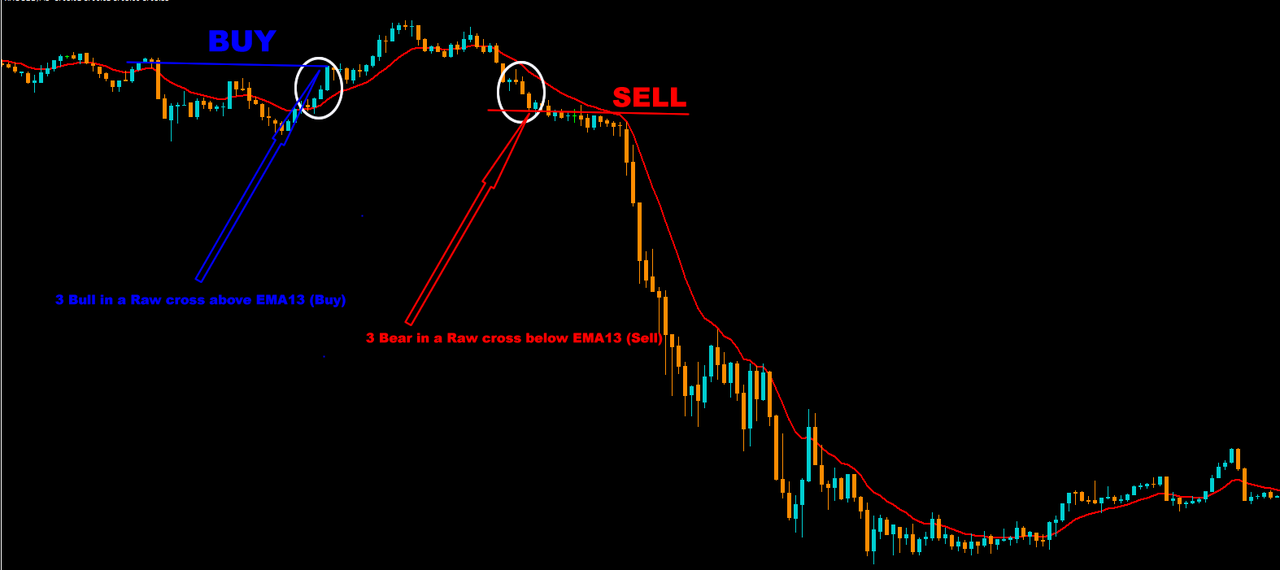
Sounds simple but I have tried my best.
Buy: 3 Bull in a Raw X> cross above EMA13.
Sell: 3 Bear in a Raw <X cross below EMA13.
Share link is: https://fxdreema.com/shared/OWDA0YyDb
If you can show visually please..Thank you