fxDreema

    • Register
    • Login
    • Search
    • Back to the main page
    • Categories
    • Recent
    • Tags
    • Popular
    • Search
    1. Home
    2. willramsey
    3. Posts
    • Profile
    • Following 0
    • Followers 1
    • Topics 0
    • Posts 42
    • Best 4
    • Controversial 0
    • Groups 0

    Posts made by willramsey

    • RE: Help - Custom MQL Code

      For MQL5, this is the code. Unfortunately, there seems to be an error with FXDreema or something for the MQL5 version. You'll have to save it as a MQ5 (the source code) and delete the semicolons on the global variables (includes/defines). For whatever reason when trying to compile, it's putting semicolons which makes it returns an error when trying to compile. I did test it and it works.

      // Global Variables, includes
      
      #include <WinAPI/winapi.mqh>
      #include <WinAPI/winuser.mqh>
      #define MT_WMCMD_EXPERTS 32851
      #define WM_COMMAND 0x0111
      #define GA_ROOT 2
      
      // Main Code
      
         if (TerminalInfoInteger(TERMINAL_TRADE_ALLOWED)){
         
            HANDLE hchart = ChartGetInteger(ChartID(), CHART_WINDOW_HANDLE);
            HANDLE hmt = GetAncestor(hchart, GA_ROOT);
            
            PostMessageW(hmt, WM_COMMAND, MT_WMCMD_EXPERTS, 0);
         
         }


      When you export the MQ5 from FXDreema, you need to remove these semicolons:

      remove.png

      Sorry there isn't an easier way, not sure why it's randomly putting semicolons.

      posted in Questions & Answers
      willramsey
      willramsey
    • RE: TRAILING STOP NOT WORKING PROPERLY

      You're wanting to trail the stop loss at a certain pip/point amount? Also, as a group or individually? I'm confused.

      posted in Bug Reports
      willramsey
      willramsey
    • RE: Help - Custom MQL Code

      The bool can be nice to have though if you want to toggle it back on or something with other conditions. Glad you got it to work.

      posted in Questions & Answers
      willramsey
      willramsey
    • RE: Help - Custom MQL Code

      I messed with creating it a different way and this worked just as well with less code . The if statement just checks the current status and if its on, then it toggles the button. Otherwise it does nothing. There is no custom function to make or anything.

      Screenshot 2023-12-11 084504.png

      // Global Variables, includes
      
      #include <WinUser32.mqh>
      #import "user32.dll"
      int GetAncestor(int, int);
      #define MT4_WMCMD_EXPERTS 33020
      #import
      
      //  Main Code
      
      if (IsTradeAllowed()){
      int main = GetAncestor(WindowHandle(Symbol(), Period()), 2/*GA_ROOT*/);
      PostMessageA(main, WM_COMMAND, MT4_WMCMD_EXPERTS, 0);
      }
      
      
      posted in Questions & Answers
      willramsey
      willramsey
    • RE: Help - Custom MQL Code

      I have seen a few people say they are getting errors so I just decided to make a quick tutorial over it. The video is about 8 minutes. If it still doesn't work, then I really wouldn't have a clue. If it works on my end, it should work on yours. Hope this helps.
      https://youtu.be/xjMN9KzBqB8

      posted in Questions & Answers
      willramsey
      willramsey
    • RE: Error in mt5 position bucket

      Very odd, I honestly have no idea lol. I haven't seen something like this happen before and I mainly work with MQL5.

      posted in Bug Reports
      willramsey
      willramsey
    • RE: Error in mt5 position bucket

      Not sure then, just so you can see my pov recorded a quick clip. You could always comment them a different way just using a variable for a counter though if your having problems and want to use MT5.
      https://youtu.be/vaWMaTmEXIE?si=aonKp7X3sO_0IFwd

      posted in Bug Reports
      willramsey
      willramsey
    • RE: Error in mt5 position bucket

      If you're using pending orders, you need to use bucket of pending orders not positions. Or both of the bucket blocks if you want both. My project is just for positions I posted earlier.

      posted in Bug Reports
      willramsey
      willramsey
    • RE: Error in mt5 position bucket

      I just put it on live chart and it worked so not sure then.

      posted in Bug Reports
      willramsey
      willramsey
    • RE: Error in mt5 position bucket

      In OnTrade, have a position created and closed block, connected into bucket of positions (gray). Then OnInit, pass and comment using bucket of trades (gray) values you want. This works for live and backtesting. The only thing is when you're EA has no trades open, it'll show random large values. You can fix this using variables and normalizing them but commenting buckets does work. Having this on OnTrade updates the values each "On Trade".
      https://fxdreema.com/shared/V2BZeqmXb

      posted in Bug Reports
      willramsey
      willramsey
    • RE: Help - Custom MQL Code

      @jonatassantanacaje I see, if that's the case you would need to create the custom block. Then wherever you pass and use the block, it will disable autotrading. If you don't know code then it'll probably be quite confusing.

      You'll also have to create some code to close all pairs open in the account. I think the close trades block will only close current EA and manual trades. This would work since it loops all orders on any pair. After they close then it gets disabled.

      Screenshot_2.png

      if (OrdersTotal() > 0){

      for (int i = OrdersTotal() - 1; i >= 0; i--) {
      if (OrderSelect(i, SELECT_BY_POS, MODE_TRADES)) {
      OrderClose(OrderTicket(), OrderLots(), MarketInfo(OrderSymbol(), MODE_BID), 5 /slippage/, clrRed);
      }
      }
      }

      posted in Questions & Answers
      willramsey
      willramsey
    • RE: Help - Custom MQL Code

      Toggling AutoTrading can't be done with a basic mql code block, it requires to be done with a dll. As you can see at the top of the code, it's including files. FXDreema doesn't do this unless you make a custom block so you can include in the global variables. Here is how you would set up a block to use to toggle the AutoTrading button off. You can click it whenever you want to resume trading. Keep in mind this would disable ALL EAs. I tested this with a basic project and it does work but it has to be done correctly.

      Screenshot_1.png

      In the project, I just had it enter a large lot with a very very low equity drawdown since this can't be done in the backtester. Then, used the block after closing trades and the AutoTrading was turned off.
      https://fxdreema.com/shared/klNJARKgb

      However, I feel like if you're just trying to prevent new trades after a certain amount of loss, there are other easier ways to do it. Just terminate the EA with the terminate block or something, why do you need to toggle the AutoTrading button? It achieves the same thing pretty much. Hope this helps.

      posted in Questions & Answers
      willramsey
      willramsey
    • RE: How do I delete a chart comment when trade closes?

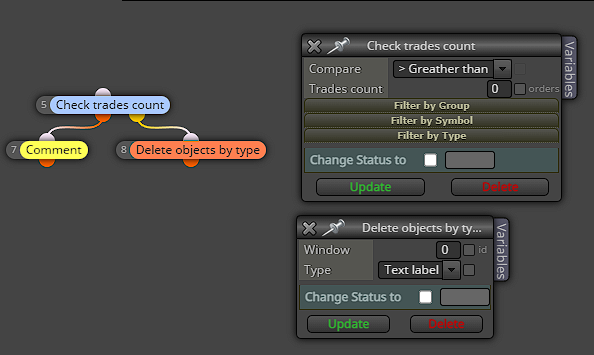
      @Julianrob Why don't you just use the Delete Objects by type block? Then select labels. The Comment block is just text labels even if it has number values. There's no need to draw text. But just removing it for back-testing works too lolScreenshot 2023-12-02 062211.png

      posted in Questions & Answers
      willramsey
      willramsey
    • RE: How do I delete a chart comment when trade closes?

      @Julianrob You can also just use the Delete Objects by type block and choose labels assuming you don't have any other text/labels you don't need. Just one block to do it.

      posted in Questions & Answers
      willramsey
      willramsey
    • RE: Wait for next candle

      Yeah, using time makes more sense in some way then what you had before.

      posted in Questions & Answers
      willramsey
      willramsey
    • RE: Wait for next candle

      What I'm trying to say is Candle ID (0) never has a close because Candle ID (0) is always the current candle. So the condition you're trying to make will never be met, therefor any blocks after won't execute. Generally, you normally always look back 1 candle unless you're doing something specific.

      posted in Questions & Answers
      willramsey
      willramsey
    • RE: Wait for next candle

      What you're saying is the Candle Open must equal the Candle close for the current candle, which is pretty much impossible since Candle ID 0 is the current open candle.
      If you're trying to wait for the next bar/candle, can you not just use Once Per Bar/Candle block?

      posted in Questions & Answers
      willramsey
      willramsey
    • RE: Multipairs EA

      Can you link your project so I can see all the blocks. I don't know if I'll be much help but, I normally work with MQL5 more than MQL4.

      posted in Questions & Answers
      willramsey
      willramsey
    • RE: Multipairs EA

      I see, yeah it can work live. This works for me at least when I just tried. Blocks have to be in the right order or it won't work.
      https://fxdreema.com/shared/XhphwbtIc

      posted in Questions & Answers
      willramsey
      willramsey
    • 1
    • 2
    • 3
    • 1 / 3