Thank you guys !!, will try that solution
X
Best posts made by Xeta50
-
RE: New order error: Invalid trade parameters (3)posted in Bug Reports
Latest posts made by Xeta50
-
RE: New order error: Invalid trade parameters (3)posted in Bug Reports
Thank you guys !!, will try that solution
-
RE: New order error: Invalid trade parameters (3)posted in Bug Reports
The one with error is MT4 newest build 4.0.0.1425 while the one that is working fine is 4.0.0.1420
Is there a way to fix this?

-
New order error: Invalid trade parameters (3)posted in Bug Reports
Guys,
My EA is working well on 1 pc but the same EA have this "New order error: Invalid trade parameters (3)" error in another pc.

- Same broker
- Same server
- Same Window 10
Please kindly advise........
-
RE: check stop-loss block to check amount of loss in deposit currency...posted in Questions & Answers
Thank you @l-andorrà but I think my question and picture might make it unclear about what I really want.
I want the EA to
- check what will be my loss for the current set stop loss
- if the loss (from set stop loss) is over -50 USD then move the stop to be closer like to the lowest of last 5 candle (for long order) to make the maximum loss smaller.
or I am wrong about your suggestion block (may that check profit block can be put -50 and work like what I mentioned above?)
-
check stop-loss block to check amount of loss in deposit currency...posted in Questions & Answers
Guy,
I want to have this block checking my stop loss that if it is over 50 USD (deposit currency) then do something.... but with the setting in the picture it is not checking 50 USD nor pip as I tested with JPY pairs and USD pairs. JPY Pairs, it will always works until I moved the stop loss to like <1 pip while USD pairs do not work even -4000 USD loss.
Do you perhaps know how should I set this block to check stop loss in deposit currency value? or how to do it with less blocks as possible?
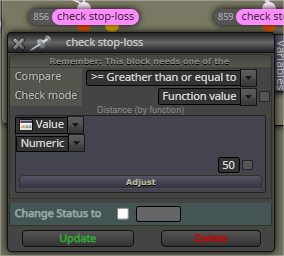
-
RE: all of my blocks has disappeared mt5posted in Bug Reports
@ProfitForJesus I have some questions....
- How many blocks do you have
- How many constants and variables do you have
Please kindly tell as I think another problem might be from the above questions.
-
RE: Store current variables on deinit or Closing MT4 or etc.posted in Questions & Answers
Thank you @jstap !! that's a very useful
-
Store current variables on deinit or Closing MT4 or etc.posted in Questions & Answers
Guys,
I am working with many variables so I just wonder if there is method to store variables at any point of time after letting the EA operating for hours (then the EA will have many variables recorded at the time) like:
- At will
- EA deinitialization
- Closing MT4
To be able to use those variables when you open MT4 again or at will (like EA input window)
Please kindly advice.
-
RE: Whenever MT4 disconnected the EA is not working properly for 5-6 minutes....posted in Questions & Answers
Thank you for the idea ! , I will try checking with a few brokers.
-
RE: Some bugs occur.... What should I do?posted in Bug Reports
Thank you for the confirmation of my choice about MT4 as 2 fxdreema veterans also shares the same view about MT4 is the better choice (also the same view with old school programmers), I will try to optimize blocks to reduce lines of coding.
FYI, I manually put a lot of input to get the total of around 200,000 lines of code but the EA can be compiled with ease so the problem is not about the limitation of number of lines of code in MT4.
Thank you !!!