let say the ea buys when EMA 5 crosses above EMA 20, but now i want the ea to wait for 30 seconds before opening the trade.
meaning EMA crosses above EMA 30, wait for 30 seconds and then open the trade

let say the ea buys when EMA 5 crosses above EMA 20, but now i want the ea to wait for 30 seconds before opening the trade.
meaning EMA crosses above EMA 30, wait for 30 seconds and then open the trade
@ambrogio yep its now working like a charm , apparently the "on tick" tab is much more effective then the on trade
@ambrogio well looks like I'll have to do it on tick as well, because if I leave it on mt5 mercy then it's gonna mess up whole thing 
the check age block can it work to count seconds?
i am trying to close each trade after 500 seconds so i used the "check age" block , can it be used for such purpose?
this is what i did with the "check age" block:

But its not closing the trades after 500 seconds
i tried it on both " on timer " and "on trade block" but it didnt work
@l-andorrà said in auto place stops:
You need to add a 'For each trade' block between both of them for it to work.
so i was wrong , modify stops do place the stops even if there is no stops initially
but there seem to be an issue , the ea places the stop most of the times , but sometimes it doesnt place the the stop https://fxdreema.com/shared/TX3Uhmjsc can you have a look and see whats going on ?
@xfire hmmmm interesting but isnt the bucket of trade used for getting the information from the trades , instead of adding the information to the trade?
but according to my understanding , modify stops block will only work if there is a stop already placed with the trade , if there is no stoploss that block can not modify it
"modify stop " block can not modify something that does not exist
in order for it to modify , it needs the sl or tp already placed
or am i wrong
i did find this mql4 version of an ea which does something similar, 0_1586683050024_RoNz Auto SL-TS-TP.mq4
if someone good in coding can take a look at the code and help me put it in fxdreema i will highly appreciate it , cuz when i try it on my own , i get lots of errors
@xfire yeah i thought about that but the problem is my main objective is to open trade on my phone cuz its more convenient , and keep the ea running on my laptop , so even if i am outside i can place the trade from my phone and the ea automatically places the sl and tp
modifying the stops is easy once there is a stop on the chart but the problem is if there isnt any stop with a trade then what ? how do we place a stop for a manually opened trade ?
@l-andorrà I don't think "for each trade" block will work, because in the end their is still that "modify stops" block, which will only modify the already placed stops, I don't think this block has the capability to place a stop if there is no stop
@ambrogio I already tried that but it does not work...
The " modify stops " block can only modify the stops if the trade is opened with a stop, but what I am trying to do is when the trade is opened manually without any sl or tp, the ea places the stops on that particular trade...
i know there is a block to modify stops but is it require the trade to already have stops in order to modify them
my question is , is there a way for the ea to place the stops automatically ?
i mean if i open a trade manually , the ea places the stops accordingly.
@trader-philipps well i am not getting any errors when i download the mq5 and compile it using the metaeditor on my pc , its compiling fine without any errors , but when i run the backtest on that compiled ea , or attach it to the chart it does not open any trades , whereas when i download the ex5 version from fxdreema it works fine in backtest and also when i attach it to the chart
@trader-philipps tried that as well but it didnt work , luckily the arrows were being placed by the same ea so i used some flags to achieve what i was trying ...but it would have been better to find the arrow on the previous candle with that block
when i download the ex5 of the project , it works great in the mt5 terminal, but when i download the same project in mq5 and run it in the same mt5 , it doesnt work
anybody else facing such issue?
@xfire well i think "object on chart" attribute for this block should work , because if it didnt then it wouldnt have been there
@xfire if you pay attention to the white box you will notice that i am indeed using the block "indicator visible" but the attribute in that block that i am using is "object on chart" which does not have the candle id selection box like the indicators or condition blocks
as for how i am drawing the arrows , i am drawing them using some calculations across multiple timeframe, thats why i am trying to detect the arrows on the higher timefram
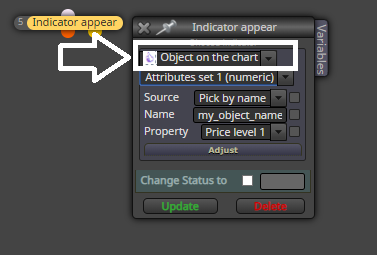
@xfire okay pardon my ignorance but as far as i am aware "indicator is visible " does not have the option for candle id 1
and i am not using the indicator, i am trying to detect the objects drawn by the ea
@xfire well thats the main issue , the attribute " object on chart" does not provide the candle id option , it wouldnt be a problem if it had the option to select the candle on which the ea should check if the object is visible or not , but as far as i am aware there is no option to select the candle id for the object on chart attribute
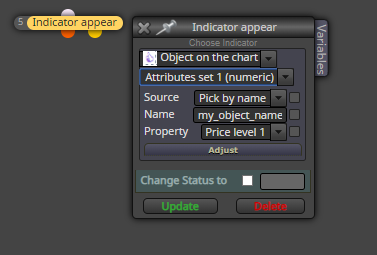
in the indicator appear block there is an option for "object on chart" can this be used to find arrows drawn on previous candle ?
because i dont see the option for "object on chart" attribute where you can select the candle id .