fxDreema

    • Register
    • Login
    • Search
    • Back to the main page
    • Categories
    • Recent
    • Tags
    • Popular
    • Search

    How to read the buffers of this custom indicator (mq5)?

    Questions & Answers
    2
    21
    1935
    Loading More Posts
    • Oldest to Newest
    • Newest to Oldest
    • Most Votes
    Reply
    • Reply as topic
    Log in to reply
    This topic has been deleted. Only users with topic management privileges can see it.
    • P
      ProteinX last edited by

      Hi there!
      Cany anyone tell me how to read the latest buffer values of this indicator please? An example with a comment block would be sufficient.
      I am talking about this fractallevels.mq5 indicator: https://www.mql5.com/de/code/732
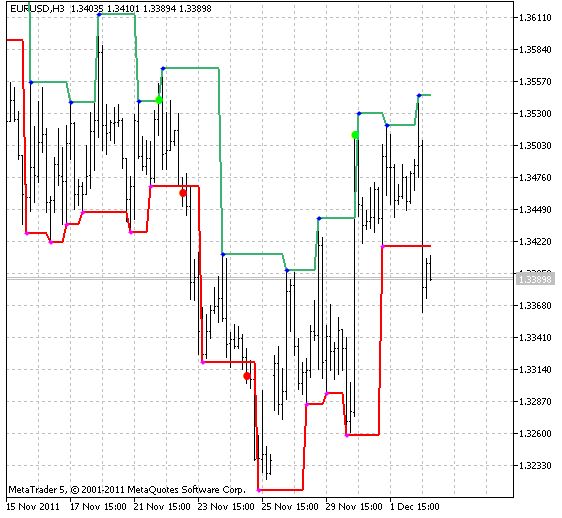
      bd759921-8c88-41de-a675-236cfb28f41d-image.png

      I have imported it correctly into fxdreema:

      a7e71419-ad74-4ebd-bd9b-5b34177d80f4-image.png

      I tried this:
      All six and non-empty buffer values should be read once per bar at previous candle 1. Checking with condition: if buffer1 at candle (1) >0 then display value.
      But i don´t get any values from the buffers. I am doing something wrong. What is it? Thank you for your support.
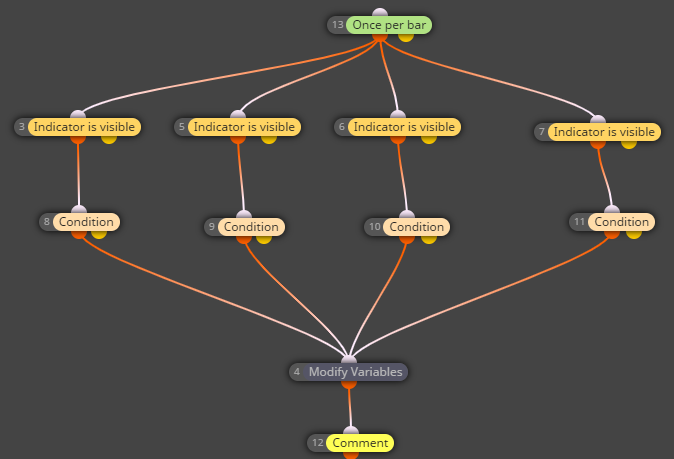
      c7628889-f434-4ea3-a25e-84c12419e8dd-image.png

      1 Reply Last reply Reply Quote 0
      • jstap
        jstap last edited by

        Get the required indicator buffer in a comment, then use this value to do what you need.

        Learn fxDreema Without the Wait!

        My comprehensive book, available on Amazon, is packed with examples and invaluable insights to help you fast-track your learning journey.

        The paperback and hardback editions include MT4 & MT5 QR codes for easy access to all prebuilt projects and robots, including my latest gold trading robot!

        Don’t miss out

        Click here➡️ https://mybook.to/fxDreema to get your copy today!

        Enjoy! 😊

        1 Reply Last reply Reply Quote 0
        • P
          ProteinX last edited by

          I did (see above screenshot), but didn´t worked. That´s why i am asking.

          1 Reply Last reply Reply Quote 0
          • jstap
            jstap last edited by

            I cannot see what is in your comment, add a shared link, by the looks of the picture that is not how to check buffers.

            Learn fxDreema Without the Wait!

            My comprehensive book, available on Amazon, is packed with examples and invaluable insights to help you fast-track your learning journey.

            The paperback and hardback editions include MT4 & MT5 QR codes for easy access to all prebuilt projects and robots, including my latest gold trading robot!

            Don’t miss out

            Click here➡️ https://mybook.to/fxDreema to get your copy today!

            Enjoy! 😊

            P 1 Reply Last reply Reply Quote 0
            • P
              ProteinX @jstap last edited by

              @jstap Of course, here it is:
              https://fxdreema.com/shared/YiB8jvEad

              Probably you have a better idea what is wrong here? Probably the arrows are objects, not buffers or the buffers are arrays? No clue.

              1 Reply Last reply Reply Quote 0
              • jstap
                jstap last edited by

                Why is indicator is visible at the top? To check values you only need what is in the picture. If you open your data window, then the comment values should match this.
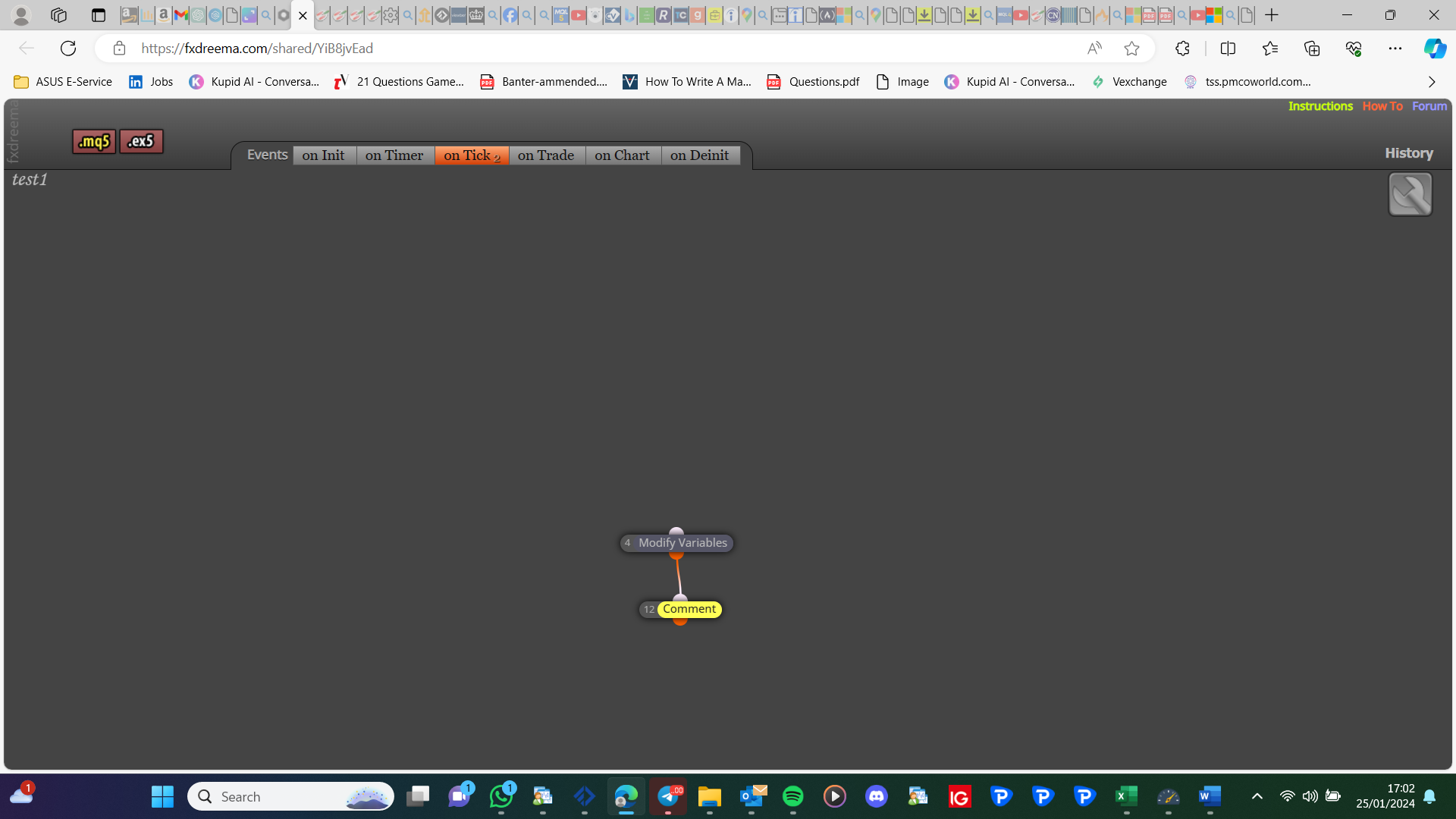
                image.png

                Learn fxDreema Without the Wait!

                My comprehensive book, available on Amazon, is packed with examples and invaluable insights to help you fast-track your learning journey.

                The paperback and hardback editions include MT4 & MT5 QR codes for easy access to all prebuilt projects and robots, including my latest gold trading robot!

                Don’t miss out

                Click here➡️ https://mybook.to/fxDreema to get your copy today!

                Enjoy! 😊

                P 1 Reply Last reply Reply Quote 0
                • P
                  ProteinX @jstap last edited by

                  @jstap Thanks for that proposal using only "modify variables" and "comments" block. But this also didn´t worked. Still no values of the buffers.

                  1 Reply Last reply Reply Quote 0
                  • jstap
                    jstap last edited by

                    Sounds like an indicator problem, do you have values in the data window?

                    Learn fxDreema Without the Wait!

                    My comprehensive book, available on Amazon, is packed with examples and invaluable insights to help you fast-track your learning journey.

                    The paperback and hardback editions include MT4 & MT5 QR codes for easy access to all prebuilt projects and robots, including my latest gold trading robot!

                    Don’t miss out

                    Click here➡️ https://mybook.to/fxDreema to get your copy today!

                    Enjoy! 😊

                    P 1 Reply Last reply Reply Quote 0
                    • P
                      ProteinX @jstap last edited by ProteinX

                      @jstap I don´t think, there is an indicator problem (check the mq5 code).
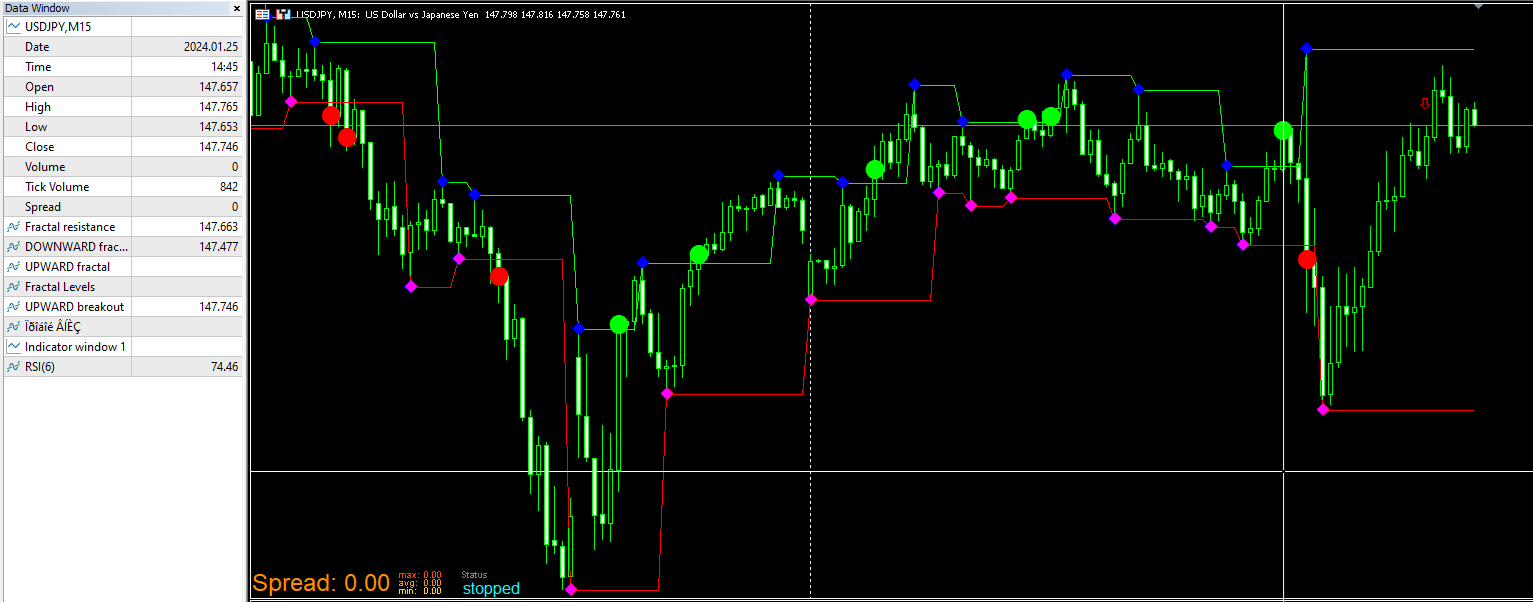
                      And: yes, all the buffer values can be seen in the data window.

                      Is there anyone who can explain, how to get the arrow signals of an indicator in general? What is the correct way? Unfortunately in the tutorials i have seen examples how to get the signals from indicators with continues signals (like MACD, ADX etc) but not how to get arrow signals which are interrupted.

                      In my case it would be sufficient to know when a dot appears. Of course, it would be perfect to read out the value as well.
                      675d1f12-9bea-4857-830f-b1baebb6ac23-image.png

                      Here is the source code of the indicator:
                      fractallevels.mq5

                      https://www.mql5.com/de/code/viewcode/732/149215/fractallevels.mq5

                      1 Reply Last reply Reply Quote 0
                      • jstap
                        jstap last edited by

                        From your picture, are you getting the 3 values that are printed in your comments?

                        Learn fxDreema Without the Wait!

                        My comprehensive book, available on Amazon, is packed with examples and invaluable insights to help you fast-track your learning journey.

                        The paperback and hardback editions include MT4 & MT5 QR codes for easy access to all prebuilt projects and robots, including my latest gold trading robot!

                        Don’t miss out

                        Click here➡️ https://mybook.to/fxDreema to get your copy today!

                        Enjoy! 😊

                        P 1 Reply Last reply Reply Quote 0
                        • P
                          ProteinX @jstap last edited by ProteinX

                          @jstap no acutally i get all the buffer signals, but in that case the mouse cursor (white vertical line) was exactly at the position of these 3 values. (green dot, green line, red line). When i move the mouse then i will get all the other signals as well.

                          So i cannot even get the green and red lines signals which are contiuous signals.
                          Could it be that fractal signals are hard to read out from the buffers?

                          1 Reply Last reply Reply Quote 0
                          • jstap
                            jstap last edited by

                            With those buffers it needs to be a constant value, if large or 0, then when indicator appears it changes to the opposite, this is what would make the block react. If it is constantly changing or fixed this would be the price value, if this value is not showing by itself I know or no way the indicator can be used.

                            Learn fxDreema Without the Wait!

                            My comprehensive book, available on Amazon, is packed with examples and invaluable insights to help you fast-track your learning journey.

                            The paperback and hardback editions include MT4 & MT5 QR codes for easy access to all prebuilt projects and robots, including my latest gold trading robot!

                            Don’t miss out

                            Click here➡️ https://mybook.to/fxDreema to get your copy today!

                            Enjoy! 😊

                            P 1 Reply Last reply Reply Quote 0
                            • P
                              ProteinX @jstap last edited by ProteinX

                              @jstap I tested the indicator itself in the strategy tester. The signals suddenly stop working after some time, see below. Probably this is the reason why the EA also cannot read the signals?
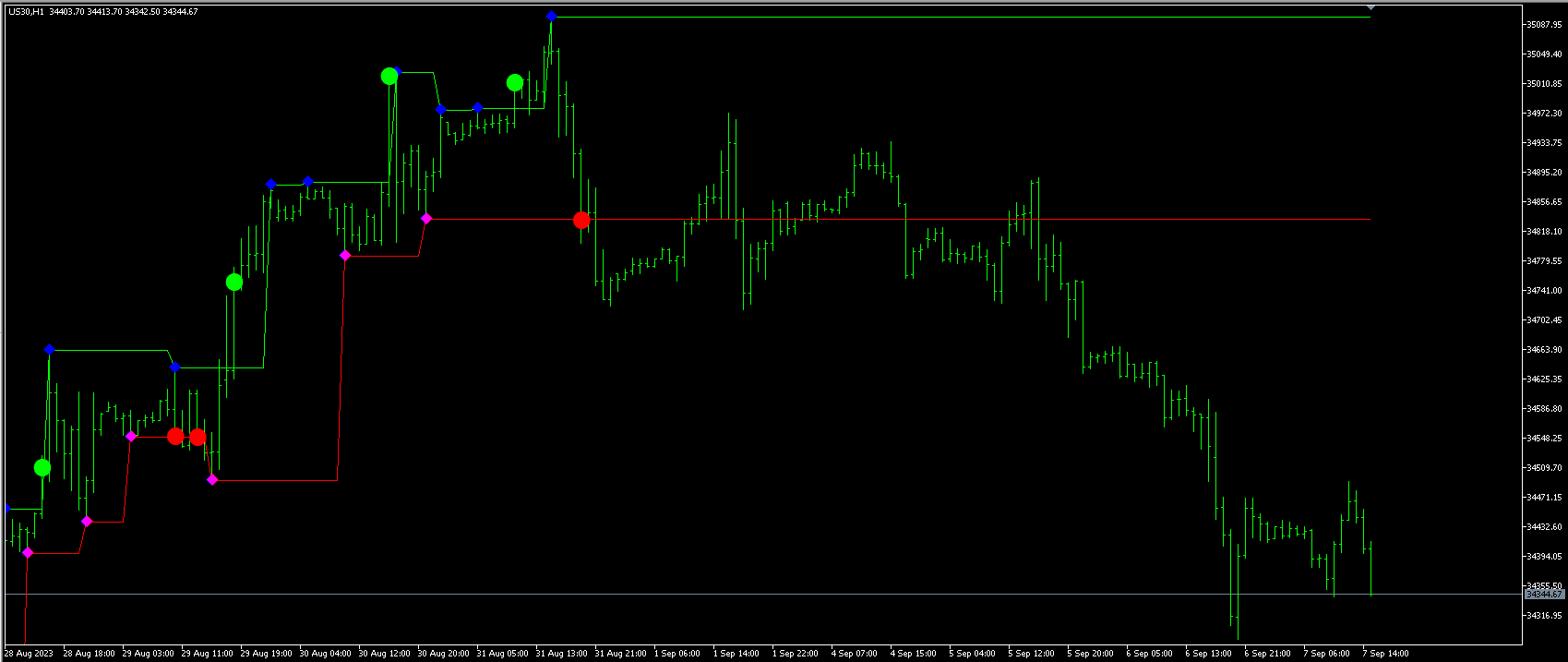
                              52ab9303-5613-40e8-8421-da92e89e422a-image.png

                              But why are they working in live? I am confused!

                              1 Reply Last reply Reply Quote 0
                              • jstap
                                jstap last edited by

                                Maybe some indicators are not coded correctly, if you have the object on the chart, see if you have it in the object list, and try to use that.

                                Learn fxDreema Without the Wait!

                                My comprehensive book, available on Amazon, is packed with examples and invaluable insights to help you fast-track your learning journey.

                                The paperback and hardback editions include MT4 & MT5 QR codes for easy access to all prebuilt projects and robots, including my latest gold trading robot!

                                Don’t miss out

                                Click here➡️ https://mybook.to/fxDreema to get your copy today!

                                Enjoy! 😊

                                P 1 Reply Last reply Reply Quote 0
                                • P
                                  ProteinX @jstap last edited by

                                  @jstap How can i read these indicator objects? You mean with the "object created" block in the "on Chart" tab?

                                  1 Reply Last reply Reply Quote 0
                                  • jstap
                                    jstap last edited by

                                    Open the object list, double click the object and see what values you have

                                    Learn fxDreema Without the Wait!

                                    My comprehensive book, available on Amazon, is packed with examples and invaluable insights to help you fast-track your learning journey.

                                    The paperback and hardback editions include MT4 & MT5 QR codes for easy access to all prebuilt projects and robots, including my latest gold trading robot!

                                    Don’t miss out

                                    Click here➡️ https://mybook.to/fxDreema to get your copy today!

                                    Enjoy! 😊

                                    P 1 Reply Last reply Reply Quote 0
                                    • P
                                      ProteinX @jstap last edited by

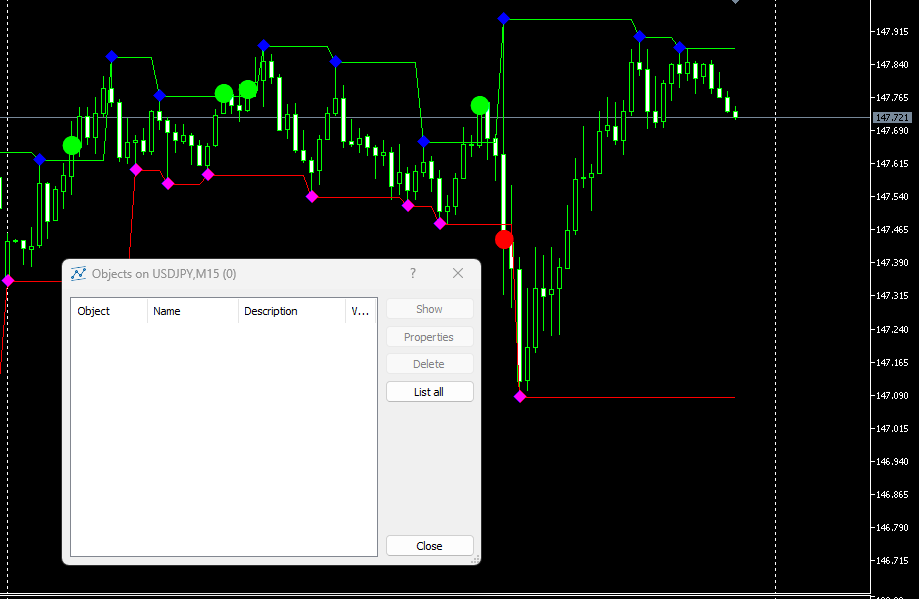
                                      @jstap the object list is empty:

                                      fdb460b3-54d9-43ff-ba28-3aff4083b43b-image.png

                                      1 Reply Last reply Reply Quote 0
                                      • jstap
                                        jstap last edited by

                                        Have you clicked on list all?

                                        Learn fxDreema Without the Wait!

                                        My comprehensive book, available on Amazon, is packed with examples and invaluable insights to help you fast-track your learning journey.

                                        The paperback and hardback editions include MT4 & MT5 QR codes for easy access to all prebuilt projects and robots, including my latest gold trading robot!

                                        Don’t miss out

                                        Click here➡️ https://mybook.to/fxDreema to get your copy today!

                                        Enjoy! 😊

                                        P 1 Reply Last reply Reply Quote 0
                                        • P
                                          ProteinX @jstap last edited by

                                          @jstap sorry, now it looks like below, but still no objects of the indicator found:
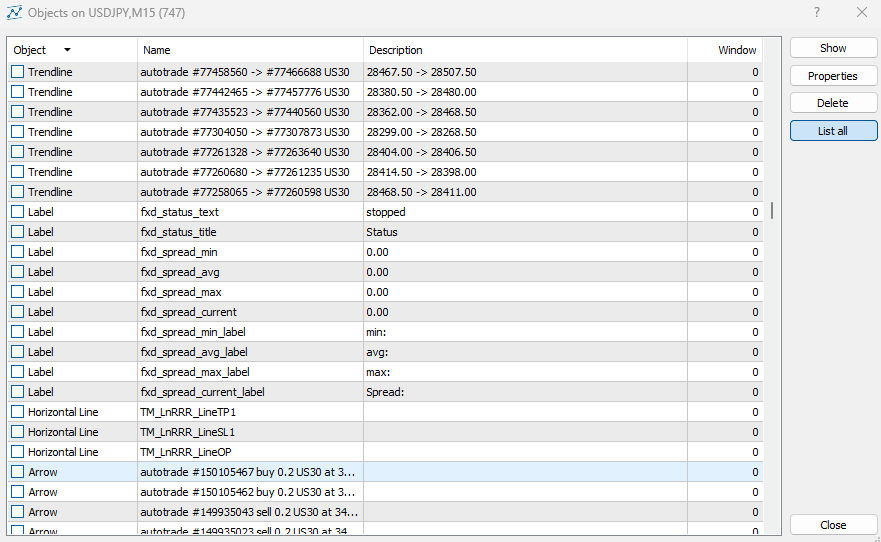
                                          180a3914-573d-4ca0-bf24-b303d419ad82-image.png

                                          1 Reply Last reply Reply Quote 0
                                          • jstap
                                            jstap last edited by

                                            Unfortunately some arrows are drawn in a way that means they are not visible in the object list,, Without this you cannot use.

                                            Learn fxDreema Without the Wait!

                                            My comprehensive book, available on Amazon, is packed with examples and invaluable insights to help you fast-track your learning journey.

                                            The paperback and hardback editions include MT4 & MT5 QR codes for easy access to all prebuilt projects and robots, including my latest gold trading robot!

                                            Don’t miss out

                                            Click here➡️ https://mybook.to/fxDreema to get your copy today!

                                            Enjoy! 😊

                                            P 1 Reply Last reply Reply Quote 0
                                            • 1
                                            • 2
                                            • 1 / 2
                                            • First post
                                              Last post

                                            Online Users

                                            E
                                            R
                                            F
                                            ح
                                            H
                                            J
                                            P

                                            15
                                            Online

                                            146.7k
                                            Users

                                            22.4k
                                            Topics

                                            122.6k
                                            Posts

                                            Powered by NodeBB Forums | Contributors