fxDreema

    • Register
    • Login
    • Search
    • Back to the main page
    • Categories
    • Recent
    • Tags
    • Popular
    • Search

    How to create your own custom blocks step by step??

    Questions & Answers
    3
    12
    693
    Loading More Posts
    • Oldest to Newest
    • Newest to Oldest
    • Most Votes
    Reply
    • Reply as topic
    Log in to reply
    This topic has been deleted. Only users with topic management privileges can see it.
    • N
      ndingoho 0 last edited by

      How to create your own custom blocks step by step?

      1 Reply Last reply Reply Quote 0
      • jstap
        jstap last edited by jstap

        You can try to learn from this, but there is no step by tutorial: https://fxdreema.com/forum/topic/19004/help-custom-mql-code/28

        Learn fxDreema Without the Wait!

        My comprehensive book, available on Amazon, is packed with examples and invaluable insights to help you fast-track your learning journey.

        The paperback and hardback editions include MT4 & MT5 QR codes for easy access to all prebuilt projects and robots, including my latest gold trading robot!

        Don’t miss out

        Click here➡️ https://mybook.to/fxDreema to get your copy today!

        Enjoy! 😊

        S 1 Reply Last reply Reply Quote 1
        • N
          ndingoho 0 last edited by

          Ok thank you

          1 Reply Last reply Reply Quote 0
          • S
            s00071609 @jstap last edited by

            @jstap Hey, I had a quick question. After creating a custom block, isnt it supposed to be available in the builder? I created a custom block, but cant find it under any category. Any idea why this might be happening?

            1 Reply Last reply Reply Quote 0
            • jstap
              jstap last edited by

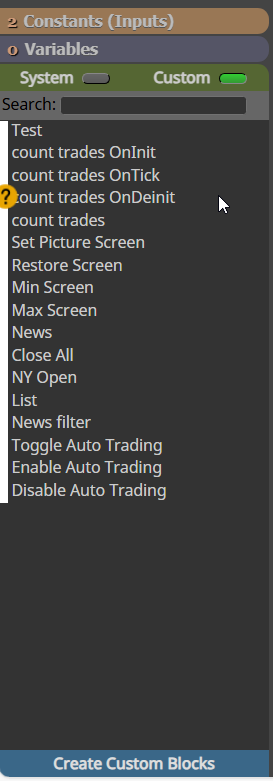
              It will be under the custom tab.

              image.png

              Learn fxDreema Without the Wait!

              My comprehensive book, available on Amazon, is packed with examples and invaluable insights to help you fast-track your learning journey.

              The paperback and hardback editions include MT4 & MT5 QR codes for easy access to all prebuilt projects and robots, including my latest gold trading robot!

              Don’t miss out

              Click here➡️ https://mybook.to/fxDreema to get your copy today!

              Enjoy! 😊

              S 1 Reply Last reply Reply Quote 1
              • S
                s00071609 @jstap last edited by

                @jstap ok thanks but isnt showing for me. Could you share any code that i could paste on studio main window that shows up in builder just for testing?

                thanks

                1 Reply Last reply Reply Quote 0
                • jstap
                  jstap last edited by

                  You can find that here (https://fxdreema.com/forum/topic/21603/close-all-mt5-trades-quickly/14) not sure how quick it will be though. maybe you are looking in MT4 when you created in MT5, or vice versa?

                  Learn fxDreema Without the Wait!

                  My comprehensive book, available on Amazon, is packed with examples and invaluable insights to help you fast-track your learning journey.

                  The paperback and hardback editions include MT4 & MT5 QR codes for easy access to all prebuilt projects and robots, including my latest gold trading robot!

                  Don’t miss out

                  Click here➡️ https://mybook.to/fxDreema to get your copy today!

                  Enjoy! 😊

                  S 2 Replies Last reply Reply Quote 0
                  • S
                    s00071609 @jstap last edited by

                    @jstap Thanks will try it. What do you mean by how quick it will be, does it take lot of time to show up in builder? Just started using the studio, no idea whats happening, I am using MT5 for MT5 builder.

                    1 Reply Last reply Reply Quote 0
                    • S
                      s00071609 @jstap last edited by

                      @jstap thanks for your help. I wasnt clicking on the customs section in the builder, so i could not see it

                      thanks the link helped

                      1 Reply Last reply Reply Quote 0
                      • jstap
                        jstap last edited by

                        not to show up in the builder, and if you already know a little about it you should be ok, When ever I create as soon as I save it can be used, I will refresh the builder page though

                        Learn fxDreema Without the Wait!

                        My comprehensive book, available on Amazon, is packed with examples and invaluable insights to help you fast-track your learning journey.

                        The paperback and hardback editions include MT4 & MT5 QR codes for easy access to all prebuilt projects and robots, including my latest gold trading robot!

                        Don’t miss out

                        Click here➡️ https://mybook.to/fxDreema to get your copy today!

                        Enjoy! 😊

                        S 1 Reply Last reply Reply Quote 0
                        • S
                          s00071609 @jstap last edited by

                          @jstap Thanks for the info. There seems to be issue with variables in the studio. Any variables declared in variable tab don't seem to be working in the studio. Is there any specific thing that needs to be done to make them work in studio? Also, var declared in global area dont seem to work in builder either

                          1 Reply Last reply Reply Quote 0
                          • jstap
                            jstap last edited by

                            show me pictures of how you have it set, if you are getting compile errors after creatin while trying to use, you could copy each section, past into ChatGPT and ask what is wrong showing the builder compilation errors


                            Learn fxDreema Without the Wait!

                            My comprehensive book, available on Amazon, is packed with examples and invaluable insights to help you fast-track your learning journey.

                            The paperback and hardback editions include MT4 & MT5 QR codes for easy access to all prebuilt projects and robots, including my latest gold trading robot!

                            Don’t miss out

                            Click here➡️ https://mybook.to/fxDreema to get your copy today!

                            Enjoy! 😊

                            1 Reply Last reply Reply Quote 1
                            • 1 / 1
                            • First post
                              Last post

                            Online Users

                            N
                            S
                            T
                            A

                            17
                            Online

                            146.7k
                            Users

                            22.4k
                            Topics

                            122.6k
                            Posts

                            Powered by NodeBB Forums | Contributors