fxDreema

    • Register
    • Login
    • Search
    • Back to the main page
    • Categories
    • Recent
    • Tags
    • Popular
    • Search

    How to use block "check how it was closed"

    Questions & Answers
    2
    6
    296
    Loading More Posts
    • Oldest to Newest
    • Newest to Oldest
    • Most Votes
    Reply
    • Reply as topic
    Log in to reply
    This topic has been deleted. Only users with topic management privileges can see it.
    • M
      mee.air last edited by

      I wan to know the position where I can use this block. Because if I put under BUY or SELL block in "On Tick" then I guess its of no use on next tick. If Use in on Trade, then how to connect it because it will only check how the last trade was closed SL or TP right. So On Trade Can be used ?

      1 Reply Last reply Reply Quote 0
      • jstap
        jstap last edited by

        Yes, use on trade, under you can put buy/sell blocks, or any others you want to do something. This would be a separate tree, and you can have multiple trees across all tabs interacting with each other

        Learn fxDreema Without the Wait!

        My comprehensive book, available on Amazon, is packed with examples and invaluable insights to help you fast-track your learning journey.

        The paperback and hardback editions include MT4 & MT5 QR codes for easy access to all prebuilt projects and robots, including my latest gold trading robot!

        Don’t miss out

        Click here➡️ https://mybook.to/fxDreema to get your copy today!

        Enjoy! 😊

        M 1 Reply Last reply Reply Quote 0
        • M
          mee.air @jstap last edited by

          @jstap Thanks

          This means I can use Any positions (either BUY or SELL) on top and in bottom of it I connect this "check how it was closed" if this passed through SL I can increment a Counter by modifying a variable. this will work right (please correct me if I am wrong
          Please tell me how I can use the Variable value to use as a condition to do some operation as direct option was terminal variable is different thing

          1 Reply Last reply Reply Quote 0
          • jstap
            jstap last edited by

            If buy or sell in not already in the block, most blocks have it. Use a formula block to add to the variable and saving back into it.

            Learn fxDreema Without the Wait!

            My comprehensive book, available on Amazon, is packed with examples and invaluable insights to help you fast-track your learning journey.

            The paperback and hardback editions include MT4 & MT5 QR codes for easy access to all prebuilt projects and robots, including my latest gold trading robot!

            Don’t miss out

            Click here➡️ https://mybook.to/fxDreema to get your copy today!

            Enjoy! 😊

            M 1 Reply Last reply Reply Quote 0
            • M
              mee.air @jstap last edited by

              @jstap f263682f-4b5b-4ff6-be35-1fb5ef08a5bd-image.png

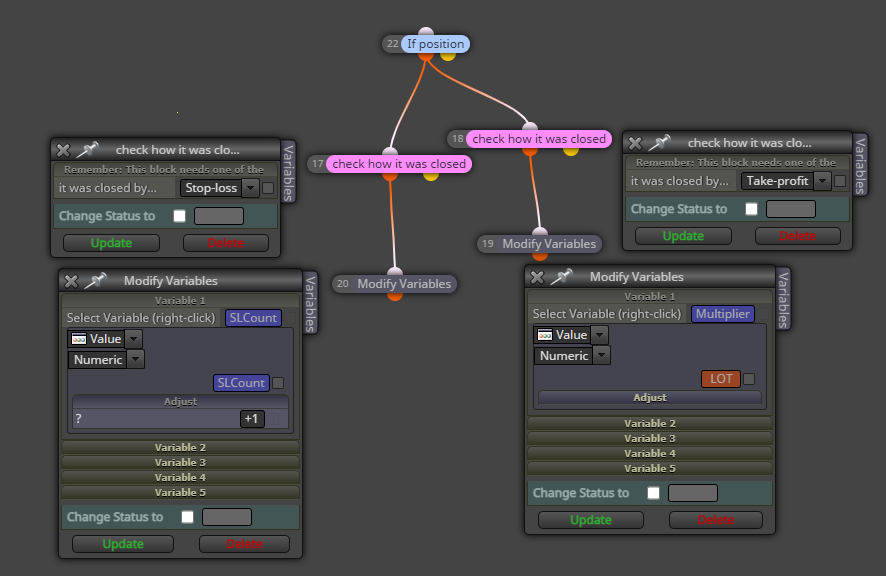
              Used like this, the block has only Stop Loss, Take Profit options so If SL hit then I increment SL Counter and If TP Hit I put Initial Constant value to it to start again.

              1 Reply Last reply Reply Quote 0
              • jstap
                jstap last edited by

                Light pink is only half what is needed, dark pink (for each) is required above, these have the missing options.

                Learn fxDreema Without the Wait!

                My comprehensive book, available on Amazon, is packed with examples and invaluable insights to help you fast-track your learning journey.

                The paperback and hardback editions include MT4 & MT5 QR codes for easy access to all prebuilt projects and robots, including my latest gold trading robot!

                Don’t miss out

                Click here➡️ https://mybook.to/fxDreema to get your copy today!

                Enjoy! 😊

                1 Reply Last reply Reply Quote 0
                • 1 / 1
                • First post
                  Last post

                Online Users

                E
                J
                T
                J

                17
                Online

                146.7k
                Users

                22.4k
                Topics

                122.6k
                Posts

                Powered by NodeBB Forums | Contributors