How to use block "check how it was closed"
-
I wan to know the position where I can use this block. Because if I put under BUY or SELL block in "On Tick" then I guess its of no use on next tick. If Use in on Trade, then how to connect it because it will only check how the last trade was closed SL or TP right. So On Trade Can be used ?
-
Yes, use on trade, under you can put buy/sell blocks, or any others you want to do something. This would be a separate tree, and you can have multiple trees across all tabs interacting with each other
-
@jstap Thanks
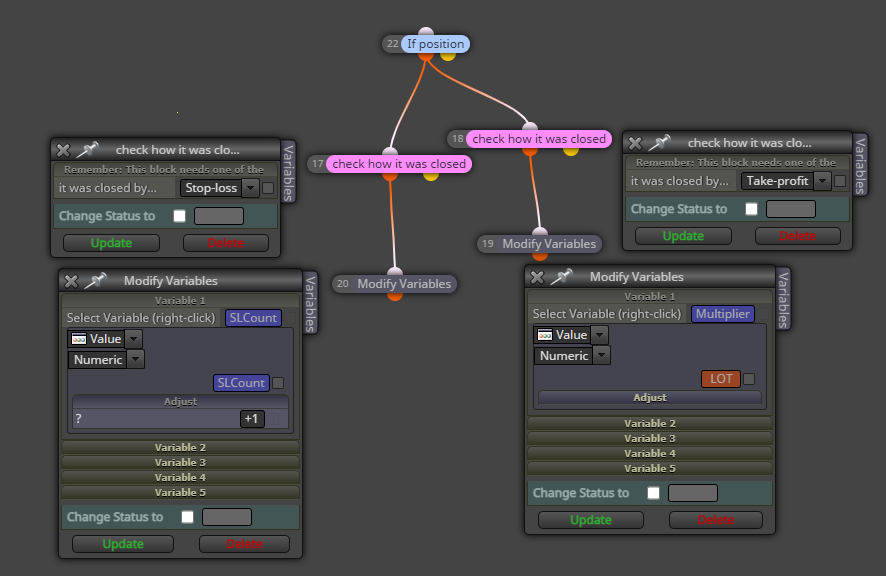
This means I can use Any positions (either BUY or SELL) on top and in bottom of it I connect this "check how it was closed" if this passed through SL I can increment a Counter by modifying a variable. this will work right (please correct me if I am wrong
Please tell me how I can use the Variable value to use as a condition to do some operation as direct option was terminal variable is different thing -
If buy or sell in not already in the block, most blocks have it. Use a formula block to add to the variable and saving back into it.
-
Used like this, the block has only Stop Loss, Take Profit options so If SL hit then I increment SL Counter and If TP Hit I put Initial Constant value to it to start again.
-
Light pink is only half what is needed, dark pink (for each) is required above, these have the missing options.