Custom Indicator Buffer is Not Trading
-
EA is not placing trades, need your help to know what causes the EA not to trade. I am using the 'MQLTA MT5 Support Resistance Lines' Indicator that draws red horizontal lines for Support and green for Resistance on the MT5 chart, now the horizontal lines correspond with the prices and it is even showing values on the MT5 Data Window as BufferZero to BufferSeven. I posted the source code of the indicator, chart screenshot, and the shared link below for your reference. The idea of this trading strategy is that the EA will only Buy when the Bid price crosses above the price of Support or Red line which is BufferThree and then close the trade when the Ask price reaches the Green line or BufferFour and vice versa for Sell trades, the EA will place sell trade, when the Ask crosses below the price of BufferFour and then close the trades when the bid price hits the BufferThree.
Simple project shared link: https://fxdreema.com/shared/QntYuwROb
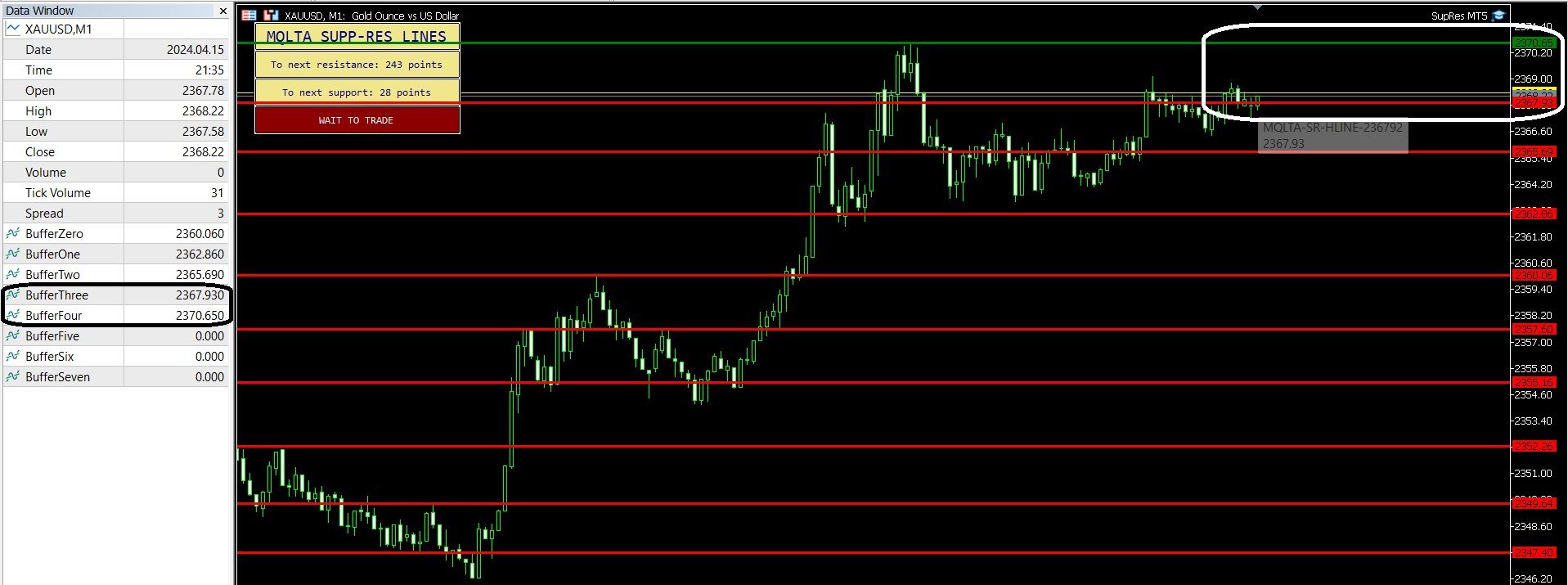
MT5 Chart screenshot:
MQLTA MT5 Support Resistance Lines.mq5 -
To start you need to get the values of a line, then work out if you can react to it
Learn fxDreema Without the Wait!
My comprehensive book, available on Amazon, is packed with examples and invaluable insights to help you fast-track your learning journey.
The paperback and hardback editions include MT4 & MT5 QR codes for easy access to all prebuilt projects and robots, including my latest gold trading robot!
Don’t miss out
Click here➡️ https://mybook.to/fxDreema to get your copy today!
Enjoy! 😊
-
@jstap thanks for your response, see that's what I thought I did when I used the Buffer from My Indicator just like what I saw from other examples and YouTube videos. Yet, it did not work, I even used 'Modify Variables' block to store the value of BufferThree and BufferFour and still did not respond.
-
Put the buffer into a comment so you can see the result, share the link, and add the indicator to look at. But multiple lines make the indicater a lot more difficult to use, even if you can get the buffer values
-
I already posted the Buffer in the screenshot, project's link is also shared, including the indicator's mq5.
-
Yes sorry you did, so the values are there, now get the value into a comment, once you can do this you can use this value to check if price is < or >, this is just the start though, because you will then need to work out when it's in between any 2 lines. Add a shared link rather than the ex file
Learn fxDreema Without the Wait!
My comprehensive book, available on Amazon, is packed with examples and invaluable insights to help you fast-track your learning journey.
The paperback and hardback editions include MT4 & MT5 QR codes for easy access to all prebuilt projects and robots, including my latest gold trading robot!
Don’t miss out
Click here➡️ https://mybook.to/fxDreema to get your copy today!
Enjoy! 😊
-
@jstap I am not yet familiar with how to 'get the value into a comment', can you please shed some light on how can I do this? Thank you.
-
Comment block, add the custom indicator buffer, and result can be seen



