@roar Hahaha Thank you for the tips. Let me try to see if that will work.

@roar Hahaha Thank you for the tips. Let me try to see if that will work.
@jstap I am not yet familiar with how to 'get the value into a comment', can you please shed some light on how can I do this? Thank you.
I already posted the Buffer in the screenshot, project's link is also shared, including the indicator's mq5.
@jstap thanks for your response, see that's what I thought I did when I used the Buffer from My Indicator just like what I saw from other examples and YouTube videos. Yet, it did not work, I even used 'Modify Variables' block to store the value of BufferThree and BufferFour and still did not respond.
EA is not placing trades, need your help to know what causes the EA not to trade. I am using the 'MQLTA MT5 Support Resistance Lines' Indicator that draws red horizontal lines for Support and green for Resistance on the MT5 chart, now the horizontal lines correspond with the prices and it is even showing values on the MT5 Data Window as BufferZero to BufferSeven. I posted the source code of the indicator, chart screenshot, and the shared link below for your reference. The idea of this trading strategy is that the EA will only Buy when the Bid price crosses above the price of Support or Red line which is BufferThree and then close the trade when the Ask price reaches the Green line or BufferFour and vice versa for Sell trades, the EA will place sell trade, when the Ask crosses below the price of BufferFour and then close the trades when the bid price hits the BufferThree.
Simple project shared link: https://fxdreema.com/shared/QntYuwROb
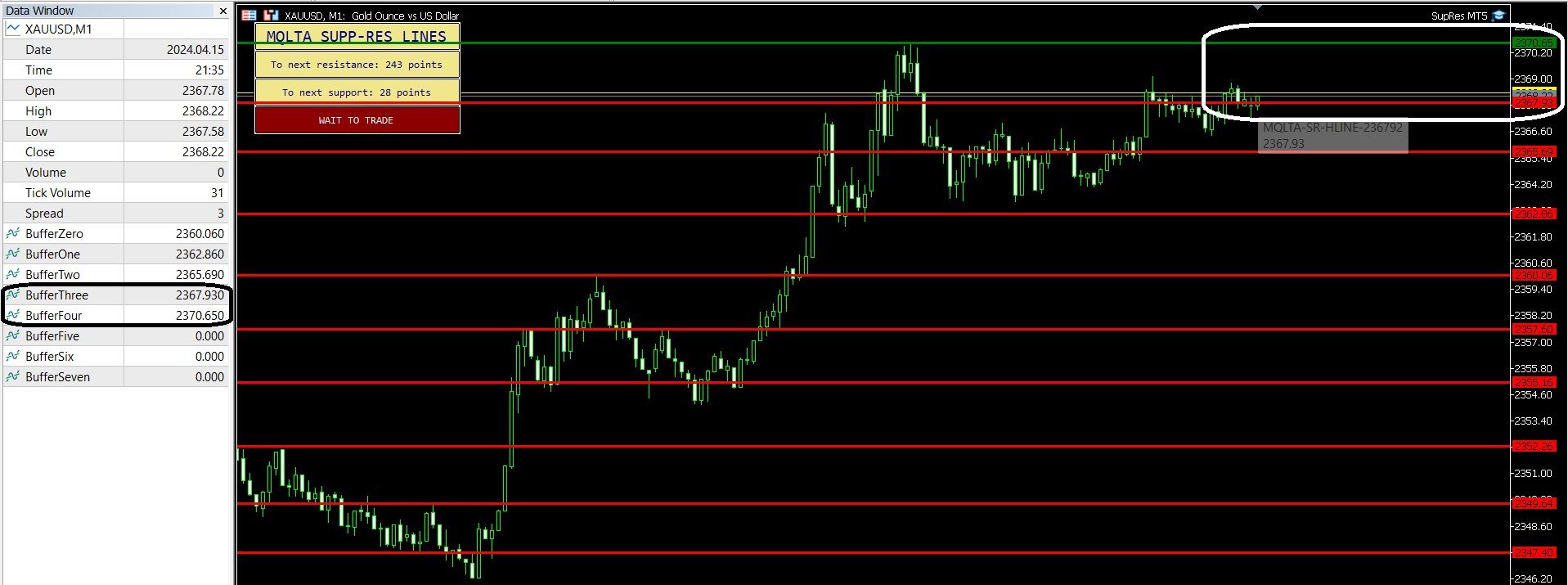
MT5 Chart screenshot:
MQLTA MT5 Support Resistance Lines.mq5
@l-andorrà I see. Thanks for the tips and help.
@l-andorrà I got the idea. Thank you so much but I am still worried about the wrong take profit that seems to be set as the same numbers showing on StopLevel Specification on Market watch.
I am wondering if this has something to do with the codes of the EA here on this part.
// https://book.mql4.com/appendix/limits
if (type == OP_BUYLIMIT)
{
if (ask - op < stoplevel) {op = ask - stoplevel;}
if (ask - op <= freezelevel) {op = ask - freezelevel - point;}
}
else if (type == OP_BUYSTOP)
{
if (op - ask < stoplevel) {op = ask + stoplevel;}
if (op - ask <= freezelevel) {op = ask + freezelevel + point;}
}
else if (type == OP_SELLLIMIT)
{
if (op - bid < stoplevel) {op = bid + stoplevel;}
if (op - bid <= freezelevel) {op = bid + freezelevel + point;}
}
else if (type == OP_SELLSTOP)
{
if (bid - op < stoplevel) {op = bid - stoplevel;}
if (bid - op < freezelevel) {op = bid - freezelevel - point;}
}
	op = NormalizeDouble(op, digits);

	//-- SL and TP ----------------------------------------------------
	double sl = 0, tp = 0, vsl = 0, vtp = 0;

	sl = AlignStopLoss(symbol, type, op, attrStopLoss(), sll, slp);

	if (sl < 0) {break;}

	tp = AlignTakeProfit(symbol, type, op, attrTakeProfit(), tpl, tpp);

	if (tp < 0) {break;}

	if (USE_VIRTUAL_STOPS)
	{
		//-- virtual SL and TP --------------------------------------------
		vsl = sl;
		vtp = tp;
		sl = 0;
		tp = 0;

		double askbid = ask;
		if (bs < 0) {askbid = bid;}

		if (vsl > 0 || USE_EMERGENCY_STOPS == "always")
		{
			if (EMERGENCY_STOPS_REL > 0 || EMERGENCY_STOPS_ADD > 0)
			{
				sl = vsl - EMERGENCY_STOPS_REL*MathAbs(askbid-vsl)*bs;

				if (sl <= 0) {sl = askbid;}

				sl = sl - toDigits(EMERGENCY_STOPS_ADD,symbol)*bs;
			}
		}
@l-andorrà Thank you for the info Sir. I am a Subscriber of your YT Channel.
How about the Accelerator Oscillator, is there a way to make the condition set for color like with the Green is for Buy and Red for Sell conditions. Just like this on picture.
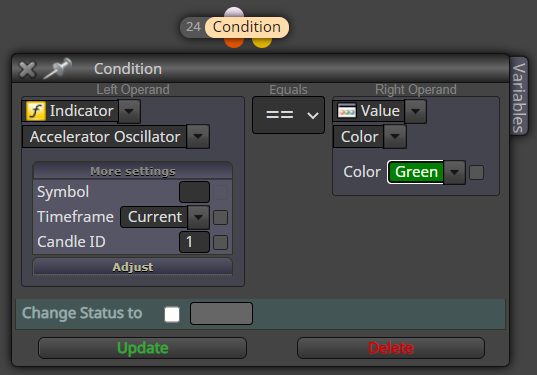
@01punchman
Hi @l-andorrà Thank you for the response. I will check the settings of the Constant and the AO. But I think I figured out that the Take Profit Set by the EA is base on STOP LEVEL.
For Example on GBPJPY the STOP LEVEL is 60 that's why the TP was set to 60Points:
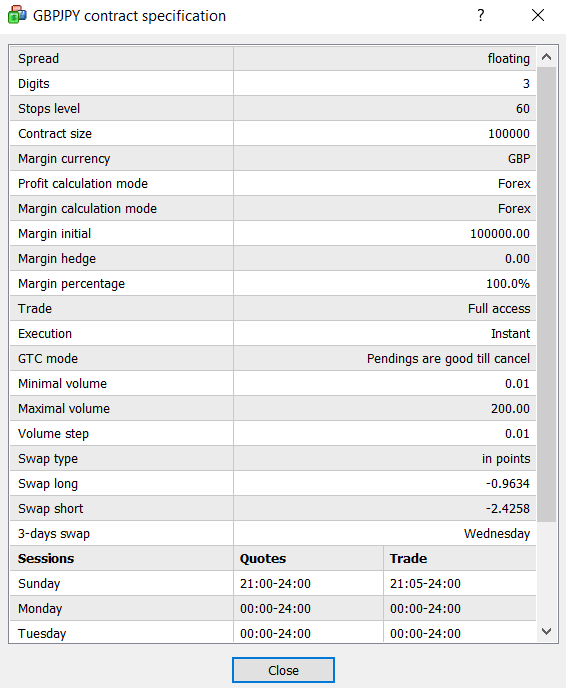
Is there a way I can modify the Take Profit to the Original Settings from the Inputs or maybe to force the STOPLEVEL to change? OR Counter the STOPLEVEL so that the Original TP will be set instead?
Sorry for the late response on my concern. It is due to my hesitation of sharing my strategy to the page to avoid copy but I guess I don't have any choice but for to share and have my concern to be address. I would like to also know what could have been missing or wrong on using Accelerator Oscillator using value with Colors. Thank you for the response.
Here is the shared web link:
shared/LkIAvKmrb : https://fxdreema.com/shared/LkIAvKmrb
Hi I would like to inquire how can the Trade Take Profit set to 10 Points was change to different Pips as you can see on the screenshot. My Original Take Profit is set to 1 Pips. I don't have Trailing SL or TP, yet the initial TP was change.

This is my Input settings on the EA Properties:
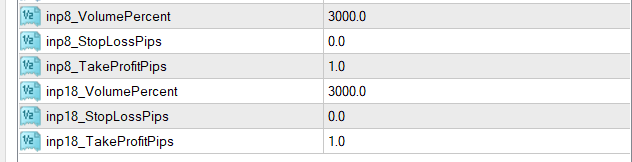 Take Profit is set to 1 Pip Only.
Please help, thank you all the response.