fxDreema

    • Register
    • Login
    • Search
    • Back to the main page
    • Categories
    • Recent
    • Tags
    • Popular
    • Search

    custom function

    Questions & Answers
    4
    6
    614
    Loading More Posts
    • Oldest to Newest
    • Newest to Oldest
    • Most Votes
    Reply
    • Reply as topic
    Log in to reply
    This topic has been deleted. Only users with topic management privileges can see it.
    • A
      alexitoeve50 last edited by

      please i am trying to create a function inside custom block and call it but not working. for example something like this:

      void MyCustomFunction(double inputValue) {
      // Your custom logic here
      double result = inputValue * 2; // For example, multiplying the input by 2
      Print("The result is: ", result);
      }

      MyCustomFunction(5); // Call the custom function

      1 Reply Last reply Reply Quote 0
      • J
        Jeson C. last edited by

        Dont work function This code you wrote does not work like this. Because tick init ... etc. This card is already a function and functions do not work inside functions, my friend.

        Mechanical Engineer and Software Master
        Mr. Jeson C.

        1 Reply Last reply Reply Quote 0
        • A
          alexitoeve50 last edited by

          the code i posted is just an example please, what i want is how do i use functions and call functions in fxdreema is that possible?

          roar 1 Reply Last reply Reply Quote 0
          • roar
            roar @alexitoeve50 last edited by

            @alexitoeve50 you need to define your function in https://fxdreema.com/studio. No need to make any custom block in the studio, just add the function to the list here.
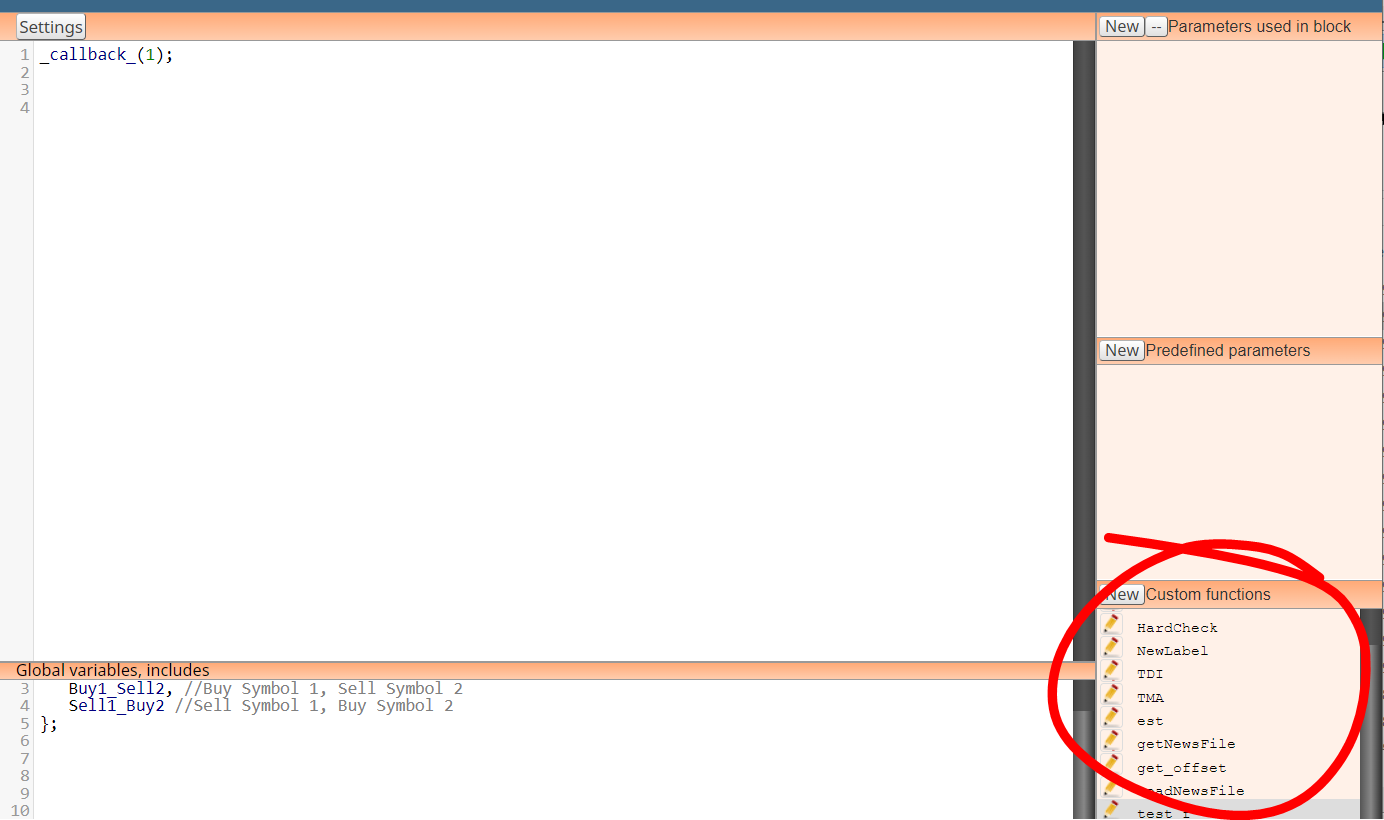
            6536d089-9b88-4e6d-9623-f36d4df4ed3f-image.png

            Need small help? Tag me in your post
            Need big help? https://www.fiverr.com/big_algo/automate-your-winning-strategy-in-mql4-or-mql5

            1 Reply Last reply Reply Quote 1
            • A
              alexitoeve50 last edited by

              @Jeson-C said in custom function:

              Dont work function This code you wrote does not work like this. Because tick init ... etc. This card is already a function and functions do not work inside functions, my friend.

              the code i posted is just an example please, what i want is how do i use functions and call functions in fxdreema is that possible?

              1 Reply Last reply Reply Quote 0
              • jstap
                jstap last edited by jstap

                The way I do this is like Roar has said, but I ask Chat GPT to tell me what to add, I will add an example:
                I say this is an example of what I add to sections to create a maximise screen in my MT4 code.
                in the on tick section I use this:
                // Example usage: maximize the window
                SetWindowState(SW_SHOWMAXIMIZED);
                ~next~

                In the custom function section I use this:
                void SetWindowState(int desiredState) {
                int hWnd = WindowHandle(Symbol(), Period());
                int parent = GetParent(hWnd);

                // Check current state using WinUser32.mqh functions
                bool isMaximized = IsZoomed(parent);
                bool isMinimized = IsIconic(parent);
                
                if (desiredState == SW_SHOWMAXIMIZED && !isMaximized) {
                    ShowWindow(parent, SW_SHOWMAXIMIZED);
                } else if (desiredState == SW_SHOWMINIMIZED && !isMinimized) {
                    ShowWindow(parent, SW_SHOWMINIMIZED);
                } else if (desiredState == SW_RESTORE && (isMaximized || isMinimized)) {
                    ShowWindow(parent, SW_RESTORE);
                }
                

                }
                In the global variables section I use this:
                #include <WinUser32.mqh>
                #import "user32.dll"
                int GetParent(int);
                int ShowWindow(int, int);
                #define SW_SHOWMAXIMIZED 3
                #define SW_SHOWMINIMIZED 6
                #define SW_RESTORE 9
                #import

                Use this set-up and create a code that does this "Choose what you would like to create". It may take a few corrections but using this you can create blocks doing what you like...

                Learn fxDreema Without the Wait!

                My comprehensive book, available on Amazon, is packed with examples and invaluable insights to help you fast-track your learning journey.

                The paperback and hardback editions include MT4 & MT5 QR codes for easy access to all prebuilt projects and robots, including my latest gold trading robot!

                Don’t miss out

                Click here➡️ https://mybook.to/fxDreema to get your copy today!

                Enjoy! 😊

                1 Reply Last reply Reply Quote 0
                • 1 / 1
                • First post
                  Last post

                Online Users

                C
                M
                M
                F
                L
                F
                F
                E
                K
                M
                T

                20
                Online

                146.6k
                Users

                22.4k
                Topics

                122.6k
                Posts

                Powered by NodeBB Forums | Contributors