How to Add Output Variable in Custom Blocks?
-
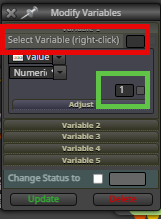
Is it possible to define an output field that stores a value in a variable in Custom blocks? Currently, we can only specify input variables while creating a custom block. But I am looking for what we have in the "Modify Variable" block. I am seeking for the red box, as I already know how to add the green box. Any help would be appreciated.
rouzbehdesign
-
Yes you can add variables/constants to either of these boxes
-
@rouzbehali This is the way to do it:
https://fxdreema.com/documentation/builder/constants-and-variables
-
@jstap Thank you for your response. My query is about "Custom Block," which is developed in Custom Block Studio. What I am asking for is a way to include output variables in "Custom Blocks." In other words, how do I create a custom block in custom block studio and then set a variable as output, similar to the field I previously shown for the "Modify Variable" block? I hope everything is clear now.
-
It is quite advanced to create blocks in Custom Studio, if I do this I use Chat GPT to create the necessary code, in this post it will say what you need to do, you can pretty much copy and paste my post into ChatGPT and tell it what you are doing, compile the code in FX (maybe a few times with corrections (you can ask ChatGPT to correct)). This was the post: https://fxdreema.com/forum/topic/21088/custom-function

