fxDreema

    • Register
    • Login
    • Search
    • Back to the main page
    • Categories
    • Recent
    • Tags
    • Popular
    • Search

    Are variables sticky upon Terminal restart?

    Questions & Answers
    3
    22
    1434
    Loading More Posts
    • Oldest to Newest
    • Newest to Oldest
    • Most Votes
    Reply
    • Reply as topic
    Log in to reply
    This topic has been deleted. Only users with topic management privileges can see it.
    • J
      Johnster last edited by

      If for some reason the system has to restart, for mandatory update or something, will variables be lost or are they sticky until being overwritten?

      1 Reply Last reply Reply Quote 0
      • jstap
        jstap last edited by

        They will reset. The only option you have to stop this is to save and load the variable as a global (terminal) variable.

        This link will give you an idea of how to achieve this: https://fxdreema.com/shared/rotTPFn8b Every time the value changes you will need to update, then read this to use

        Learn fxDreema Without the Wait!

        My comprehensive book, available on Amazon, is packed with examples and invaluable insights to help you fast-track your learning journey.

        The paperback and hardback editions include MT4 & MT5 QR codes for easy access to all prebuilt projects and robots, including my latest gold trading robot!

        Don’t miss out

        Click here➡️ https://mybook.to/fxDreema to get your copy today!

        Enjoy! 😊

        1 Reply Last reply Reply Quote 1
        • J
          Johnster last edited by

          So they got reset on program close... What about a system crash (or force close)?

          1 Reply Last reply Reply Quote 0
          • J
            Johnster last edited by

            (or reset on terminal open?)

            1 Reply Last reply Reply Quote 0
            • B
              Byens last edited by

              save it in file? read initial lots last open position? what are you trying to save?

              https://entrepreneurstart.pw | https://www.mql5.com/en/users/byens8199

              1 Reply Last reply Reply Quote 0
              • jstap
                jstap last edited by

                As my link, save as global then any type of crash won't affect the saved value. Global variables are saved on your computer so to lose you would have a hard drive/computer problem

                Learn fxDreema Without the Wait!

                My comprehensive book, available on Amazon, is packed with examples and invaluable insights to help you fast-track your learning journey.

                The paperback and hardback editions include MT4 & MT5 QR codes for easy access to all prebuilt projects and robots, including my latest gold trading robot!

                Don’t miss out

                Click here➡️ https://mybook.to/fxDreema to get your copy today!

                Enjoy! 😊

                1 Reply Last reply Reply Quote 1
                • J
                  Johnster last edited by

                  I'm trying to make sense of the method.
                  Block 1 sets the variable...
                  Block 2 reads it and does nothing if something there.
                  Block 3 If nothing there it resets the variable to 0

                  I'm not getting it... please elaborate @jstap

                  1 Reply Last reply Reply Quote 0
                  • J
                    Johnster last edited by

                    Also... is it limited 10?

                    1 Reply Last reply Reply Quote 0
                    • jstap
                      jstap last edited by

                      Nothing is limited to 10 unless you are on the free version, then that is the maximum number of connections. add a shared link to see what you have done...

                      Learn fxDreema Without the Wait!

                      My comprehensive book, available on Amazon, is packed with examples and invaluable insights to help you fast-track your learning journey.

                      The paperback and hardback editions include MT4 & MT5 QR codes for easy access to all prebuilt projects and robots, including my latest gold trading robot!

                      Don’t miss out

                      Click here➡️ https://mybook.to/fxDreema to get your copy today!

                      Enjoy! 😊

                      1 Reply Last reply Reply Quote 0
                      • J
                        Johnster last edited by

                        I need some guidance... can't get it to work...

                        1 Reply Last reply Reply Quote 0
                        • J
                          Johnster last edited by

                          Can't post images here? Only links?

                          1 Reply Last reply Reply Quote 0
                          • J
                            Johnster last edited by

                            Is the example you gave me above correct?
                            I'm on mt5 btw. @jstap

                            1 Reply Last reply Reply Quote 0
                            • J
                              Johnster last edited by

                              Your name is not accidentally Jasper? And you play sax?

                              1 Reply Last reply Reply Quote 0
                              • jstap
                                jstap last edited by

                                You should be able to post images, links are better because inside blocks can be seen, so you get a full picture of what the EA is/isn't doing. MT5 and MT4 on FX are basically the same but you will need to create as MT5

                                Learn fxDreema Without the Wait!

                                My comprehensive book, available on Amazon, is packed with examples and invaluable insights to help you fast-track your learning journey.

                                The paperback and hardback editions include MT4 & MT5 QR codes for easy access to all prebuilt projects and robots, including my latest gold trading robot!

                                Don’t miss out

                                Click here➡️ https://mybook.to/fxDreema to get your copy today!

                                Enjoy! 😊

                                1 Reply Last reply Reply Quote 0
                                • J
                                  Johnster last edited by

                                  https://fxdreema.com/shared/eLJBfyide
                                  Global Writing is fine... now how to put them back in terminal variables.

                                  1 Reply Last reply Reply Quote 0
                                  • J
                                    Johnster last edited by

                                    • Conditional writing
                                    1 Reply Last reply Reply Quote 0
                                    • jstap
                                      jstap last edited by

                                      You read them by selecting terminal variable and putting in the name:
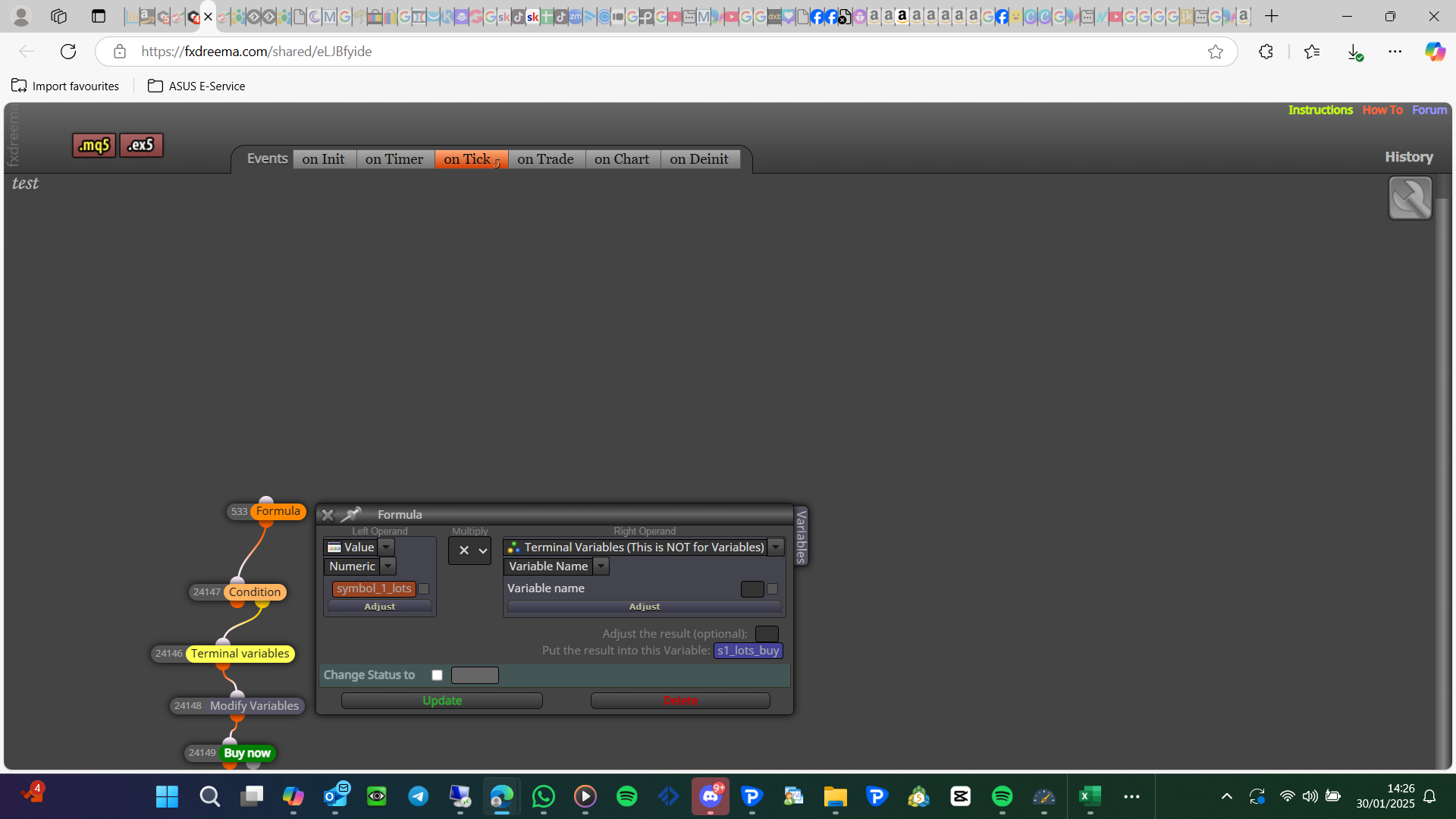
                                      image.png

                                      Learn fxDreema Without the Wait!

                                      My comprehensive book, available on Amazon, is packed with examples and invaluable insights to help you fast-track your learning journey.

                                      The paperback and hardback editions include MT4 & MT5 QR codes for easy access to all prebuilt projects and robots, including my latest gold trading robot!

                                      Don’t miss out

                                      Click here➡️ https://mybook.to/fxDreema to get your copy today!

                                      Enjoy! 😊

                                      1 Reply Last reply Reply Quote 1
                                      • J
                                        Johnster last edited by

                                        This might actually fix my problem.
                                        Ran some tests yesterday and not storing vars, indeed gives a lot of problems upon restart. .

                                        Thanks mate.

                                        1 Reply Last reply Reply Quote 0
                                        • J
                                          Johnster last edited by

                                          I can restore all values in the "on init" tab right?
                                          This runs the stuff just one time when it starts up? Correct?

                                          1 Reply Last reply Reply Quote 0
                                          • J
                                            Johnster last edited by

                                            @jstap A new thought came up... this means I can only run the EA once on a single computer? There is no magic number attached or something?

                                            1 Reply Last reply Reply Quote 0
                                            • 1
                                            • 2
                                            • 1 / 2
                                            • First post
                                              Last post

                                            Online Users

                                            E
                                            J
                                            T
                                            J
                                            B

                                            17
                                            Online

                                            146.7k
                                            Users

                                            22.4k
                                            Topics

                                            122.6k
                                            Posts

                                            Powered by NodeBB Forums | Contributors