fxDreema

    • Register
    • Login
    • Search
    • Back to the main page
    • Categories
    • Recent
    • Tags
    • Popular
    • Search

    custom indicator

    Questions & Answers
    4
    30
    1305
    Loading More Posts
    • Oldest to Newest
    • Newest to Oldest
    • Most Votes
    Reply
    • Reply as topic
    Log in to reply
    This topic has been deleted. Only users with topic management privileges can see it.
    • D
      Dr.Amiin last edited by

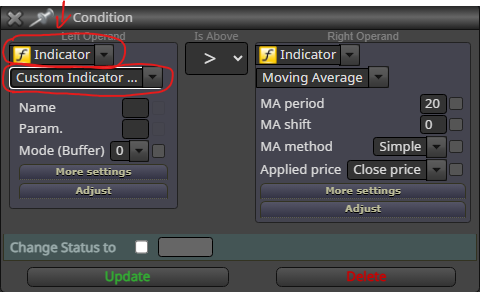
      98d51b48-3e8f-4b9f-a65a-c8f0f93bd4b0-image.png

      Hello, Please can someone tell me step by step how to use this option?

      1 Reply Last reply Reply Quote 0
      • jstap
        jstap last edited by

        insert the indicator in the my indicators tab at the top of your builder page

        Learn fxDreema Without the Wait!

        My comprehensive book, available on Amazon, is packed with examples and invaluable insights to help you fast-track your learning journey.

        The paperback and hardback editions include MT4 & MT5 QR codes for easy access to all prebuilt projects and robots, including my latest gold trading robot!

        Don’t miss out

        Click here➡️ https://mybook.to/fxDreema to get your copy today!

        Enjoy! 😊

        D 1 Reply Last reply Reply Quote 0
        • D
          Dr.Amiin @jstap last edited by

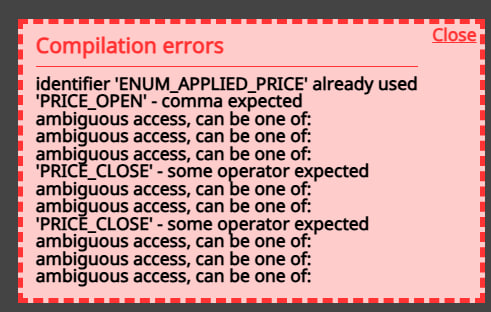
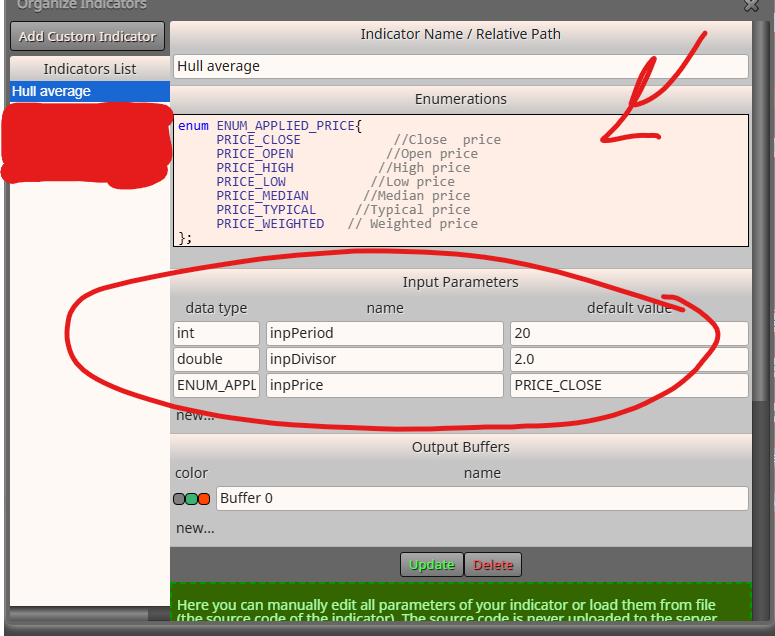
          @jstap c8bfeead-95ee-4782-a7e6-4e9138f54829-image.png fc25ff4e-234d-4840-942a-59b4401538e2-image.png

          i did but i get this error

          S 1 Reply Last reply Reply Quote 0
          • jstap
            jstap last edited by

            From the looks of what you have posted 2 indicators in the same project are using the same ENUM name, to fix this you will need to rename the ENUM in the MQ file in meta trader and upload uthe new

            Learn fxDreema Without the Wait!

            My comprehensive book, available on Amazon, is packed with examples and invaluable insights to help you fast-track your learning journey.

            The paperback and hardback editions include MT4 & MT5 QR codes for easy access to all prebuilt projects and robots, including my latest gold trading robot!

            Don’t miss out

            Click here➡️ https://mybook.to/fxDreema to get your copy today!

            Enjoy! 😊

            D 1 Reply Last reply Reply Quote 0
            • D
              Dr.Amiin @jstap last edited by Dr.Amiin

              @jstap I did it but it shows up again.

              Hull average 2.mq5

              can you check by yourself (use this indicator in a block and try to get ex5 file)

              1 Reply Last reply Reply Quote 0
              • jstap
                jstap last edited by

                Just upload a picture showing the ENUM code now being used

                Learn fxDreema Without the Wait!

                My comprehensive book, available on Amazon, is packed with examples and invaluable insights to help you fast-track your learning journey.

                The paperback and hardback editions include MT4 & MT5 QR codes for easy access to all prebuilt projects and robots, including my latest gold trading robot!

                Don’t miss out

                Click here➡️ https://mybook.to/fxDreema to get your copy today!

                Enjoy! 😊

                1 Reply Last reply Reply Quote 0
                • D
                  Dr.Amiin last edited by

                  @jstap what?

                  1 Reply Last reply Reply Quote 0
                  • jstap
                    jstap last edited by

                    The picture above shows the ENUM code, take another picture of the updated code.

                    Learn fxDreema Without the Wait!

                    My comprehensive book, available on Amazon, is packed with examples and invaluable insights to help you fast-track your learning journey.

                    The paperback and hardback editions include MT4 & MT5 QR codes for easy access to all prebuilt projects and robots, including my latest gold trading robot!

                    Don’t miss out

                    Click here➡️ https://mybook.to/fxDreema to get your copy today!

                    Enjoy! 😊

                    D 1 Reply Last reply Reply Quote 0
                    • D
                      Dr.Amiin @jstap last edited by Dr.Amiin

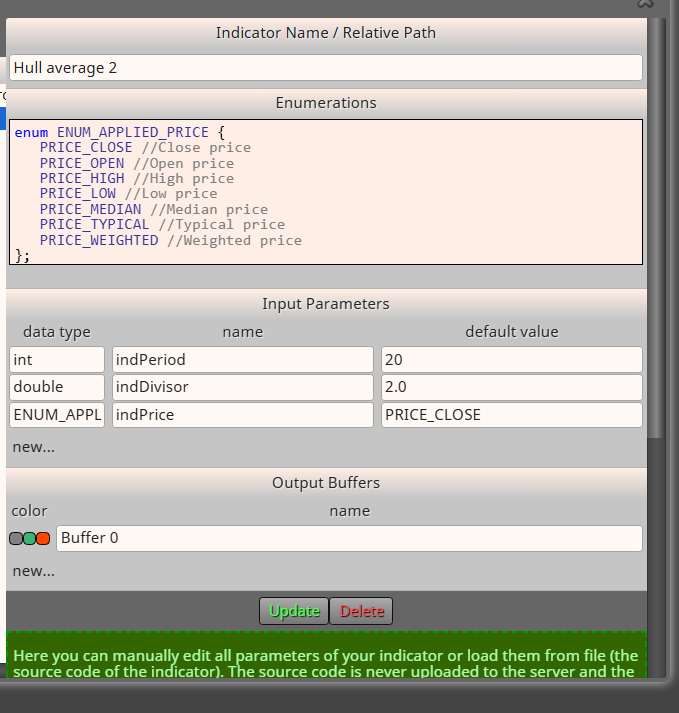
                      @jstap 4eb489c7-51a4-4608-bef2-1ea743fab26f-image.png

                      i renamed the inputs as you said

                      1 Reply Last reply Reply Quote 0
                      • jstap
                        jstap last edited by

                        You haven't changed the name of the enum, just add a number1 and change the name in meta editor, then compile.

                        Learn fxDreema Without the Wait!

                        My comprehensive book, available on Amazon, is packed with examples and invaluable insights to help you fast-track your learning journey.

                        The paperback and hardback editions include MT4 & MT5 QR codes for easy access to all prebuilt projects and robots, including my latest gold trading robot!

                        Don’t miss out

                        Click here➡️ https://mybook.to/fxDreema to get your copy today!

                        Enjoy! 😊

                        D 1 Reply Last reply Reply Quote 0
                        • S
                          sktsec @Dr.Amiin last edited by

                          @Dr-Amiin
                          Remove your custom enumeration of ENUM_APPLIED_PRICE.

                          It is built-in. Just used it directly.

                          D 1 Reply Last reply Reply Quote 0
                          • D
                            Dr.Amiin @sktsec last edited by

                            @sktsec I deleted them and when I try to export it, it gives this error the first time and the second time it gives the file, but when I test the file in MetaTrader, it gives these errors.

                            e0585360-a407-42ea-9933-630584e29a39-image.png

                            14a078e1-2849-44bd-ad89-d5cb9e2f40a3-image.png

                            73e2c31e-53de-41ff-a820-b21ea53786bc-image.png

                            1 Reply Last reply Reply Quote 0
                            • D
                              Dr.Amiin @jstap last edited by

                              @jstap what should i do please help

                              1 Reply Last reply Reply Quote 0
                              • jstap
                                jstap last edited by

                                Try copy, add it as new with the deleted enum, and see if this works

                                Learn fxDreema Without the Wait!

                                My comprehensive book, available on Amazon, is packed with examples and invaluable insights to help you fast-track your learning journey.

                                The paperback and hardback editions include MT4 & MT5 QR codes for easy access to all prebuilt projects and robots, including my latest gold trading robot!

                                Don’t miss out

                                Click here➡️ https://mybook.to/fxDreema to get your copy today!

                                Enjoy! 😊

                                D 1 Reply Last reply Reply Quote 0
                                • D
                                  Dr.Amiin @jstap last edited by

                                  @jstap no it didn't worked.

                                  I want to try hull indicator do you have one to have buffers or can it be imported into Fxdreema without any problems?

                                  jstap 1 Reply Last reply Reply Quote 0
                                  • jstap
                                    jstap @Dr.Amiin last edited by

                                    @Dr-Amiin Not MT5

                                    Learn fxDreema Without the Wait!

                                    My comprehensive book, available on Amazon, is packed with examples and invaluable insights to help you fast-track your learning journey.

                                    The paperback and hardback editions include MT4 & MT5 QR codes for easy access to all prebuilt projects and robots, including my latest gold trading robot!

                                    Don’t miss out

                                    Click here➡️ https://mybook.to/fxDreema to get your copy today!

                                    Enjoy! 😊

                                    D 1 Reply Last reply Reply Quote 0
                                    • S
                                      sktsec last edited by

                                      It may need some time to update the custom indicator.

                                      Try it the next day. Remove the related block and start from scratch.

                                      By the way, the :: problem is an old bug, that happens when you try to set enum in custom indicator.

                                      D 1 Reply Last reply Reply Quote 0
                                      • D
                                        Dr.Amiin @sktsec last edited by

                                        @sktsec can you report this bug to admin (he doesn't replay me)

                                        1 Reply Last reply Reply Quote 0
                                        • D
                                          Dr.Amiin @jstap last edited by

                                          @jstap can you send it

                                          1 Reply Last reply Reply Quote 0
                                          • jstap
                                            jstap last edited by

                                            I compiled your hull average 2 and no issues, start a fresh project using this and all should work.
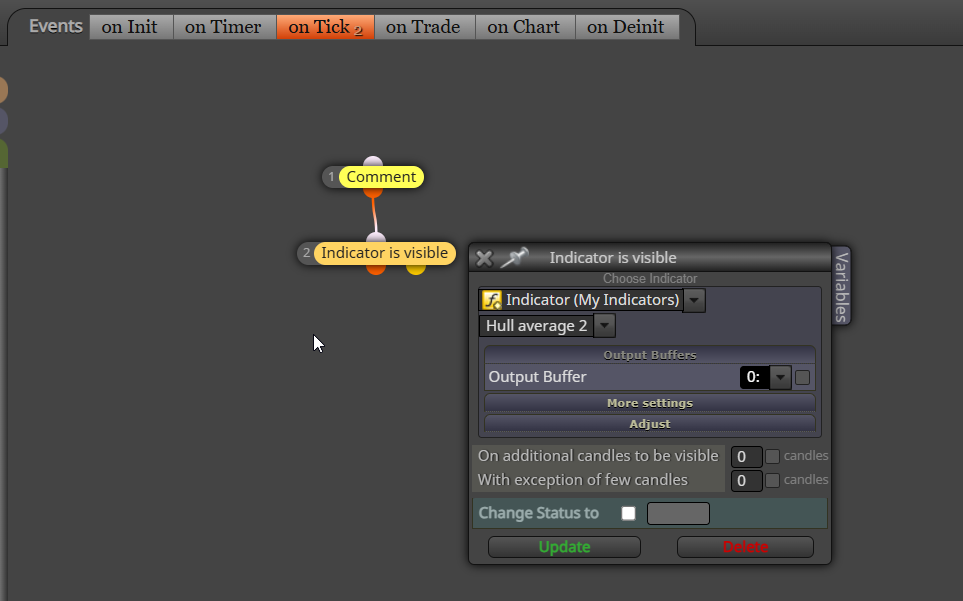
                                            image.png

                                            Learn fxDreema Without the Wait!

                                            My comprehensive book, available on Amazon, is packed with examples and invaluable insights to help you fast-track your learning journey.

                                            The paperback and hardback editions include MT4 & MT5 QR codes for easy access to all prebuilt projects and robots, including my latest gold trading robot!

                                            Don’t miss out

                                            Click here➡️ https://mybook.to/fxDreema to get your copy today!

                                            Enjoy! 😊

                                            D 2 Replies Last reply Reply Quote 0
                                            • 1
                                            • 2
                                            • 1 / 2
                                            • First post
                                              Last post

                                            Online Users

                                            S
                                            L
                                            E
                                            M
                                            A
                                            H
                                            S

                                            15
                                            Online

                                            146.7k
                                            Users

                                            22.4k
                                            Topics

                                            122.6k
                                            Posts

                                            Powered by NodeBB Forums | Contributors