on timer of on tick chart
-
What is better to lower cpu usage for the EA?
The on timer or the on tick chart?
my on timer tab is set to 1 second
and as far as i know 1 second can have multiple ticksI am asking this because i want to turn off and on 1 block that is placed in the on tick tab
Screenshot below is of the on time tab
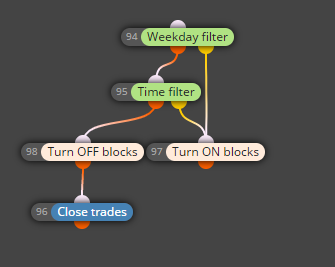
Screenshot below is of the on tick tab
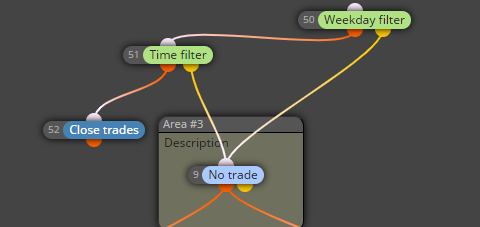
They both do the same but i wonder which one is better?
The on timer tab or the on tick tab? -
The tick event is fired when there is a change in the price, which is what is important in trading. If the price doesn't change, there is no reason to trade, so that's why the Tick event is the main event for expert advisors. If you don't care so much about the ticks, you can use the Timer. Better check if everything is correct when you test the EA, because the Timer event there is a little bit fake.
Otherwise when the EA is working live, these blocks in the screenshots are working pretty fast and I don't think there will be any CPU benefit. Well, I never checked that, but this is what I think.
-
I replied you because I think where is your main issue (server scammers).
-
Sorry i dont get what you mean
-
Is this claim still true (see FxDreema reply (above) from 18 May 2019 15:37): " because the Timer event there is a little bit fake."
I recently ran against the issue that my EA (during backtest) did not react on a On Timer event (On Time block), let's say at 22:00. When I investigated this I saw that on that particular day, time there was no Tick data (where on other days there was every day data from 16:30 till 22:59 but on this day only till 19:58). When I changed my timer block to run at 19:58 (last occurance of tick data) the timer responded as expected.
My EA blocks were all located on the On Timer Tab.
Can someone explain this ? -
I wonder if this is a typical Backtest issue; in other words will this also happen if I run the EA live ?
-
It is definietly true for backtest. I'm not completely sure for real trading because a real clock (broker's clock) is working there, but many changes have been made on fxDreema since, so I can't be 100% sure. I recommend you to ask the admin directly.
-
Who/how can I contact the admin directly ? @fxDreema ?
-
FX uses the rules set by meta trader, so maybe asking them would give you the best answer. Generally though, the more often the EA does something, whether it is on tick or through another process, your CPU will have to work, so the more things that can be switched off at any given time, the faster your handwear/software will be able to work.
-
Thanks @jstap
My observation is that if there is no tickdata for a certain date, for example on Thanksgiving, my EA running a backtest is not passing the Block Timefilter at the Orange/true output that is for example set to pass between 21:00 and 22:00 at all on that particular date (in that timeframe). I wondered if that is a backtest related issue/behaviour and that I might expect it to run correctly on a live feed. -
It won't pass on tick, it will on timer, but I don't think just like on chart it works on backtest. That is my opinion of MT4, so MT5 may now work
-
I am using (my blocks are )on the timer tab and still the lack of tickdata as described results in the timer not passing on the true/Orange side on the time specified.
-
@doeveR You can contact him directly here:


