Trader3487
-
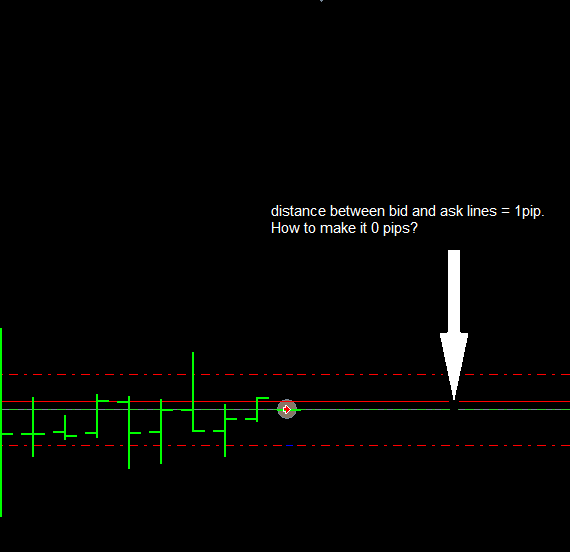
Hi, I'm still stumped on how to run a backtest with 0 spread. Even when I remove these lines from the void DrawSpreadInfo() function in source code, it still shows a distance of 1pip between bid line and ask line on graph:
if (custom_point > 0) {
current_spread = (SymbolInfoDouble(Symbol(),SYMBOL_ASK)-SymbolInfoDouble(Symbol(),SYMBOL_BID))/custom_point;
}
if (current_spread > max_spread) {max_spread = current_spread;}
if (current_spread < min_spread) {min_spread = current_spread;}I want to run a test where it buys and sells once per bar with 10pips sl/tp so that the trades cancel each other out and the blue line on the graph is perfectly horizontal (currently it goes only downhill to 0 balance).
Thanks!
Screenshot of unchangeable 1pips spread:
Screenshot of downhill slope graph:
https://www.dropbox.com/s/mqk6hvmh3lwzicq/Screenshot 2016-11-23 10.24.30.png?dl=0 -
Is there a way to create a simple EA with spread = 0 that buys when no trade is open, sl/tp = 10pips. I want to see results where the blue balance line stays in the same place after a large # of trades.
I tried editing the function void DrawSpreadInfo() in EA source code and setting current_spread = 0; but it didn't work. Metatrader results still say spread = 1 and blue/green curves are still going downhill.
-
Look at that "Spread" near the "Open chart" button in the Tester, just over "Optimization"
-
2nd screenshot:
-
Well, I guess that file uploads doesn't work for some reason

What I wanted to say is that the spread does not depend at all on the EA, the Tester (MetaTrader) controls it and the EA works with whatever it is. But the spread can be changed for tests from the "Tester" panel. DrawSpreadInfo() only prints information, nothing more. Even if you remove it, this will not change anything.
-
@fxDreema I understand but even with spread set to 0 in MT4, there is still a spread of 1. Using the ea below, are you able to produce a 0 spread and have a horizontal blue balance line?
-
When you set spread in tester to 0, you have spread 0 .... (I have it) ...
with your EA you can not test results line to be horizontal ...
but spread is 0, if you check your trades with visual tester, ther are not offseted from Bid price (that means bid and ask is aligned) ... -
for me, setting changing MT4 spread to a lower number like from 10 to 1 decreases the distance between bid and ask lines but setting it to 0 does not make it 0. Any suggestions?
-
But why would you want to test with spread 0? it would be unrealistic and detrimental to the testing purpose (you DO NOT want to test it with ideal conditions, on the contrary you want it as rough as possible).
-
@Andermaiden2nd I want to test with spread 0 to see with my own eyes that the back tester results are, in fact, accurate and that the EA is trading exactly as it is written. An EA that buys and sells each bar with 10pips sl/tp should produce an even balance - neither profit nor loss, correct?
Question is why doesn't setting spread to 0 in MT4 strategy tester give a 0 spread? What broker are you using?
Thank you

-
I get the point, if the spread was zero, then that hedging wouldn't produce any loss. I'M using Admiral Markets as broker but that does not influence my backtestings because I'm using historick tick data from Dukascopy and the Tickdata Suite program which means that I have to enter manually the right settings for the strategy tester to emulate the real spread conditions of my broker. I recomend using Historic data as it changes drastically the quality of the results. Now if you are using Tickdata Suite and you want to set the spread to zero, remember to also set the commision to zero. Are you using Metaquotes tick data or Dukascopy tick data?


