Custom Indicators not Uploading Correctly
-
Hi,
When I upload a custom indicator in .mq4 format it doesn't pull through the data Inputs or Buffers like it use to.
Also, when I insert Buffers they don't save. This is an issue with the .ex4 versions of custom indicators.
These bugs have both appeared after you moved servers.
Can you please fix.
Thanks
-
As usual, I can't see problems
 Can you give me some indicator and basic instructions of what to do to see the problem?
But with .ex4 files, you can't use them directly to get information from them. fxDreema reads only .mq4/5 files.
-
@fxDreema
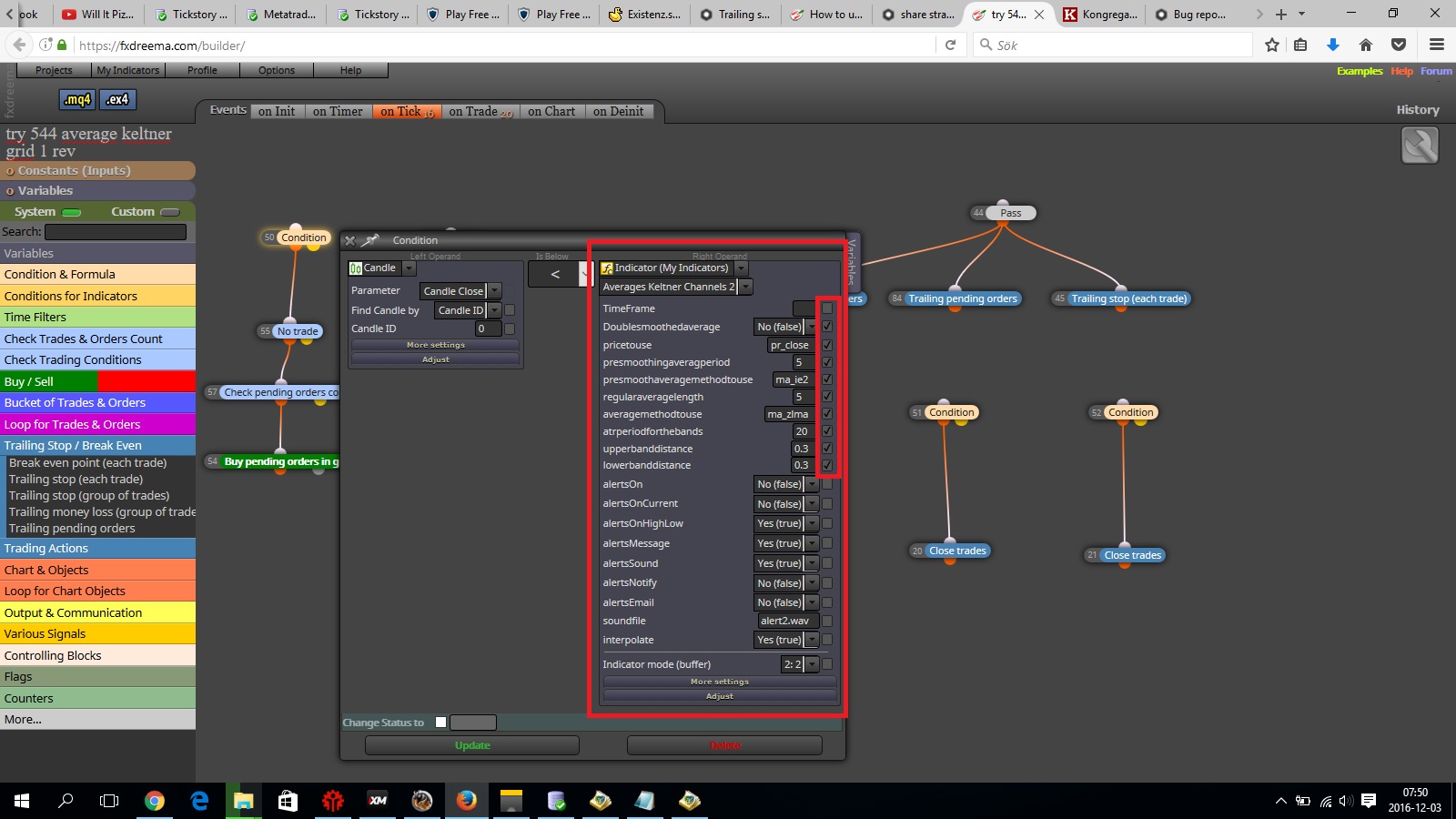
I have problems with indicators to in the Web based version, the settings you want to use in the ea you press the tick box but they dosnt appare in the expert advisor at all.
Tried with a ex4 indicator with the right ensum and it worked before but not now. -
tick box... what, where?
-
@fxDreema
Sorry the boxes you press for the setting the ea will add so it can be changed in metatrader.
Variables can be word im looking for
-
I don't understand you very well, do you have pictures?
-
@fxDreema
Lets say you add a condition with an indicator,in the right side of the setting there are boxes.
The setting you want to be shown in the expert advisor you press that box.
But it dosnt come up in the expert advisor settings when you load on metatrader.
But everything else works as it should like takeprofit stoploss and so on so maybe its something wrong with the condition block itself.
If you dont understand i will add a picture tomorrow because im not home right now -
-
learn to use constants as input (check tutorials section)
instead of that "enum" boxes (as you named it) you can use number (like 0, 1, 2, 3, etc) ...
if you like rolled checkbox you can use data type as in indicator ...Between trading and gambling is a very small gap, be careful.
-
I tried with other indicators aswell that didnt use ensum prises/ methods .
But the boxes i press so the checkmark appears on it dont do that the settings is visibly shown in the expert advisor when its loaded into metatrader for backtest or live trading .
So it makes it harder because you cant change settings anymore when backtesting to optimize it .
And thats why im writing this because everything takes much longer time than before now .
And when everything is good ( when the expert advisor actually makes profit that you are happy with)
then its time to make it proper with better names for each input .But if i had to make it so it looks good for every single expert advisor that i made using fx dreema i would have had a mental breakdown .
Hope you understand , and have a great weekend / Timmy Hanke
-
upload here or somewhere that indicator and post link here ... maybe that will be better to show you visually ...
-
Now working?
-
@fxDreema
It works now , thank you so much !