how i can control in the spread ?
-
hello
I made my EA and it work in Eur\usd chart and work in spread from 0 to 20
if the spread up to 30 or 40 or elc it don't good workso please I want create anther EA attach it on second chart eur\usd
this EA work if the spread up from 20 to any number elc don't buy and sell , else this buy and sellcan I do that ?
please share example to understand
thank you
-
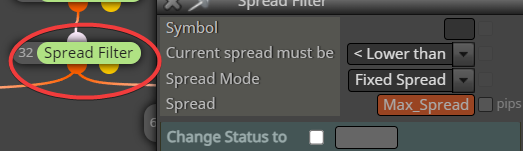
before buy/sell blocks connect block named: Spread Filter, you can find this block under Time Filters drop-down menu, or just in condition block is this option under Market properties
here you can see 3 examples how to use spread filters:
https://fxdreema.com/shared/63ondNL9e -
hello
your examples tell me put this block before buy or sellbut
i dont create EA because my EA it real made so i cant put your code in it
i want create new EA work on any chart and give order not trade buy or sell > 20 spread
i mean
i now open chart eur/usd and i attach on it EA named : A
i want open second the same chart eur/usd and attach on it EA named : no buy or sell > 20 spreadwhere two EA with some - no trade buy or sell > 20 spread
you understand me ?
this your examples can i used its for this idea ?
thank you
-
you can give more EAs on the same pair (each EA for own chart), you give different MagicNumber while inserting EA into chart and each EA will control own trades
-
Re: how i can control in the spread ?
this mean every EA will work in chart with out effect on anther EA until if in the same pair
every EA can not effect on anther EA because different in the magic-numberthis you mean ?
But
If the EA,s magic-number in all the same number this mean can effect on each other in case of its attach in the same pair ???
thank you
-
note: manually opened trades have magic 0
next is explained here:
https://www.youtube.com/watch?v=h38Wd7NH4_4 -
hello
see this and what your opinion ?https://fxdreema.com/shared/vHVHc2Msd
i want use this in any chart in any pair and effect on any EA else i use it
-
-
each your EA must have this filter in blocks, that means, create our EA with all functionality + give spread filter into this EA ...
-
EA 1 cannot control EA 2 directly, if this is what you want. Each EA is separate program and works independently from other EAs. If you want to send some information between EAs, you can do that with those Global Variables that appear when you click F3 (I call them Terminal Variables). This is pool of variables that can be read (and write) from all EAs in the same MetaTrader, but of course if EA 1 is not set up to read any of these variables, they just don't work for that EA.
-
thank you
-
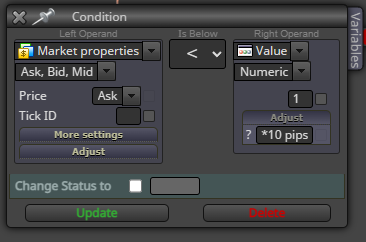
Have I set my spread filters correctly, so that I don't enter a trade with a spread of more than 10pips?
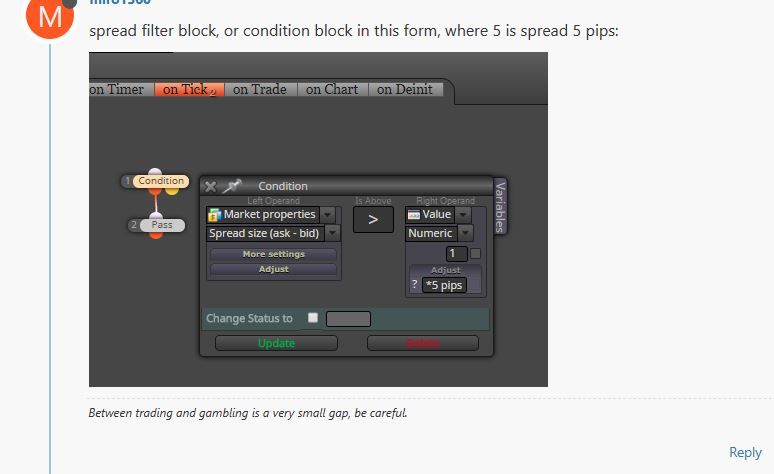
-
Never tried that way to do it but I think it should work.
-
@TumiTladi is easier use the max spread filter block :