how can i Disable spread text on chart
-
Hello
How can i disable spread text that appear at the bottom of the chart When the EA starts?
Thanks -
You need to open the mq4 file, and put // before "DrawSpreadinfo" , "Draw Status", etc.
-
or using blocks:
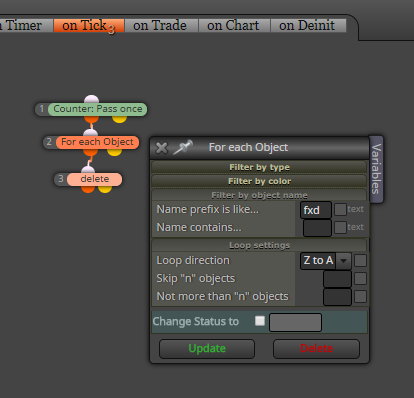
-
@Stroker
Thanks but this is so hard for every project! -
@miro1360
Thanks , i think it can remove all of other object that create with fxdreema or i should change all of object name -
or use Delete objects block where you can specify name exactly (in Name starts with give whole object name) ...
-
I think I'm gonna add some option for this, because people are asking me for this from time to time. I still don't understand why they want to remove it

-
Look at the project options
-
@fxDreema
But there is no option for this in project option -
You saw it
-
@fxDreema
Oh Thanks that is my problem that see option in script project !


