Indicator on indicator
-
Hey guys, a few questions regarding fxdreema
First of all, at the top left in only see MQL4 and no MQL5, where can i code an EA for MQL5 ?
My second question is how can i create a condition of an indicator ON an other indicator. For example i want the RSI on the Awesome Oscillator to be above 70 for example.
Thanks guys
-
@horizion
for your first question:
if you see on the top left corner of the screen right above the ".mq4" button you will see the "project" button click on it and then click on new project from there you can choose if you want to create MQ4 Project or MQ5 projectfor your second question :
if you are asking about using 2 indicators , you can simply use two condition block and connect them together -
actually it is not using 2 indicators, it is using one indicator ON an other indicator.
For example i use the Awesome Oscillator on the close price of my chart, and then i put 2 moving averages on the values of the Awesome Oscillator
-
@horizion
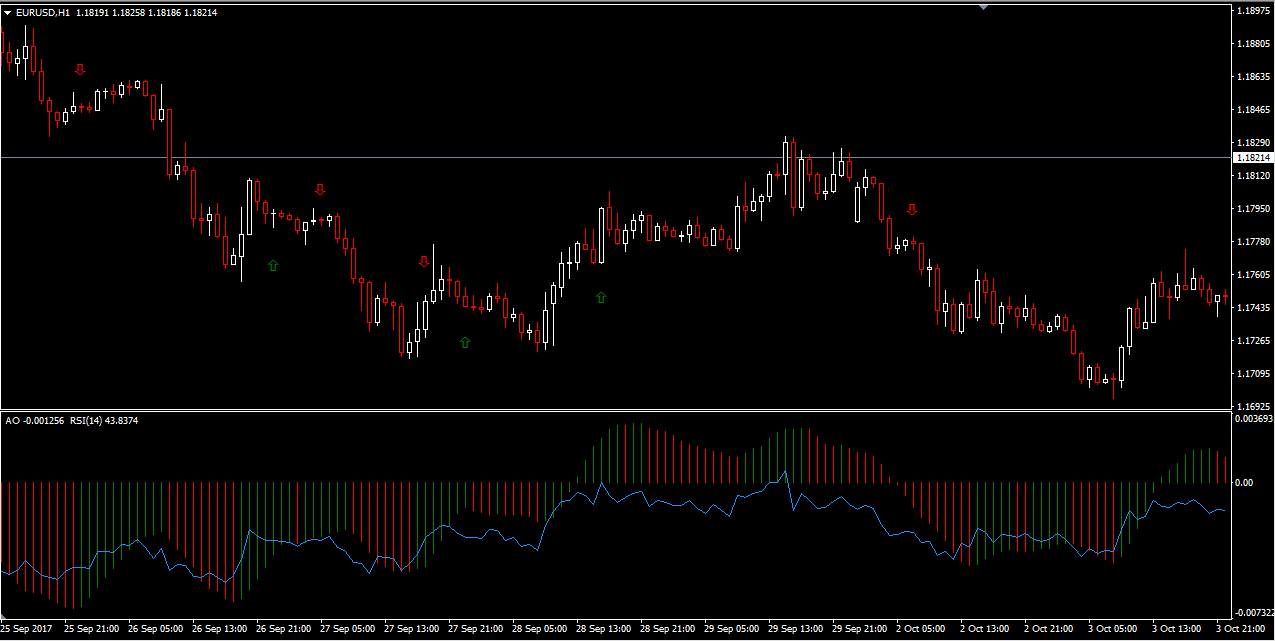
do you mean , something like this?
-
If the RSI is ont the Awesome Oscillator and not the close price of the price chart, then yes i mean like this.
It's basically using an indicator on an other indicator.Do you have an idea of how to create such a strategy on FXdreema ?
-
Or an other example, 2 moving averages on the AO of a chart

-
this can be done only with custom indicator ... this custom indicator imported into fxdreema in My indicators and working with this imported one ...
-
@miro1360 is it possible to draw trendline from peak to peak or valley to valley on CCI, Stochastic,...? I have seen it on divergence eas but I just don't know how to even get a trendline on a chart. There are the instuctional portions on the blocks, but it still doesn't work. I tried both optons. I know something can be done, but I wasn't sure if that was truly for programmers only.

Is it attainable here? -
it is possible with fxdreema but not that simple, a custom code can be necessary, not that simple ... begin with something more easy and master your know-how
-
@miro1360 thank you
