Opening 2+ </> Condition block's details displays 'Cross width' option
-
Hi @fxDreema ,
For the attached project that uses </> in Condition blocks, if I open 2+ block details they display the Cross width option.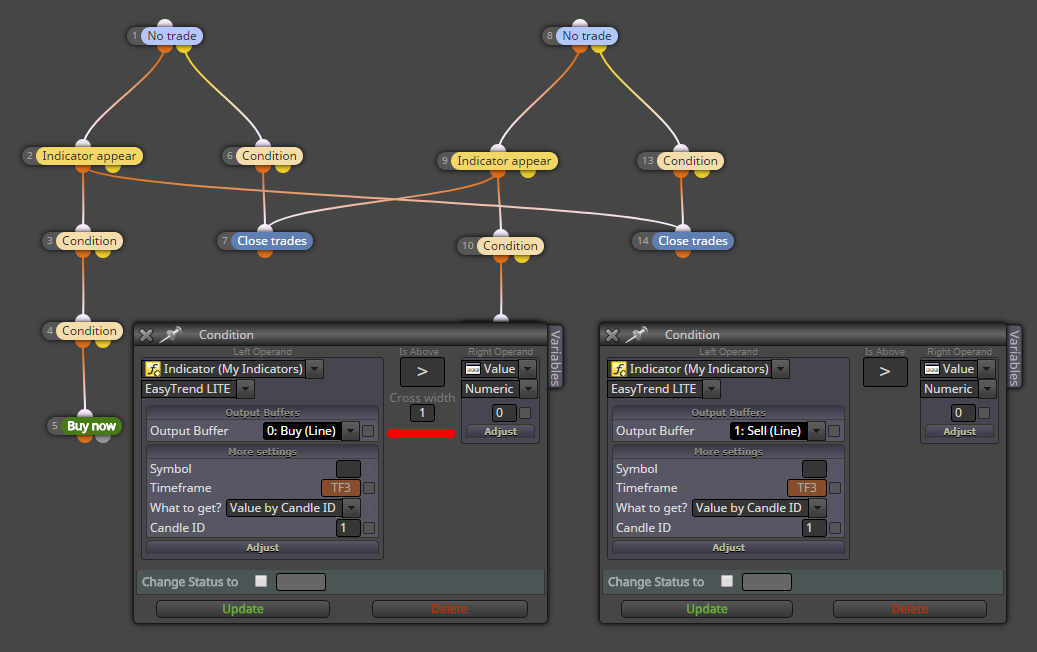
Changing it between < or > does not remove the Cross width option.
The only way I can see it without the Cross width option is to open only a single block's details.I'm thinking possibly because the Custom Indicator has no Inputs, I'm only referencing it's Buffers to use it.
EasyTrend.mq4
EasyTrend LITE.ex4 -
I found that this option didn't worked and I did some updates to fix it. Maybe something broke visually now, but in any case this option is only for x> and x<, so the fact that you see it under > is only a visual bug. Which is an old bug I think, I knew that something like this happened from a long time, but when I decided to finally fix it I forgot how to cause the problem. Now I know