fxDreema

    • Register
    • Login
    • Search
    • Back to the main page
    • Categories
    • Recent
    • Tags
    • Popular
    • Search

    Opening 2+ </> Condition block's details displays 'Cross width' option

    Bug Reports
    2
    2
    1106
    Loading More Posts
    • Oldest to Newest
    • Newest to Oldest
    • Most Votes
    Reply
    • Reply as topic
    Log in to reply
    This topic has been deleted. Only users with topic management privileges can see it.
    • drayzen
      drayzen last edited by drayzen

      Hi @fxDreema ,
      For the attached project that uses </> in Condition blocks, if I open 2+ block details they display the Cross width option.
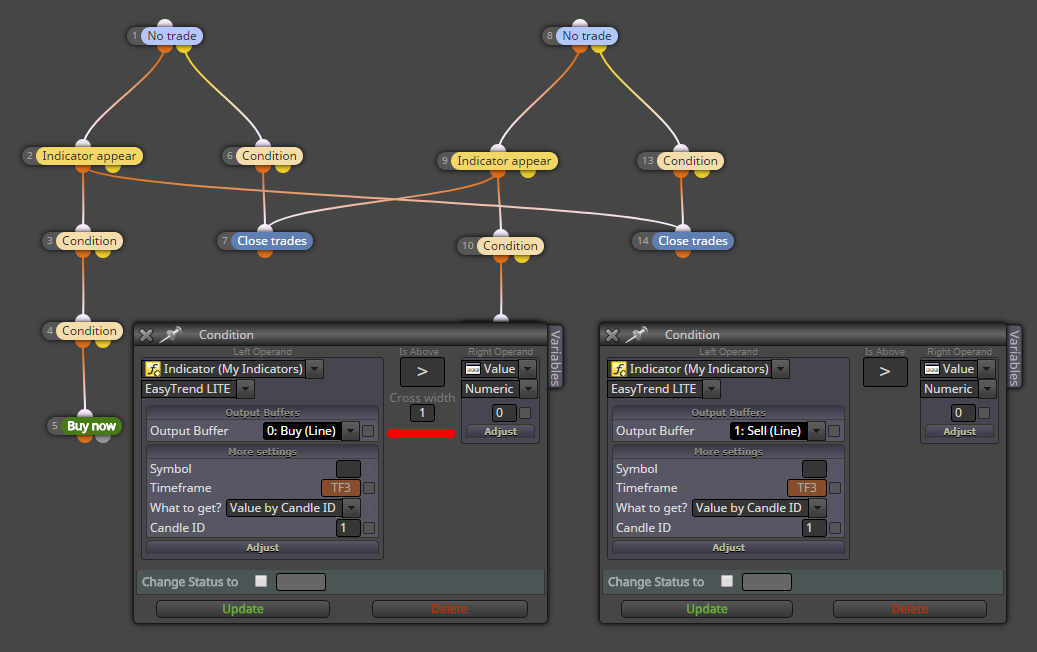
      0_1526445424420_fxDreema - Bug LT GT Cross Width.png

      Changing it between < or > does not remove the Cross width option.
      The only way I can see it without the Cross width option is to open only a single block's details.

      I'm thinking possibly because the Custom Indicator has no Inputs, I'm only referencing it's Buffers to use it.
      EasyTrend.mq4
      EasyTrend LITE.ex4

      ..the alien does not concern itself with the opinions of humans..

      1 Reply Last reply Reply Quote 0
      • fxDreema
        fxDreema last edited by

        I found that this option didn't worked and I did some updates to fix it. Maybe something broke visually now, but in any case this option is only for x> and x<, so the fact that you see it under > is only a visual bug. Which is an old bug I think, I knew that something like this happened from a long time, but when I decided to finally fix it I forgot how to cause the problem. Now I know 😄

        1 Reply Last reply Reply Quote 2
        • 1 / 1
        • First post
          Last post

        Online Users

        S
        L
        J
        D

        13
        Online

        146.7k
        Users

        22.4k
        Topics

        122.6k
        Posts

        Powered by NodeBB Forums | Contributors