fxDreema

    • Register
    • Login
    • Search
    • Back to the main page
    • Categories
    • Recent
    • Tags
    • Popular
    • Search

    How to include library?

    Questions & Answers
    6
    27
    7734
    Loading More Posts
    • Oldest to Newest
    • Newest to Oldest
    • Most Votes
    Reply
    • Reply as topic
    Log in to reply
    This topic has been deleted. Only users with topic management privileges can see it.
    • G
      GSMtricks last edited by

      Actually https://stackoverflow.com/questions/41360826/managing-json-array-format-in-mql4-script
      Here is a working example, the question is how to include an external library?

      1 Reply Last reply Reply Quote 0
      • l'andorrà
        l'andorrà last edited by

        Any real programmer here? 🙂

        (English) I will try to help everyone in these fxDreema forums. But if you want to learn how to use the platform in depth or more quickly, I can help you with my introductory fxDreema course in English at https://www.theandorraninvestor.eu.

        (Català) Miraré d’ajudar tothom en aquests fòrums d’fxDreema. Tanmateix, si vols aprendre a fer servir la plataforma amb més profunditat o més de pressa, t’hi puc ajudar amb el meu curs d’introducció a fxDeema en català a https://www.theandorraninvestor.eu/ca.

        (Español) Intentaré ayudar a todo el mundo en estos foros de fxDreema. Sin embargo, si quieres aprender a usar la plataforma en profundidad o más deprisa, te puedo ayudar con mi curso de introducción a fxDreema en español en https://www.theandorraninvestor.eu/es.

        1 Reply Last reply Reply Quote 0
        • G
          GSMtricks last edited by

          I know how to do it with native MQL and it works. WIth FxDremma it's not working.

          T 1 Reply Last reply Reply Quote 0
          • T
            trader.philipps @GSMtricks last edited by

            @gsmtricks I think the only way (so far I realized) is that you can incide external libraries when building a custom block. But I've never done this by myself and there are not so many examples here.

            I like to share my knowledge, but expect the others to contribute as well.

            1 Reply Last reply Reply Quote 0
            • roar
              roar last edited by

              Hey @fxdreema, could you please shed some light on the library compability? Being able to use the statistical library would be equivalent to anabolic steroids for my projects 😄

              Need small help? Tag me in your post
              Need big help? https://www.fiverr.com/big_algo/automate-your-winning-strategy-in-mql4-or-mql5

              1 Reply Last reply Reply Quote 1
              • M
                miro1360 last edited by

                it is simple ...
                copy your include files into your fxdreema local folder (folder named MQL4\Include)
                you can recompile the inserted mqh file in metaeditor
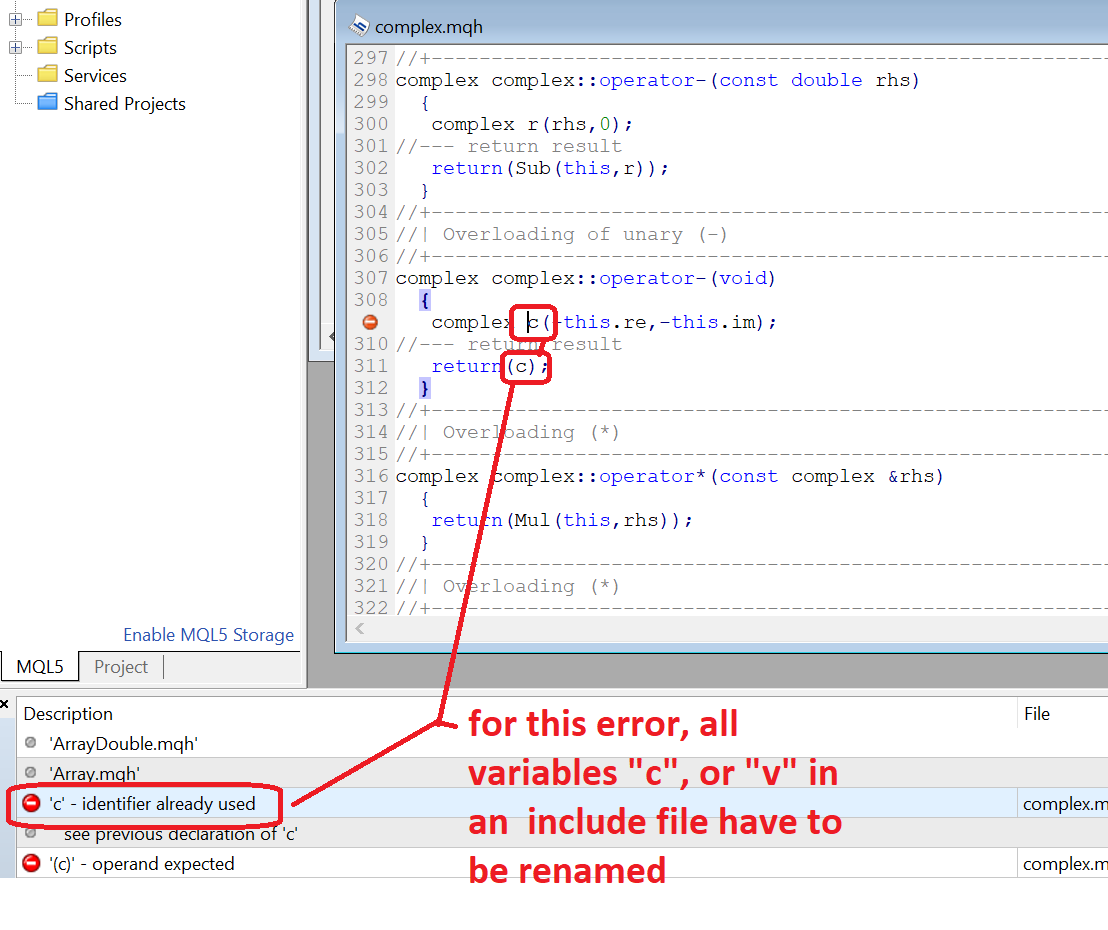
                the json file needed to be modified because (all the variables/objects named as "v" or "c" must be renamed to something else)
                https://gofile.io/?c=3ysLTa

                do your job in fxdreema and generate only mql code
                0_1569787315754_21b0969e-c016-412e-a0c1-f48513b1de90-image.png

                open the EA in metaeditor and insert desirable statement in the top of EA code and click compile button:
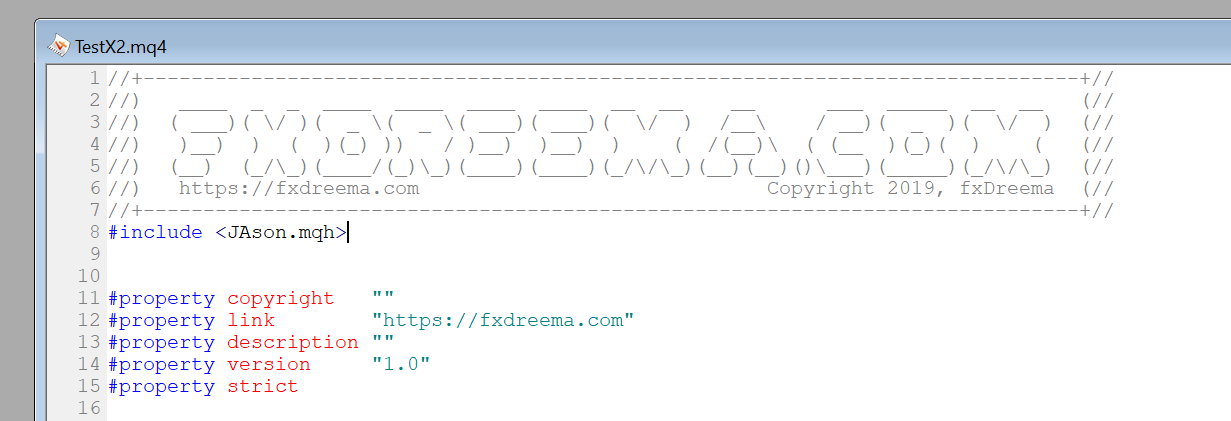
                0_1569787482377_e21c9a3e-08da-4443-9174-c044b089a5ec-image.png

                hope for no errors

                Between trading and gambling is a very small gap, be careful.

                T G A 3 Replies Last reply Reply Quote 1
                • T
                  trader.philipps @miro1360 last edited by

                  @miro1360 But you have to do it each time you save your mq4 file. That's a bit anoying, isn't it? Would be easy to have a block for includes maybe on init tab?!?

                  I like to share my knowledge, but expect the others to contribute as well.

                  1 Reply Last reply Reply Quote 0
                  • M
                    miro1360 last edited by miro1360

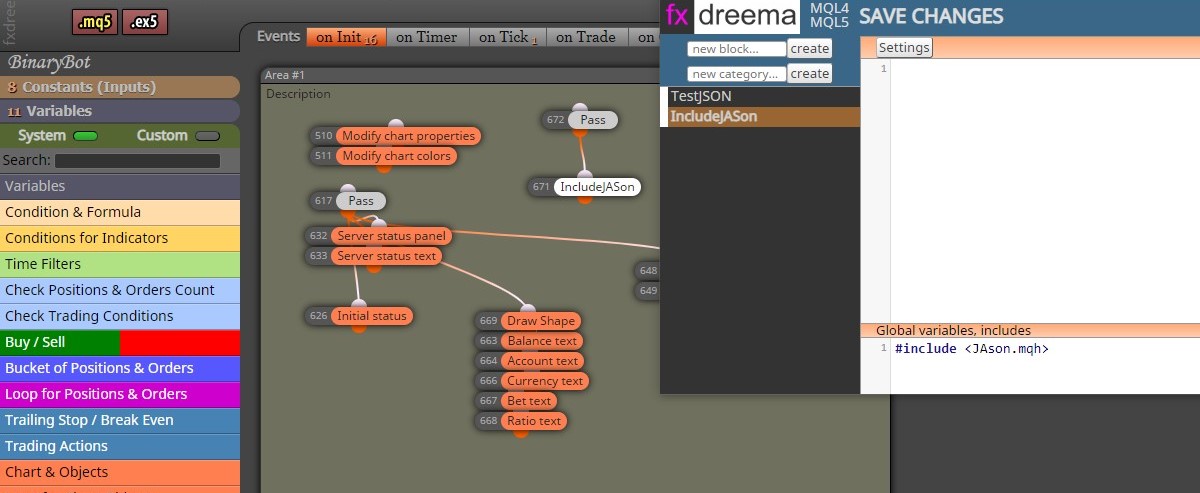
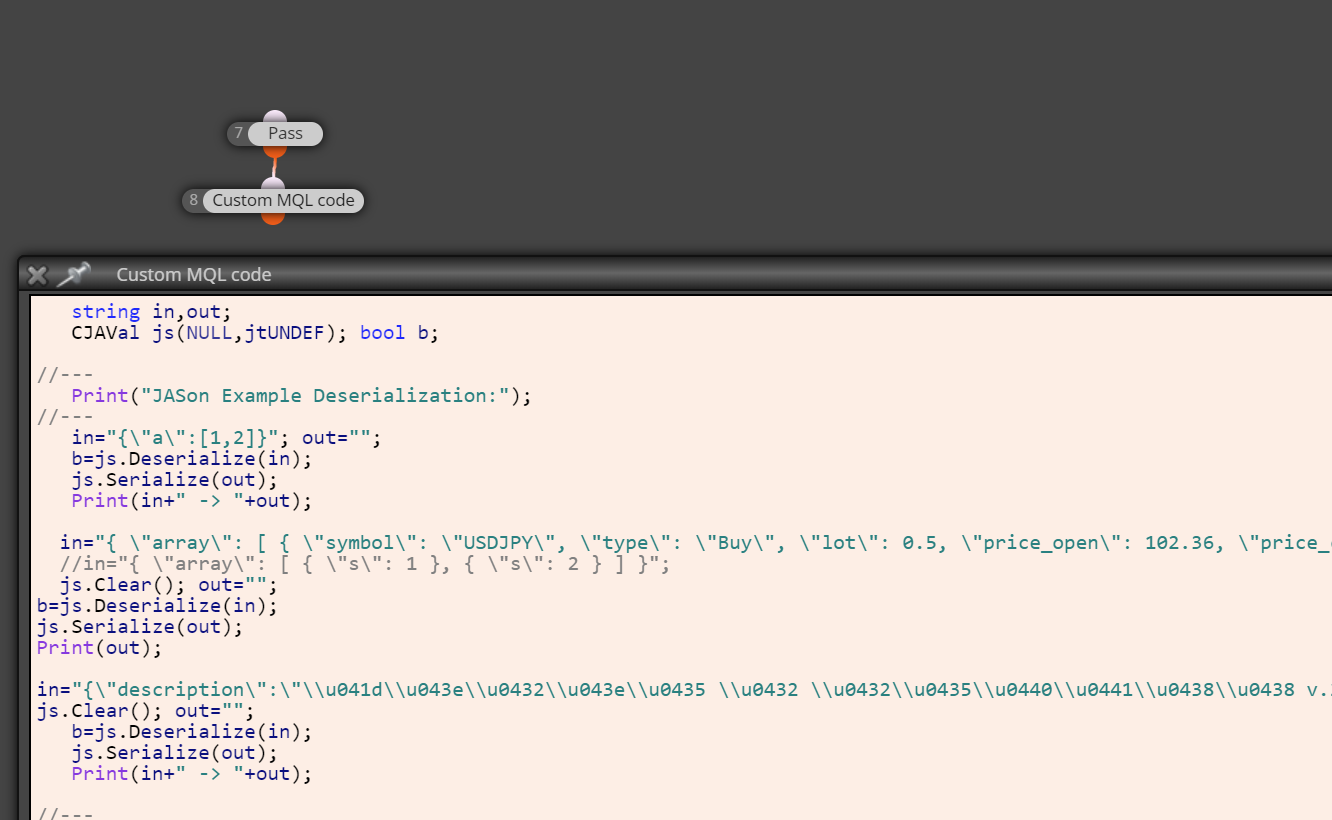
                    this is how to create a custom code block in the studio, only for the MQL4 (mql5 probably the same)
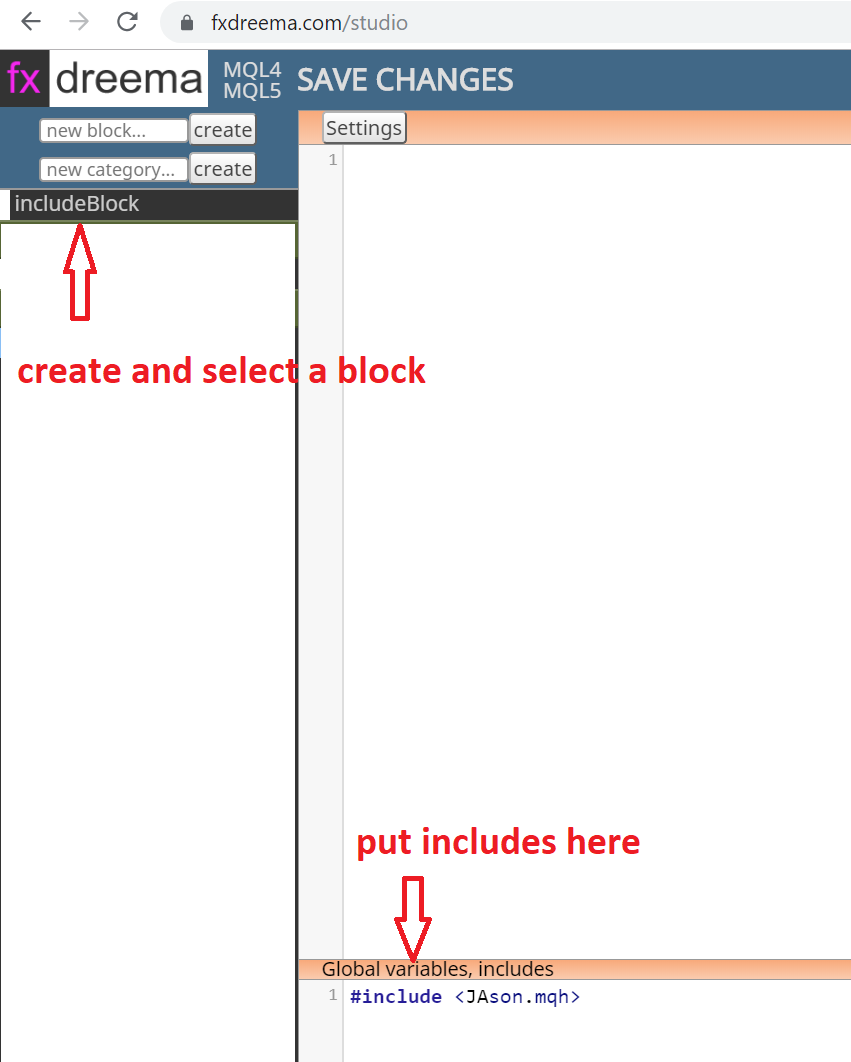
                    0_1569806013504_102e1da5-3b11-4cfc-9896-3bc68b3f6899-image.png

                    then insert the include block in the project ... only the mq4 code can be generated from fxdreema, then it has to be compiled with the metaeditor:
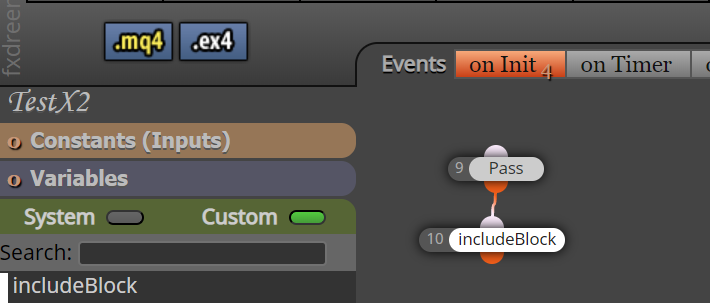
                    0_1569804161478_b3312996-7cc8-45ed-a448-42028874cd31-image.png
                    ...

                    Would be easy to have a block for includes maybe on init tab?!?

                    Well, it is not that simple because you have to compile with your local Metaeditor even with a block for includes (the include files can be seen only from local, they are needed for the compilation process ..... custom indicators may not be present, that is the difference). Therefore the web based ex4 compilation throws an error, because the compiler looks for these "missing" libraries on the compilation machine (webserver).

                    Just use the first method, it will take a few seconds.
                    Test your code prototypes in the Metaeditor, and after that put a functional prototype into a complicated EA in fxdreema.

                    That is all I can do to help you 🙂

                    Between trading and gambling is a very small gap, be careful.

                    1 Reply Last reply Reply Quote 1
                    • M
                      miro1360 last edited by miro1360

                      note this:

                      0_1569806405004_235679c4-36f4-4b80-9951-cd947513f1da-image.png

                      ... for an include file with such issue, it will only be done only once, but it must be correctly done

                      Between trading and gambling is a very small gap, be careful.

                      T 1 Reply Last reply Reply Quote 1
                      • T
                        trader.philipps @miro1360 last edited by

                        @miro1360 Okay, that's worth a try. Thanks for the information! I always compile in local Metaeditor. So that would be fine for me.

                        I like to share my knowledge, but expect the others to contribute as well.

                        1 Reply Last reply Reply Quote 0
                        • G
                          GSMtricks last edited by

                          It's not working. Good idea but not works.
                          How to test?

                          1. Create new MT5 expert - just empty
                          2. Export mq5 code
                          3. Open exported code in MetaEditor
                          4. Compile it - works
                          5. Add line #include <JAson.mqh>;
                          6. Compile - can't compile it. 100 errors.
                          1 Reply Last reply Reply Quote 0
                          • G
                            GSMtricks @miro1360 last edited by

                            @miro1360
                            With your file JAson.mqh I can do include now.
                            Now still to understand how to adopt custom qml code.
                            I have a code:
                            // Object
                            CJAVal json;

                            // Load in and deserialize the data
                            json.Deserialize(data);

                            // Try to access the data elements
                            Alert(json["orderid"].ToInt());
                            Alert(json["ordercurrency"].ToStr());

                            But with this code can't compile.
                            Please advice.

                            I just need to read JSON string from variable: data

                            T 1 Reply Last reply Reply Quote 0
                            • T
                              trader.philipps @GSMtricks last edited by

                              @gsmtricks said in How to include library?:

                              data

                              Did you apply your test json to the data variable for testing?

                              I like to share my knowledge, but expect the others to contribute as well.

                              1 Reply Last reply Reply Quote 0
                              • G
                                GSMtricks last edited by

                                So let me provide full information.

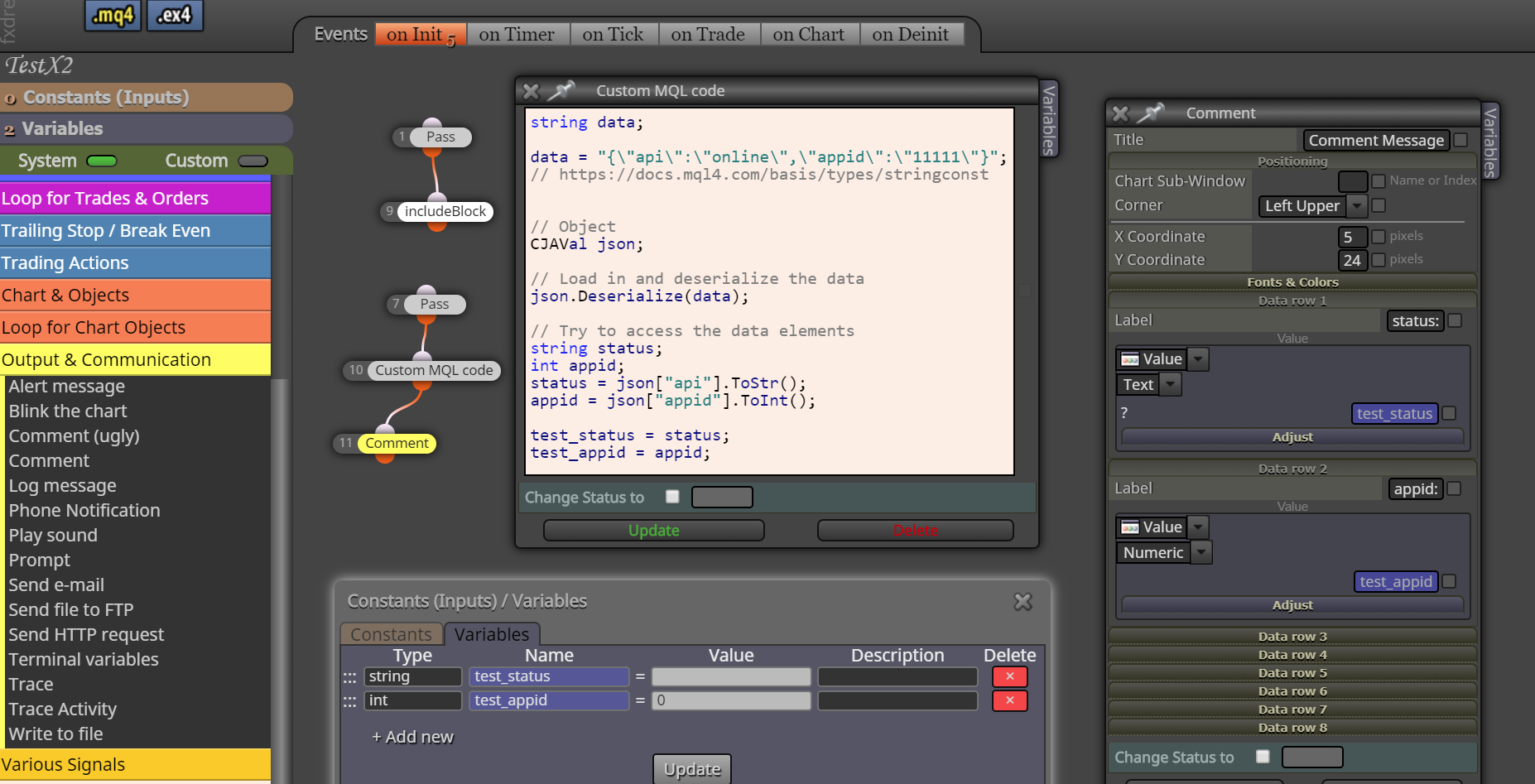
                                1. I have variable created and named: test_json ( for example )
                                2. In some time I write there JSON data: {"api":"online","appid":"11111"}

                                What do I need:

                                1. Read JSON string from a variable test_json ( here is data: {"api":"online","appid":"11111"} )
                                2. Save to variable test_status: online
                                3. Save to variable test_appid: 11111

                                That all.
                                If someone can provide me working custom mql code for FxDremma I will be able to use it as an example for my strategy,

                                1 Reply Last reply Reply Quote 0
                                • M
                                  miro1360 last edited by

                                  0_1569862566587_56c3cd3e-01b4-43d1-aef0-2f9f7eaaa494-image.png

                                  Between trading and gambling is a very small gap, be careful.

                                  1 Reply Last reply Reply Quote 0
                                  • G
                                    GSMtricks last edited by

                                    @gsmtricks said in How to include library?:

                                    {"api":"online","appid":"11111"}

                                    Thank you for help.
                                    Feel stupid:
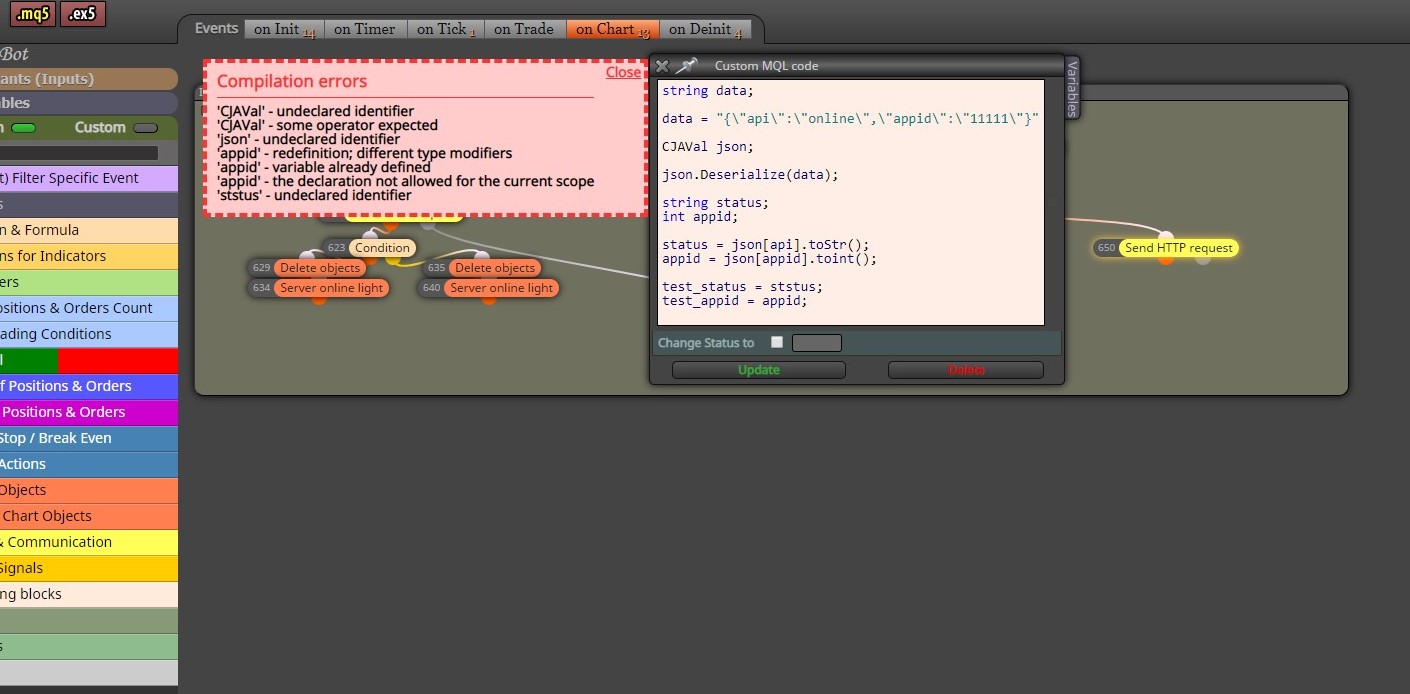
                                    0_1569864772068_SharedScreenshot.jpg

                                    G 1 Reply Last reply Reply Quote 0
                                    • G
                                      GSMtricks @GSMtricks last edited by

                                      0_1569865032571_SharedScreenshot.jpg

                                      T 1 Reply Last reply Reply Quote 0
                                      • T
                                        trader.philipps @GSMtricks last edited by

                                        @gsmtricks @miro1360 said that you have to compile in meta editor not in fxdreema.
                                        So save your mq5 file to experts folder of your terminal and open it with metaedior (eg. refresh experts list and right click on your ea name and choose modify).
                                        In Metaeditor press compule button and watch for errors on the bottom.

                                        I like to share my knowledge, but expect the others to contribute as well.

                                        1 Reply Last reply Reply Quote 0
                                        • G
                                          GSMtricks last edited by

                                          I am done. Compelled.
                                          Now will try to get the data from the variable.
                                          string data

                                          Does it mean that i will read a string from variable named data?

                                          T 1 Reply Last reply Reply Quote 0
                                          • T
                                            trader.philipps @GSMtricks last edited by

                                            @gsmtricks I think so.

                                            I like to share my knowledge, but expect the others to contribute as well.

                                            1 Reply Last reply Reply Quote 0
                                            • 1
                                            • 2
                                            • 1 / 2
                                            • First post
                                              Last post

                                            Online Users

                                            R
                                            S
                                            D
                                            V
                                            O

                                            14
                                            Online

                                            146.7k
                                            Users

                                            22.4k
                                            Topics

                                            122.6k
                                            Posts

                                            Powered by NodeBB Forums | Contributors