Modify Stops based on a price level that is reached to set new stop loss and take profit based on that price level
-
Hi All,
I am trying to use the "modify stops" block with a custom "trigger" price level and I can't get it working.
Once a "trigger" price level is reached, I want to modify an open buy trade so the stop loss is lower than that "trigger" price and modify the take profit to be higher than that "trigger" price.
Ideally, I want to use the value from a predefined variable(s) to set the distance away from the "trigger" price.
Every time I try, I get an error that says Invalid TP requested (0.168 for Bid price 109.126). The "trigger" price is around 109.126 because I put "current market price" as the "price relative to". Then I put the variable in for the Take Profit. It seems to use only the value instead of making the value relative to the current market price like market price plus the value.
Here is the example from my ea:
https://fxdreema.com/shared/6fuucAEeb
I'm looking for any solution to modify SL and TP of an open trade once a "trigger" price level is reached.
Thanks!
Hax -
I recommend you to use the pink blocks. Create a new block tree headed by a 'For each trade' block and thenuse the 'modify stops' block. I think that will fix the problem. I never use the block you use in your project.
-
@hax
Hi, custom (price level) take-profit is a level of the price, not a distance. Idk what is your value but if the target is 109.126, this TP should be at least 109.126+0.168.
So if you wanted like 20 pips distance TP, write 109.326. -
HA! As soon as I posted this I found the pink block and I was about to post again and ask pink or blue. Thank you for telling me its the pink box!
Oh no I have blue boxes all over my project LOL! but they are working. I wonder what is the difference between pink modify stops block and blue modify stops block.
I will try your suggestion and let you know the outcome. Thanks!
-
@hax the difference is that pink blocks assume that you have already selected the trade in question, while blue blocks can select the trade by themselves (or just modify all trades). The selection happens in the dark pink (loop) block, for example.
-
@roar Thanks for the clarification!
-
@l-andorrà
I tried your suggestion and it worked!!! You have helped me finish my best EA ever!!! It seems to give profit with not too much drawdown, at least that is what my backtests show. I will be forward testing it this week on my live account!Thank you so much!!!!!
ps,
Do you have any suggestion on how to make all trades close before the market closes?
-
@hax You're welcome!
 Honestly I prefer not to give any advice on strategies. I'm still trying to find the perfect one so I'm the last guy you should ask help for.
-
I thought I would send this to you as you have helped me so much. Might work. Daily timeframe only. Thanks
-
I understand.
I thought I would send this to you as you have helped me so much. Might work. Daily timeframe only. Thanks!
-
@hax thank you!
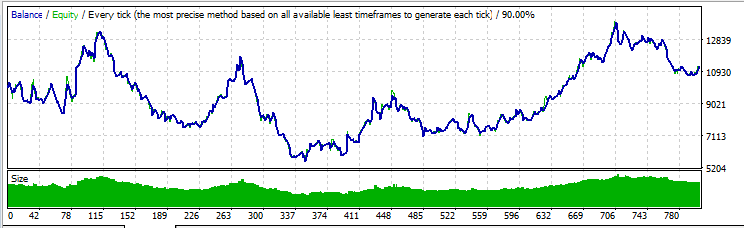
This looks quite good, I like this backtest graph. Wish I had better mt4 history data, though... Testing a trailing stop requires very precise tick data
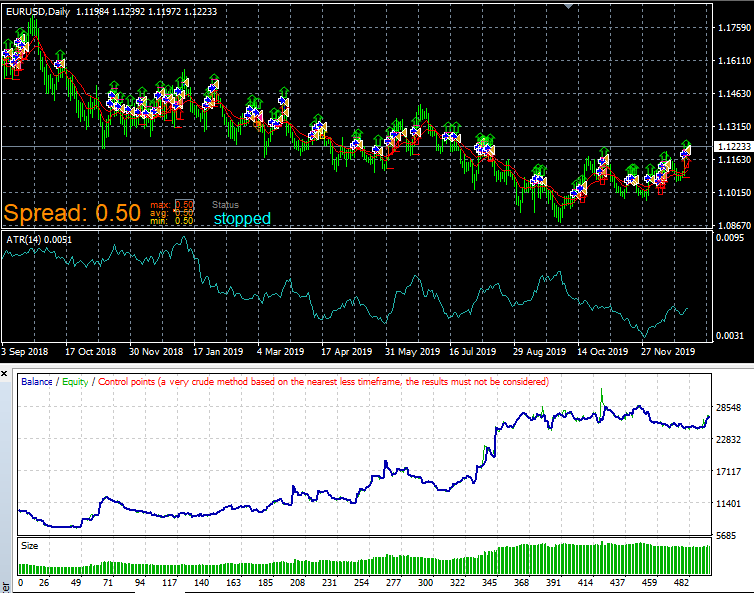
edit: BT with every tick data:
-
@hax You are welcome. I will give it a try!
-
@roar Awesome!
It is designed to run on all 28 major pairs. It wins on about 22 of the 28 pairs on a one year backseat. running on multiple pairs I think will make the wins bigger than the losses.
I'm having the hardest time trying to get the EA to start 00:58 minutes after market open. I have seen lots of buying power at 1 hour after market open so I want my EA to enter right before the 1 hour mark. Any thoughts?
-
Hey nevermind about the 00:58 start time question. I figured it out.
FYI my running this on a live account for 2 days and I'm up $300!!!
-
There is one known issue with the trailing stops. The way I set up my "modify stops" sometimes causes the rising trailing stop price to be modified back down! So some profit is lost. I will try to fix it in another version.
-
Good for you! Plesase don't hesitate to share it with us.
-
@l-andorrà Ok I will!
-
@Hax said in Modify Stops based on a price level that is reached to set new stop loss and take profit based on that price level:
I thought I would send this to you as you have helped me so much. Might work. Daily timeframe only. Thanks
Hello! Can you send me this EA mp5 to my gmail. Thank you very much
Gmail: hotelandresorthalong@gmail.com


