How to set close trade condition for moving average crossover
-
Hi guys. I'm having some difficulty with trades closing the moment the EA opens when I use the EA setup in the instructions section of this website. I'm using the moving average crossover strategy and would like to have the current trade close the moment the moving average crosses the opposite direction. BUT what happens instead when I use the setup in the instructions section of the website is that the moment the EA opens a trade it automatically closes it. It does this multiple times until it finally blows the trading account. I expected this to happen because the setup in the description does not make much sense. One can add a buy/sell condition ( for example when the fast period moving average crosses above slow period moving average) but the ' close trades " block is just attached to the buy now or sell now block, which confuses the EA to do opposite things. BUY and close or SELL and close. Here is the link to the EA : https://fxdreema.com/shared/xbLKxBHdb
-
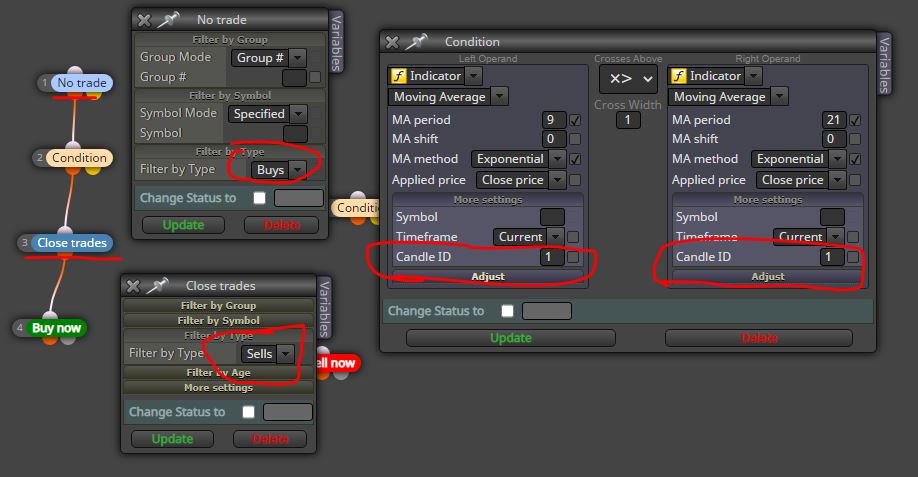
@rogerthat Keep the "no Trade" and "close trade" separate for buying and selling, with respect to the sequence of conditions that must be activated first. Always specify candle ID 1 when you use the indicators. This screenshot is for buy orders and close sell orders
-
https://fxdreema.com/shared/8Cn7r82gb
your blocks should be arranged this way -
@ambrogio Hey man. Thank you for the response. I see that you filter the close trades to sells only that is linked to the "BUY Now" block which makes much more sense. BUT in the EA uploaded by admin it has it set for either buys or sells. I just want to understand why he says that will work.
-
@od Thanks dude. Can you please tell me, why did you change the no trade to once per block?
-
@rogerthat said in How to set close trade condition for moving average crossover:
@ambrogio Hey man. Thank you for the response. I see that you filter the close trades to sells only that is linked to the "BUY Now" block which makes much more sense. BUT in the EA uploaded by admin it has it set for either buys or sells. I just want to understand why he says that will work.
The administrator is very lazy (by his own admission) :))) , even in the condition block does not put candle ID 1.
-
@rogerthat The once per bar block sets ur condition to open trades when the condition happens once per candlestick...this is in order to avoid opening many trades at once since the condition could happen more than once in one candlestick period hence opening too many unwanted trades
-
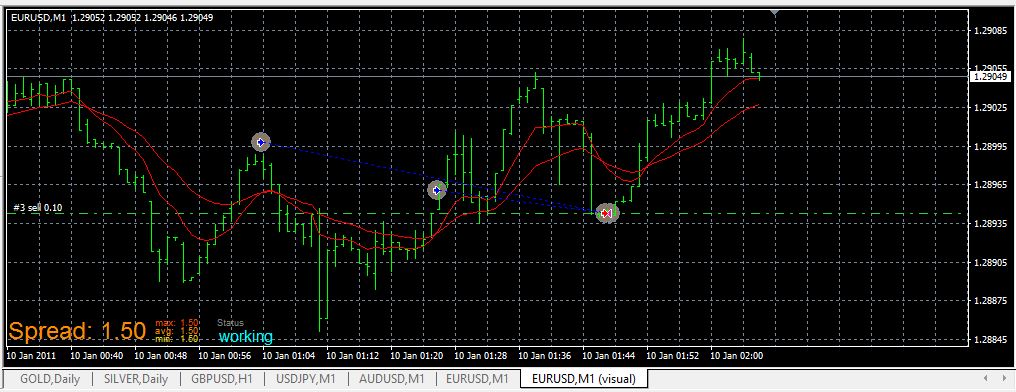
@od remember to specify candle ID 1 in the condition block, otherwise problems like this happen, two consecutive trades without the first one being closed
-
@od Thanks for your help , I will test it in my demo. Quick question though... With the setting of " Once per bar" will the EA take another trade on the following candle? I only want it to take one trade once the crossover occurred.
I would also like to know will I be able to set another condition to let the EA only take a trade once the candle has closed above ( in the case of a buy) above the slow moving average after the crossover has occurred. Because sometimes the moving average crosses over whilst the candle is still open, but if the candle closes the two EMAs no longer crosses each other and the price moves into the opposite direction. To be safe as a condition I would like to have the candle closed above the slow moving average ,and as a second condition to have the fast and slow EMA to cross. Could you please advise how do I go about doing this. Thank you. -
@ambrogio Thank you dude. I have tested it and forgot add candle ID 1 and my EA opened 12 trades at once almost blowing my account. So thanks for the heads up. Another quick question, I hope you can help me:
I would also like to know will I be able to set another condition to let the EA only take a trade once the candle has closed above ( in the case of a buy) above the slow moving average after the crossover has occurred. Because sometimes the moving average crosses over whilst the candle is still open, but if the candle closes the two EMAs no longer crosses each other and the price moves into the opposite direction. To be safe as a condition I would like to have the candle closed above the slow moving average ,and as a second condition to have the fast and slow EMA to cross. Could you please advise how do I go about doing this. Thank you.
I would like to know will I be able to set another condition to let the EA only take a trade once the current candle or previous candle has closed above ( in the case of a buy) the slow moving average after the crossover has occurred. Because sometimes the moving average crosses over whilst the candle is still open, but if the candle closes the two EMAs no longer crosses each other and the price moves into the opposite direction. To be safe as a condition I would like to have the candle closed above the slow moving average ,and as a second condition to have the fast and slow EMA to cross. Could you please advise how do I go about doing this. Thank you. Much appreciated.
-
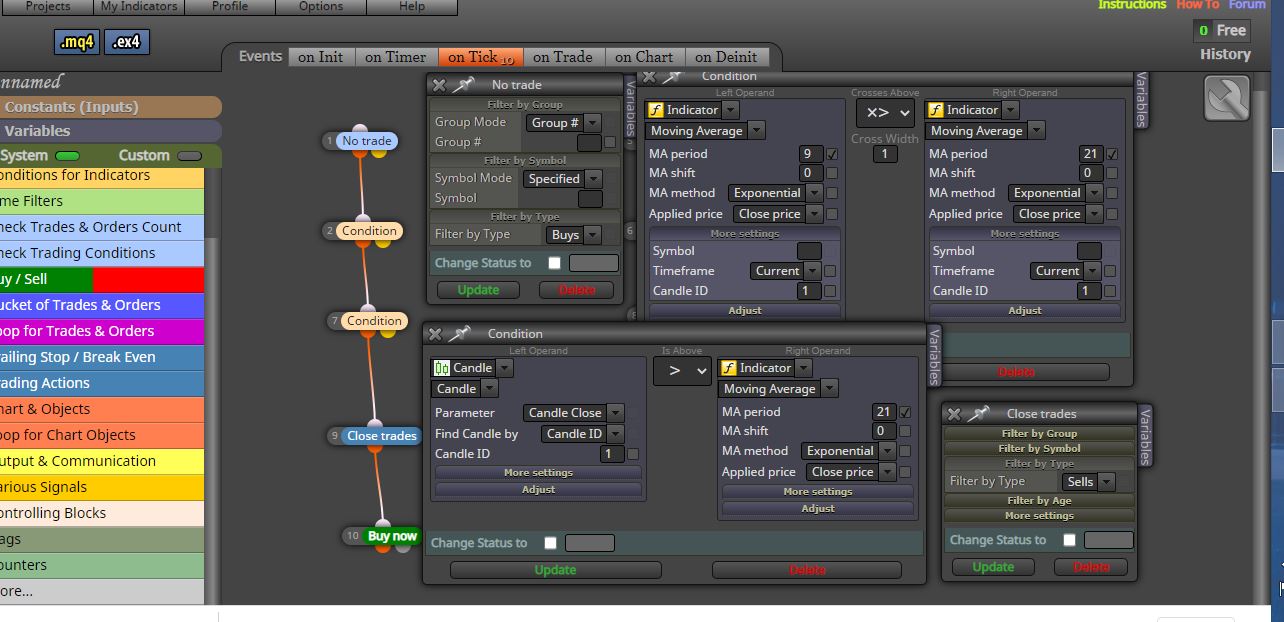
@rogerthat For that case you'll have to use candle ID 1 in your moving averages crossover block then create another block where the previous candle should be above the slow moving average..use is above for all blocks and your candle IDs should be 1
-
@od Thank you. Can you please tell if this is correct?
-
@rogerthat Switch the no trade block with a once per bar block to avoid opening many trades once then create a similar one for sell trades


