Trailing only profit (after offset) regardless of Stop Loss position
-
Hello,
I spent more than three hours and did all the possible combinations in the Buy/Sell Block and the Trail Trades (Block) including Pips Offset, Trail stop, Trail Step, and changing the trailing for either stop loss or target profits to achieve the following with no luck.I want to trail the profit (only) regardless of the stop loss position.
An example:
I have a stop loss of 50 pips. I want to trail the profit after the price goes a certain level above the open price, irrespective of the stop loss position.With all the combinations I have used, including the (Pips Offset), the stop loss distance is always interfering. i.e if the price moves 10 pips above the open price, then the stop loss will move up 10 pips. I do not want that. I just want the stop to be at the breakeven point immediately once the price is 10 Pips plus Open Price. The intial 50 pip stop loss should not take part in any further trailing.
So when I trail the profit by 20 pips and with a strat trailing offset at 10 pips, then as soon as price goes 10 pips plus entry price, price is trailed every 20 pips. The 50 pip stop loss should not be playing any more role.Is there a way to do it with the standard blocks?
Thanks,
-
please provide project link for best help.
Also, you should learn how to do variables and constants. Computers are infinitely smarter than us and can change all those parameters for you if you place them as variables and/or constants.
-
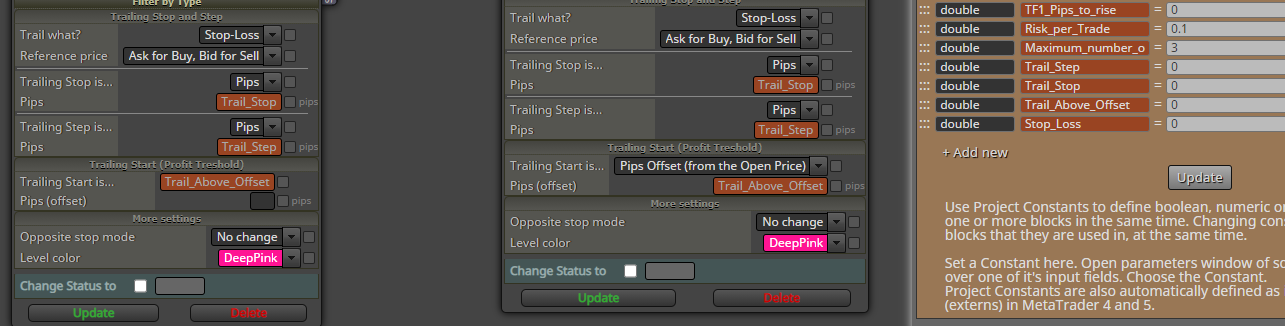
This is one of many combinations I have tried, showing the trailing stop block and constants I used. There are no variables.
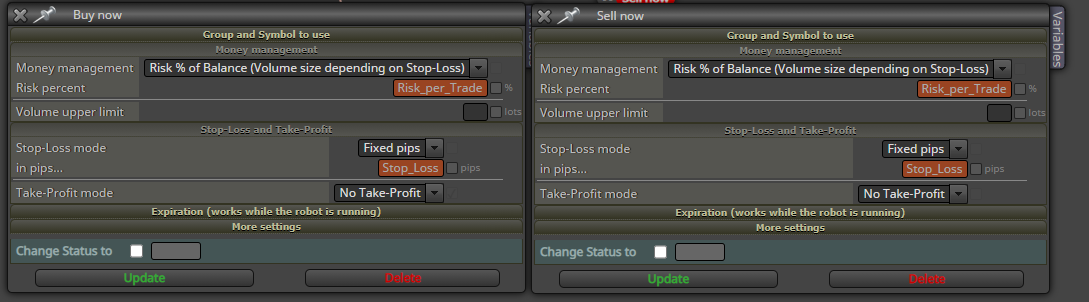
The second photo is for the Buy/Sell blocks. I have tried both: No stop loss and no take profit.
-
I found this link https://fxdreema.com/tutorial/builder/trailing-stop and there is mention of more blocks for Modifying Stop Loss and Pips Away from Stop Loss that are different from the standard Trail Stop Block.
In addition to this, the standard Block for trailing stops should not be connected directly to the Buy/Sell Blocks.
Anyway, I believe the answer is in the (Pips Away from Stop Loss) Block and (Modify Stops) Block.
I will have a thorough reading.
-
@jsauter86
I believe I have got it right this time and will keep testing.
We can use these three blocks.
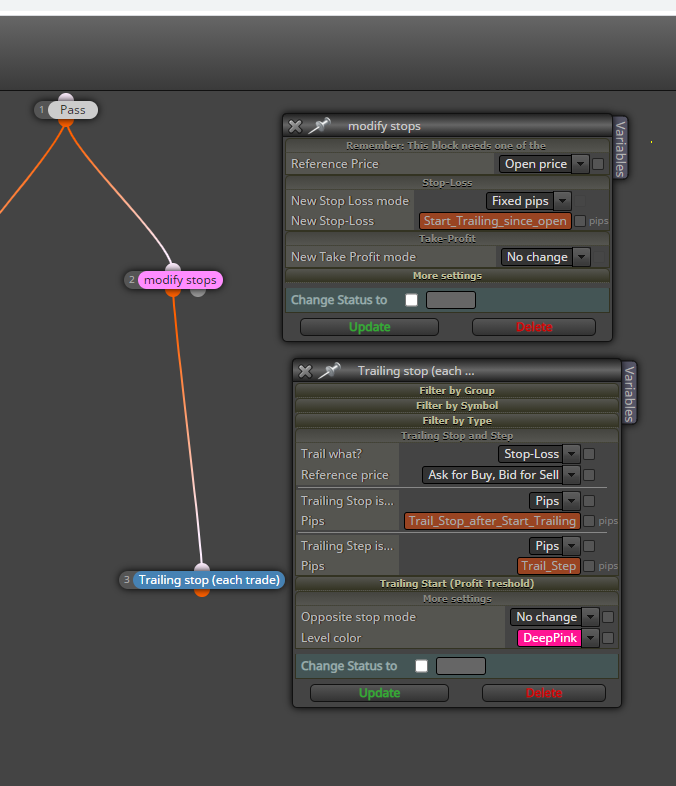
And the constants look like this:

In Case I want to start the trailing above the Open Price/Break-Even Point, then I will type the appropriate number of pips in the (Trail Stop After Start Trailing) Constant.
I am now working on another scenario. Sometimes, I want to start the trailing below the Open Price/Break Even level. I think if I use (-10) for example the (Trail Stop After Start Trailing) Constant, the trailing should start 10 pips below the Open Price. I am still to find out if this is the case.
-
@mohamed80 Those screenshots are not providing all necessary info to check the issue. Could you please share the link to the project?
-
Sure
https://fxdreema.com/shared/IqejMZiUcI think it is right but need to do more testing to activate the trailing above Breakeven by inputting a pip value in the (Trail Stop After Start Trailing) Constant.
Please bear in mind that the reason behind this is to choose at what level the trailing stop should be activated regardless of the stop loss level. Hence I have a block to modify the stop loss.
Another way is to use the "Break Even"Block but I am confused between two inputs: The first is the (On Profit Mode) and the second is BEP offset mode). I find them to have the same output so I am yet trying to understand the difference between them.
-
i dont mean to be rude, but do you think that simple MA crossovers are going to provide a working EA?
I know a guy that can code well but can't trade for sh*t. He can create grid systems and recovery systems better than anyone I've seen. But he too applies them to something simple like RSI and they blow up each time...lol.
I just hope your strategy is more robust and you're saving that piece of your blocks elsewhere in the real strategy.
-
@jsauter86
The sole purpose of my post is to ask questions with regard to Trailing. Trailing can be used on its own for manual trading or used in any strategy. It is not about discussing a strategy.
-
Has anyone used trailing before through FX Dreema?
-
@mohamed80 I think this is doing what you have requested but, you will need to ad another condition otherwise you will never hit TP so you may as well not have a TP. hope this helps.
-
its easier to first remove everything off of variable and constant and see how they work straight forward. Like many coders who don't trade, they often build complex EA's of things they dont understand and then try to use it when in fact the problem could be in their logic.
Its easier in the beginning when learning to do straight pips so you know what values to expect, without having to rely on whether or not you also coded something correctly.
-
@jsauter86
On what basis are you assuming I am learning to trade?!!
I am learning to use FX Dreema not how to trade.
I have been trading for more than a decade stocks and forex.
-
Hi,
Thank you for your reply.
I do not have a TP as I am leaving it for the trailing. While I was testing my EA in the strategy tester, some positions should have been trailed in a different way. So I resorted back (temporarily) to the Trailing Stop Block without modifying the stops until I get a cue.I had a look at the link you provided. It is an interesting approach to using the flags. I will try the concept.
Thanks again. -
If you do not mind I have two questions and will be great if you direct me to where to look:
1- For manual trading, let's say I already have current open trades on the chart and some pending orders at different levels. I want to trail whatever is on the chart with the same settings.
So I tried the Trailing Block for each trade and connected it to the No Trade/ Pass / Once per tick/ and other Blocks but it did not work.
https://fxdreema.com/shared/rGHEBVR42- What is the final verdict with regard to using ATR as a stop loss.
I do not want you to code it but rather direct me (if you are familiar with the topic) to the most recent verdict. It is a complicated and lengthy issue.
For simplicity, the easiest way is to use custom pips (fraction) and choose ATR with candle ID set to 1 so it can be variable from one bar to another. However, there is a problem with JPY pairs. Hence, other FXDreema users suggested using some formulas and showed the steps. But still, I find it bit more complex and there is more than one approach/formula.
Anyway, I was wondering if you happen to know the most recent say with regard to the use of ATR in a simple manner.Cheers,
-
@mohamed80 I was asking, to offer to see if you wanted to learn more fast paced, instead of through a forum with hours or days of response time in between.
-
@jsauter86
It's fine. I edited my previous response.
Regards, -
@mohamed80 Every block has group numbers, the trail will work with only with whatever group is inserted, the magic number in settings determines what trades the EA interacts with, 0 is manually placed, I think the group number is placed on the end. I would set up different trailing stops to interact with your different groups, I would put magic to 0 unless not interfering with manual is what you require.
In here you will find how to put ATR pips into a variable so you can use for whatever you want.
https://fxdreema.com/forum/topic/12854/help-please-using-atr-as-stop-loss
Hope this helps
-
Thank you.
1- For the Group number, I have seen it present in many blocks but could not tell how to assign certain pair(s)/trades to a specific group. i.e How to name them Group 1 or 2. The rest is easy as I can reference the Group number later on.
2- The ATR solution is very smart and simple and as I read it works with any pair (Yen or Gold).
3- By the way, does FX Dreema allow manually changing stop loss from the chart after applying the EA.
For example; I have an EA to only trail the stop loss. The trailing starts without issue once I have a stop loss (manually placed). But If I change the stop loss (dragging it up or down), I am not sure if the EA is reacting to this new level or not.Cheers,
-
@jsauter86
I had a chat message from another user who bombarded me with too many questions. My mistake was when I linked your response to his and thought it is the same person. I should have checked first. I just realised this now.


