fxDreema

    • Register
    • Login
    • Search
    • Back to the main page
    • Categories
    • Recent
    • Tags
    • Popular
    • Search

    Trailing only profit (after offset) regardless of Stop Loss position

    General Discussions
    4
    32
    6545
    Loading More Posts
    • Oldest to Newest
    • Newest to Oldest
    • Most Votes
    Reply
    • Reply as topic
    Log in to reply
    This topic has been deleted. Only users with topic management privileges can see it.
    • jstap
      jstap @Mohamed80 last edited by

      @mohamed80 To have a specific group work with a specific symbol you need to have applied that symbol B4 placing trade/order. (at least I think)

      If you drag something like SL then on the next tick it will get reset to EA settings, to stop this change the EA settings from the face in top right, you can set a bool condition to switch it off if you prefer, you can also change the settings from screen but this concept is quite advanced, you would need to learn button concepts for a start.

      Learn fxDreema Without the Wait!

      My comprehensive book, available on Amazon, is packed with examples and invaluable insights to help you fast-track your learning journey.

      The paperback and hardback editions include MT4 & MT5 QR codes for easy access to all prebuilt projects and robots, including my latest gold trading robot!

      Don’t miss out

      Click here➡️ https://mybook.to/fxDreema to get your copy today!

      Enjoy! 😊

      1 Reply Last reply Reply Quote 0
      • M
        Mohamed80 last edited by

        I have made an attempt to trail one trade by locking in profits every number of pips. There is something wrong with the locking in of profits.

        I am using a simple EA to trade breakouts.

        https://fxdreema.com/shared/kw3xkFMM

        jstap 1 Reply Last reply Reply Quote 0
        • jstap
          jstap @Mohamed80 last edited by

          @mohamed80 You need to have it set up more like this:
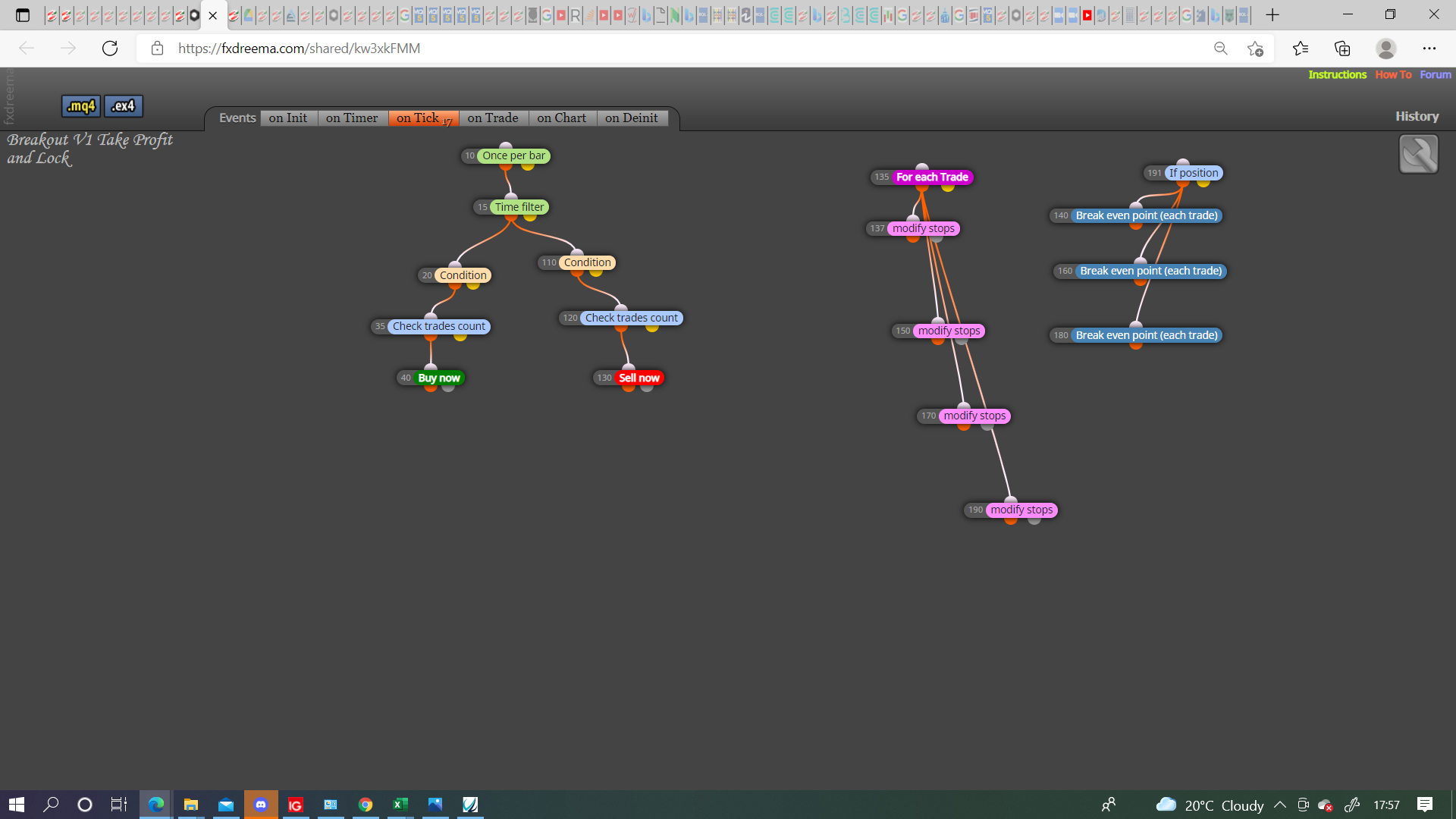
          0_1627232258677_Screenshot (482).png

          You may need a condition to activate/deactivate modify/breakeven, generally having 1 block to sort many is the way to go.

          Learn fxDreema Without the Wait!

          My comprehensive book, available on Amazon, is packed with examples and invaluable insights to help you fast-track your learning journey.

          The paperback and hardback editions include MT4 & MT5 QR codes for easy access to all prebuilt projects and robots, including my latest gold trading robot!

          Don’t miss out

          Click here➡️ https://mybook.to/fxDreema to get your copy today!

          Enjoy! 😊

          M 1 Reply Last reply Reply Quote 0
          • M
            Mohamed80 @jstap last edited by Mohamed80

            @jstap
            Thanks
            I was just thinking of Loop Break Block before seeing your post. I will try it with the Activate/Deactivate Blocks. I definitely need to stop the Breakeven Block and Modify stops from operating more than once.

            Why did you separate Modify Pinky blocks from Breakeven ones? This will help me understand your approach.

            Thanks,

            jstap 1 Reply Last reply Reply Quote 0
            • jstap
              jstap @Mohamed80 last edited by

              @mohamed80 Because they already have what's needed inside of them, not always but generally using blue blocks separate to pink is the preferred route, in this case you would have gained no advantage.

              Learn fxDreema Without the Wait!

              My comprehensive book, available on Amazon, is packed with examples and invaluable insights to help you fast-track your learning journey.

              The paperback and hardback editions include MT4 & MT5 QR codes for easy access to all prebuilt projects and robots, including my latest gold trading robot!

              Don’t miss out

              Click here➡️ https://mybook.to/fxDreema to get your copy today!

              Enjoy! 😊

              1 Reply Last reply Reply Quote 0
              • M
                Mohamed80 last edited by

                I tried this approach

                https://fxdreema.com/shared/Dgnq3Hpme
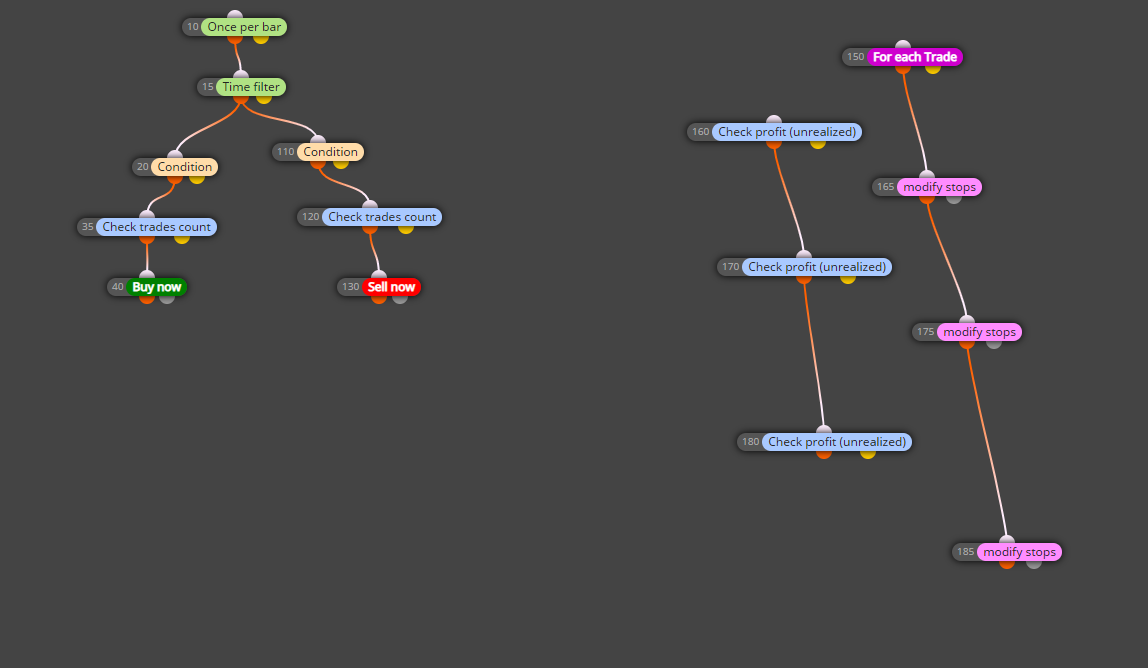
                0_1627237060984_kkk (2).png

                I used Check Profit (unrealised) as a means to condition the stop loss modification.
                However, it did not work and the stop loss did not get modified.

                In the (For Each Trade) Block, is there something needed to be inputted there? Otherwise, the logic of check profit may not be the right solution.

                jstap 1 Reply Last reply Reply Quote 0
                • jstap
                  jstap @Mohamed80 last edited by

                  @mohamed80 As is you have all in line, the logic here is one block has to be true before the next activates, but if block 1 is true it activates 2, but as soon as block 1 becomes false it will stop 2 & 3 activating.

                  Learn fxDreema Without the Wait!

                  My comprehensive book, available on Amazon, is packed with examples and invaluable insights to help you fast-track your learning journey.

                  The paperback and hardback editions include MT4 & MT5 QR codes for easy access to all prebuilt projects and robots, including my latest gold trading robot!

                  Don’t miss out

                  Click here➡️ https://mybook.to/fxDreema to get your copy today!

                  Enjoy! 😊

                  M 1 Reply Last reply Reply Quote 0
                  • M
                    Mohamed80 @jstap last edited by Mohamed80

                    @jstap
                    This means my logic should be right. In Block 160 I am checking for profit. If so, the stop should get modified in Block 165 and so on.
                    But it is not the case.

                    M 1 Reply Last reply Reply Quote 0
                    • M
                      Mohamed80 @Mohamed80 last edited by

                      @mohamed80

                      Unless Check Unrealised Profit Block is not a condition per se and may be I need a formula block to get value from the Profit Block.

                      1 Reply Last reply Reply Quote 0
                      • M
                        Mohamed80 last edited by

                        Sometimes (depends on what blocks I am using), the stop loss widens more than the initial one. i.e, stop loss is modified but the stop its self widens if it is a losing trade.

                        jstap 1 Reply Last reply Reply Quote 0
                        • jstap
                          jstap @Mohamed80 last edited by

                          @mohamed80 In your check unrealised it will go from 1 to 2 to 3 but you have it doing nothing if true or false.
                          For the pink blocks every tick it will modify stops to TP1 then to TP2 then to TP3, so you need a condition before each modify to stop them interfering with each other this is why I separated them, you can have for each trade>condition>modify-from yellow condition another condition>modify and so on so whenever a condition is false it moves onto the next.

                          Learn fxDreema Without the Wait!

                          My comprehensive book, available on Amazon, is packed with examples and invaluable insights to help you fast-track your learning journey.

                          The paperback and hardback editions include MT4 & MT5 QR codes for easy access to all prebuilt projects and robots, including my latest gold trading robot!

                          Don’t miss out

                          Click here➡️ https://mybook.to/fxDreema to get your copy today!

                          Enjoy! 😊

                          M 1 Reply Last reply Reply Quote 0
                          • M
                            Mohamed80 @jstap last edited by

                            @jstap

                            Can you connect them because I tried but it did not work.

                            1 Reply Last reply Reply Quote 0
                            • 1
                            • 2
                            • 2 / 2
                            • First post
                              Last post

                            Online Users

                            E
                            J
                            T
                            J
                            B

                            17
                            Online

                            146.7k
                            Users

                            22.4k
                            Topics

                            122.6k
                            Posts

                            Powered by NodeBB Forums | Contributors