fxDreema

    • Register
    • Login
    • Search
    • Back to the main page
    • Categories
    • Recent
    • Tags
    • Popular
    • Search

    Buy a EUR pair when Conditions are met from three Pairs

    General Discussions
    3
    38
    5988
    Loading More Posts
    • Oldest to Newest
    • Newest to Oldest
    • Most Votes
    Reply
    • Reply as topic
    Log in to reply
    This topic has been deleted. Only users with topic management privileges can see it.
    • M
      Mohamed80 @jstap last edited by Mohamed80

      @jstap @TipsyWisdom

      I will look into the text provided and the comments.

      I believe using current high and current low won't be an issue. I am using them for averaging strength and calculating overall scores not to trade them per se (as this is against logic). I already have the formula in my Excel sheet without any issue. As soon as we get one tick, we already have a High and a Low, and if we do not get this tick and stay at open price, the high and low is at the open price.
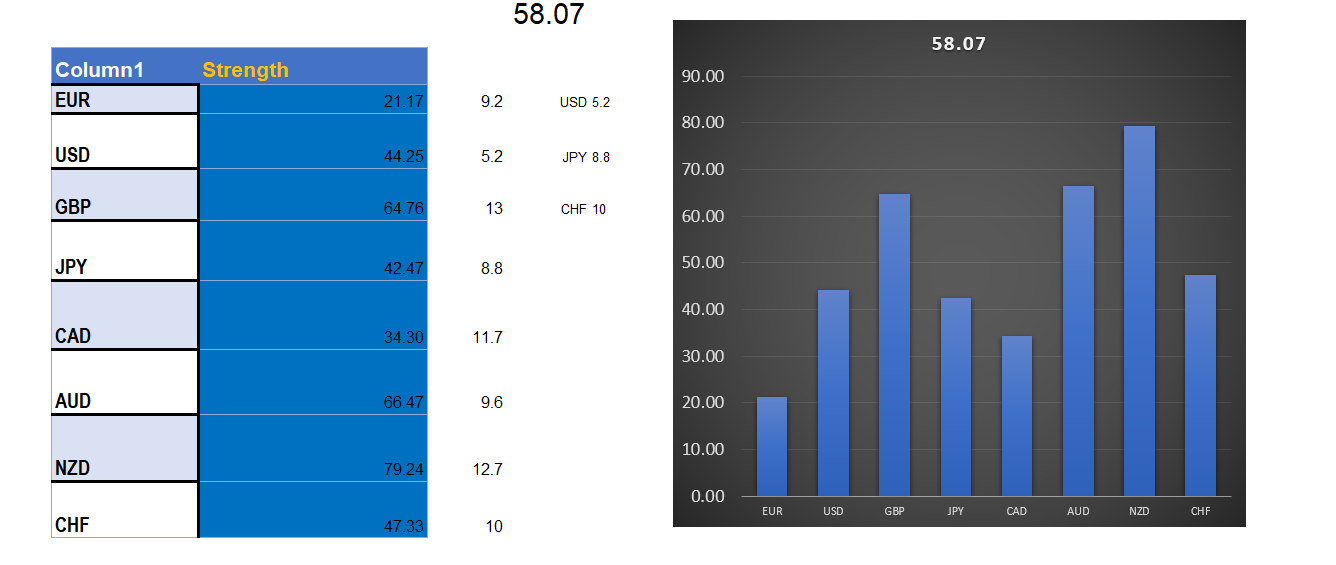
      0_1628034100764_540928f1-7517-4404-a8aa-4cb05f6252bd-2021-08-04 (2).png

      I will report back on how it goes.
      Thanks,

      1 Reply Last reply Reply Quote 0
      • M
        Mohamed80 last edited by Mohamed80

        0_1628035181631_c8af589f-cb43-4e01-b924-03ac5e5ab2df-2021-08-04 (6).png
        0_1628035247518_5a9fed8c-95b6-4030-ad27-0cc66f3a74d6-2021-08-04 (8).png

        I used Current (0), Low(0), and Open (0).

        @jstap
        The link you provided was great for me to start building on it. I understand now the logic of combining both Modifying Variable Block and the Custom MQL code Block.

        Now, is there a way to type: 1- pairs 2-Time Fame in the MQL Code Block?

        Thanks,

        jstap 1 Reply Last reply Reply Quote 0
        • M
          Mohamed80 last edited by Mohamed80

          @jstap

          I need some sort of a road map.

          The next step, after calculating the score for each currency group, is to check the inputed pair and link it to its Quote and Base currencies groups.

          For example: If I input EURUSD, then the EA will reference EUR and USD Blocks while disregarding the rest of the blocks of other currencies.

          This way, the EA will be more universal and can be applied to any chart.

          Do you know how to check for the inputted currency?
          Thanks,

          jstap 1 Reply Last reply Reply Quote 0
          • jstap
            jstap @Mohamed80 last edited by

            @mohamed80 Although this is not the prettiest you can generate more variables, in the more settings option set the timeframe and use in custom code like you did above.

            Learn fxDreema Without the Wait!

            My comprehensive book, available on Amazon, is packed with examples and invaluable insights to help you fast-track your learning journey.

            The paperback and hardback editions include MT4 & MT5 QR codes for easy access to all prebuilt projects and robots, including my latest gold trading robot!

            Don’t miss out

            Click here➡️ https://mybook.to/fxDreema to get your copy today!

            Enjoy! 😊

            M 1 Reply Last reply Reply Quote 0
            • jstap
              jstap @Mohamed80 last edited by jstap

              @mohamed80 I am a little lost with what you would like to achieve, if you look in the link link text you will see how to return the current symbol, the first 3 letters and the last 3. there are ways you can type letters on screen and use this to do something, is quite advanced though. Ignore that I've done it on MT4, is all I have free, should work on MT5 the same.

              Learn fxDreema Without the Wait!

              My comprehensive book, available on Amazon, is packed with examples and invaluable insights to help you fast-track your learning journey.

              The paperback and hardback editions include MT4 & MT5 QR codes for easy access to all prebuilt projects and robots, including my latest gold trading robot!

              Don’t miss out

              Click here➡️ https://mybook.to/fxDreema to get your copy today!

              Enjoy! 😊

              1 Reply Last reply Reply Quote 0
              • M
                Mohamed80 @jstap last edited by Mohamed80

                @jstap

                I will explain a bit more my (logic) and whether there is a better one you can suggest:

                Let's say I have the seven groups of currencies with their scores
                For Ex:
                AUD 80
                USD 30
                GBP 60
                NZD 28
                CHF 78
                etc..

                Now when I apply the EA on a chart of for ex: (GBPAUD). I want to only take values from GBP and AUD scores. I will have a string constant for inputting the pair name.

                The only logic I can think of for the next step is to use (Turn On/Off) Blocks.
                But this means I have to input 46 (for 28 pairs) of Turn On/Off Blocks.

                So my question is : Is there a way around it to have less number of Turn On/Off Blocks? That is if the only solution is to use these Turn On/Off Blocks. There might be another way to address it.

                Thanks,

                jstap 1 Reply Last reply Reply Quote 0
                • jstap
                  jstap @Mohamed80 last edited by jstap

                  @mohamed80 link text Look in the custom code of this link, I think what you need is there. If what yon need is in a variable/constant then calculate these not just numbers.

                  Learn fxDreema Without the Wait!

                  My comprehensive book, available on Amazon, is packed with examples and invaluable insights to help you fast-track your learning journey.

                  The paperback and hardback editions include MT4 & MT5 QR codes for easy access to all prebuilt projects and robots, including my latest gold trading robot!

                  Don’t miss out

                  Click here➡️ https://mybook.to/fxDreema to get your copy today!

                  Enjoy! 😊

                  M 1 Reply Last reply Reply Quote 0
                  • M
                    Mohamed80 @jstap last edited by

                    @jstap

                    This is great. It is similar to the Mid/Left/Right functions in Excel to extract a number of charcters. I love it.

                    BTW: Is there a way to substitute variables inside the custom code without assigning them first in the variables table?
                    This will be another milestone in my project.

                    Cheers,

                    jstap 1 Reply Last reply Reply Quote 0
                    • jstap
                      jstap @Mohamed80 last edited by

                      @mohamed80 To be honest I am unsure, what I do know though is a variable has to be in the list otherwise it will throw errors. I came from an excel back ground, a lot is very similar, if I have lots to add to code, rather than typing it all, I use excel to compile using formulas before copy/paste.

                      Learn fxDreema Without the Wait!

                      My comprehensive book, available on Amazon, is packed with examples and invaluable insights to help you fast-track your learning journey.

                      The paperback and hardback editions include MT4 & MT5 QR codes for easy access to all prebuilt projects and robots, including my latest gold trading robot!

                      Don’t miss out

                      Click here➡️ https://mybook.to/fxDreema to get your copy today!

                      Enjoy! 😊

                      M 1 Reply Last reply Reply Quote 0
                      • M
                        Mohamed80 @jstap last edited by

                        @jstap
                        "I use excel to compile using formulas before copy/paste"
                        What do you mean by (Compile) in Excel. Are using a certain application?

                        Or did you mean, using the autofill/drag for repetitive lines?

                        1 Reply Last reply Reply Quote 0
                        • jstap
                          jstap last edited by jstap

                          @mohamed80 I put a value in a cell, I then use a formula to sort the cell in next row, when I have the next row with all the correct formulas, I drag/autofill down, this gives me all required data, I then copy the range of cells, paste into custom code in FXDreema, all data is in normal row format so ready to use.

                          Learn fxDreema Without the Wait!

                          My comprehensive book, available on Amazon, is packed with examples and invaluable insights to help you fast-track your learning journey.

                          The paperback and hardback editions include MT4 & MT5 QR codes for easy access to all prebuilt projects and robots, including my latest gold trading robot!

                          Don’t miss out

                          Click here➡️ https://mybook.to/fxDreema to get your copy today!

                          Enjoy! 😊

                          1 Reply Last reply Reply Quote 0
                          • TipsyWisdom
                            TipsyWisdom @Mohamed80 last edited by

                            @mohamed80

                            very interesting concept indeed.

                            It sounds similar to how the dollar index is calculated.USDX = 50.14348112 × EURUSD^-0.576 × USDJPY^0.136 × GBPUSD^-0.119 × USDCAD^0.091 × USDSEK^0.042 × USDCHF^0.036

                            1 Reply Last reply Reply Quote 0
                            • M
                              Mohamed80 last edited by Mohamed80

                              0_1628323446951_3de609ef-0e83-482e-9072-d73dc15da6c0-To Dreema 2 (2).png

                              I wanted to see how the EA will behave if I trade all signals at once without me choosing which pair. tested on a demo account during the overlap hours of London and Newyork sessions.

                              I made the calculations for percentage change in the Custom Code Block. I found it in MQL4 reference and used for example:
                              EURUSD_Change=(iClose("EURUSD",PERIOD_D1,0)-iLow("EURUSD",PERIOD_D1,0))/(iHigh("EURUSD",PERIOD_D1,0)-iLow("EURUSD",PERIOD_D1,0))*100;

                              Observation: I used the "Comment Block" to plot the values and to check the updating frequency.
                              I found that when calculations are embedded in the Custom Block Code, they update quicker than when using a custom indicator(that calculates the same formulas) in the EA. I tried both.
                              I will try later on to find the same formulas to get few indicators readings like RSI, etc..


                              @jstap

                              I had to put a Sell and Buy Block for each of the 28 pairs and have two Conditions blocks for each one of them for Buys and Sells. For ex: for EURUSD: (EUR >= Bullish Threshold, USD<= Bearish Threshold)
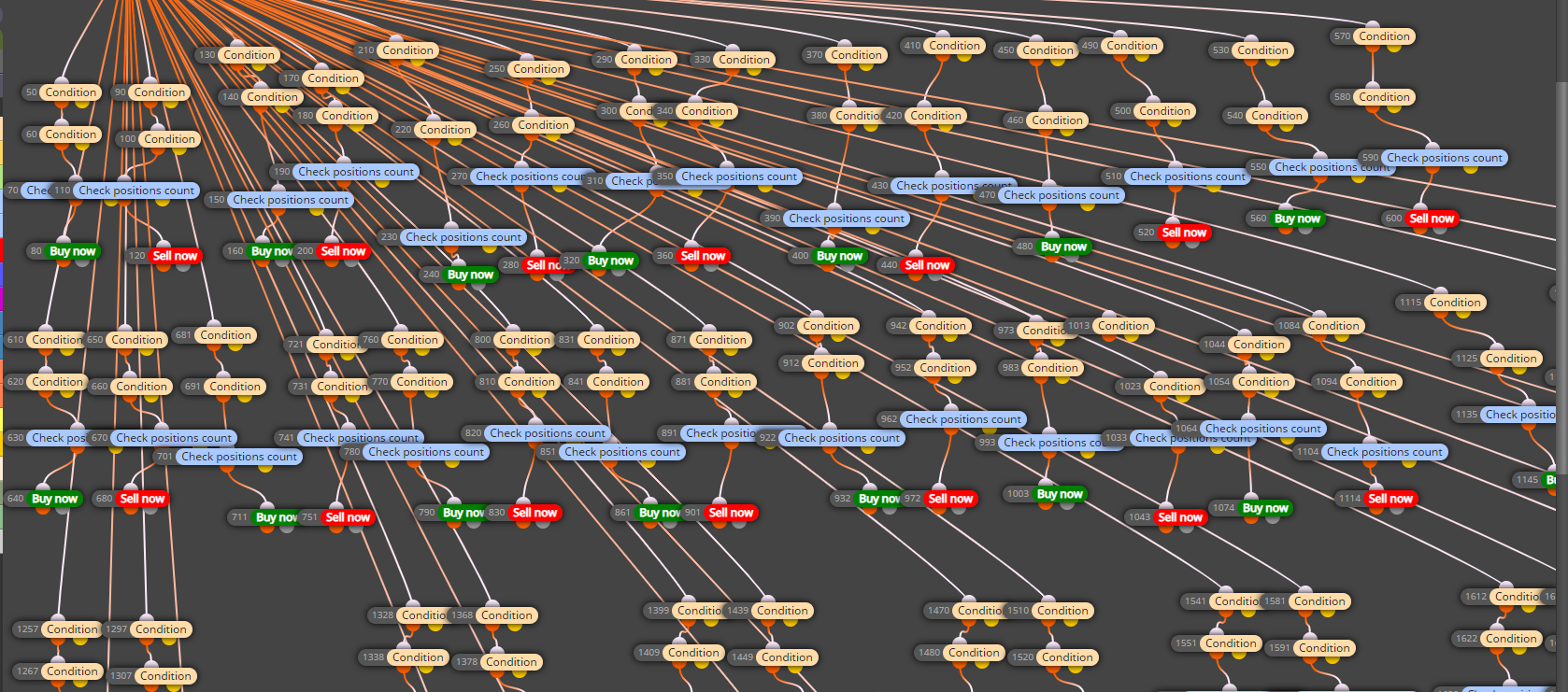
                              0_1628323909452_1f320216-c180-4fc9-9978-9b17cb807f02-2021-08-07 (3).png

                              I want to maximize all that I can do inside the Custom Code Block so I will include few points I want to address whenever you have some time:

                              1- The two condition blocks are for each Buy (For ex: EUR>= 80, USD<=20) and Sell (For ex: USD <=20, EUR>=80). They are placed just above a Buy/Sell Order Block for each pair.
                              Can I type the conditions inside the Custom Code Block or inside the Condition (coding) Block? Instead of having 2*28 Conditions Block?
                              Something like:
                              If((EUR_Strength >= 80) && (USD_Strength <=20 )) {Then Activate the buy Order Block for EURUSD or type a Buy Order if Possible.}

                              2- A General question: I tried inserting a string variable/constant between the brackets of Symbol () but it did not work. For ex: Symbol ("EURUSD") or Symbol (EURUSD). Is there a proper way to do it?
                              The reason for this question is that I may have certain numbers of Pairs that I want to trade only based on my Technical analysis and do not want to manually delete the pairs I do not need.
                              So I will have the 28 pairs as string constants and I want to choose which to trade.

                              3- In Excel, as you know, we can use the Filter Function for those values that are bigger than or smaller than a threshold. Then I can concat the respective Currencies and get the Pairs I need to trade.
                              Is there something similar to the Filter function one can use in the Custom Block? I can then use the substr. I only found MAthmax and MathMin but they won't help.
                              Anyway, it might be a bit complicated in the custom bloc as it is already lengthy in Excel.I am not really fussy about it.
                              I can use an Excel template to give me the list of all possible combinations and embed it in the Custom Code Block.

                              4- Any idea how to backtest? The backtesting did not yield any results although it was working Live and in MT5.

                              Thanks,

                              jstap TipsyWisdom 2 Replies Last reply Reply Quote 0
                              • jstap
                                jstap @Mohamed80 last edited by

                                @mohamed80 When I get a minute I will go over your questions, for now though (Symbol()==SYMBOL);
                                (OrderSymbol()==SYMBOL);
                                both go into custom code, although I haven't tried I think the string in SYMBOL variable is what is used and probably OrderSymbol is what to use for placing an order.

                                Learn fxDreema Without the Wait!

                                My comprehensive book, available on Amazon, is packed with examples and invaluable insights to help you fast-track your learning journey.

                                The paperback and hardback editions include MT4 & MT5 QR codes for easy access to all prebuilt projects and robots, including my latest gold trading robot!

                                Don’t miss out

                                Click here➡️ https://mybook.to/fxDreema to get your copy today!

                                Enjoy! 😊

                                M 1 Reply Last reply Reply Quote 1
                                • TipsyWisdom
                                  TipsyWisdom @Mohamed80 last edited by TipsyWisdom

                                  @mohamed80 wow

                                  M 1 Reply Last reply Reply Quote 0
                                  • M
                                    Mohamed80 @TipsyWisdom last edited by

                                    @tipsywisdom

                                    PM me with the discord group.

                                    Generally, what would be your approach? What blocks or codes do you suggest for all the Buy/Sell Order Blocks?

                                    1 Reply Last reply Reply Quote 0
                                    • TipsyWisdom
                                      TipsyWisdom last edited by TipsyWisdom

                                      it would depend on the strategy.

                                      1 Reply Last reply Reply Quote 0
                                      • M
                                        Mohamed80 @jstap last edited by Mohamed80

                                        @jstap

                                        Take your time...

                                        By the way, with regard to my first point/question, the pain for me was in changing/editing the two condition blocks for each pair.

                                        However, I overcame this problem by using a code to get a value of a variable if it is equal to 1(for longs) or -1 (for shorts). Then the two condition blocks will always remain intact. The editing will be in the Main Custom MQL4 Code Block which will make life easier of course.

                                        With regard to your answer to number 2, I want to know how to refer to a variable within the Symbol (). The latter will fetch the one on Chart. But if I type Symbol ("EURUSD"), it will give an error. There might be some difference between MT4 and MT5.

                                        Thanks,

                                        1 Reply Last reply Reply Quote 0
                                        • 1
                                        • 2
                                        • 2 / 2
                                        • First post
                                          Last post

                                        Online Users

                                        J
                                        T
                                        J
                                        B

                                        19
                                        Online

                                        146.7k
                                        Users

                                        22.4k
                                        Topics

                                        122.6k
                                        Posts

                                        Powered by NodeBB Forums | Contributors