fxDreema

    • Register
    • Login
    • Search
    • Back to the main page
    • Categories
    • Recent
    • Tags
    • Popular
    • Search

    Same TP multiple trades

    Questions & Answers
    7
    21
    3915
    Loading More Posts
    • Oldest to Newest
    • Newest to Oldest
    • Most Votes
    Reply
    • Reply as topic
    Log in to reply
    This topic has been deleted. Only users with topic management privileges can see it.
    • C
      Crisfx last edited by Crisfx

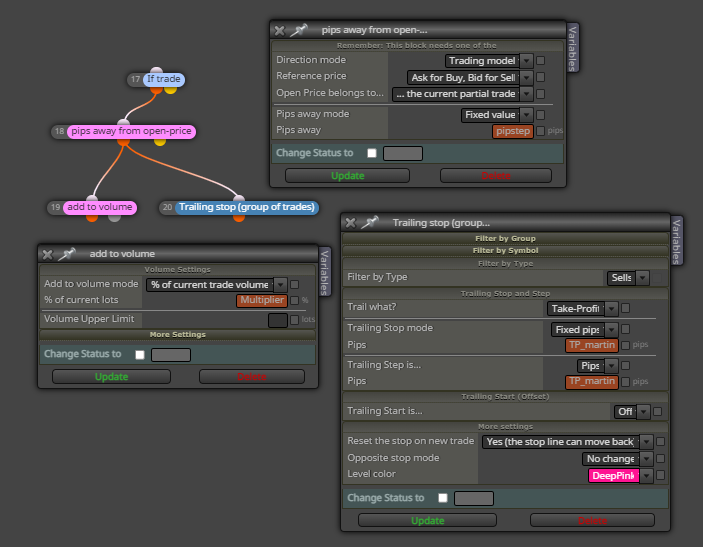
      Hello, I'm having trouble getting the take profit of 1 or more trades set at the same price. The logic is this: when the condition is right, the expert opens a buy or sell trade. If the trade goes negative after x pips opens another trade and adds volume (not exactly martingale), then the TP of the new and parent trade is changed to a preset number at this point. The problem is that "the new TP" is not always the same for both trades, I don't know if it depends on the spread or the volatility of that moment, I think the problem is the "market price" setting, you cannot set to change the new take profit FROM the new trade opening price?
      0_1650644673861_Cattura.JPG

      P fxbam 2 Replies Last reply Reply Quote 0
      • C
        Crisfx last edited by

        If you have another solution to do the same it is welcome

        jstap 1 Reply Last reply Reply Quote 0
        • jstap
          jstap @Crisfx last edited by

          @cri760 You need a pink for each trade block above pink, not if trade, there is a pink modify stopes block.

          Learn fxDreema Without the Wait!

          My comprehensive book, available on Amazon, is packed with examples and invaluable insights to help you fast-track your learning journey.

          The paperback and hardback editions include MT4 & MT5 QR codes for easy access to all prebuilt projects and robots, including my latest gold trading robot!

          Don’t miss out

          Click here➡️ https://mybook.to/fxDreema to get your copy today!

          Enjoy! 😊

          C 1 Reply Last reply Reply Quote 0
          • C
            Crisfx @jstap last edited by

            @jstap The problem is the market price, the pink modify stops also uses it. Is there a way to open the second trade (with pips away) using the new TP from the opening price and not the market price? Sometimes it happens that the TP is not the same for both trades, probably because in that thousandth of a second the price moves and the block takes the new market price and not the opening price of the trade!

            jstap 1 Reply Last reply Reply Quote 0
            • jstap
              jstap @Crisfx last edited by

              @cri760 When time to add new trade use the standard buy/sell block under pink.

              Learn fxDreema Without the Wait!

              My comprehensive book, available on Amazon, is packed with examples and invaluable insights to help you fast-track your learning journey.

              The paperback and hardback editions include MT4 & MT5 QR codes for easy access to all prebuilt projects and robots, including my latest gold trading robot!

              Don’t miss out

              Click here➡️ https://mybook.to/fxDreema to get your copy today!

              Enjoy! 😊

              C 1 Reply Last reply Reply Quote 0
              • C
                Crisfx @jstap last edited by

                @jstap Set as in the picture, everything already works correctly. If it opens at 1.10000 in buy, the price drops and opens at 1.09300 with another buy with the photo blocks. However, when the TP of both is changed (modify stops of trades) it is not always set at the same price. It happens 1-2 times out of 5. Do you know why?

                1 Reply Last reply Reply Quote 0
                • CedieTraderMax
                  CedieTraderMax last edited by

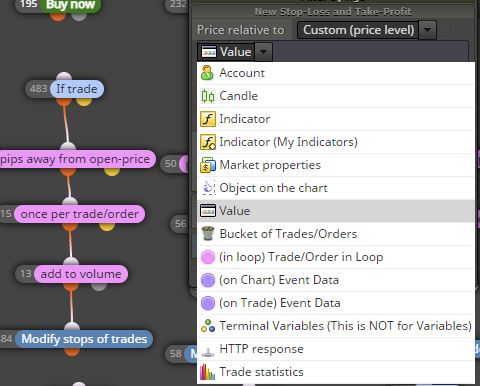
                  Use TP at PRICE LEVEL, will do the trick

                  C 1 Reply Last reply Reply Quote 0
                  • C
                    Crisfx @CedieTraderMax last edited by Crisfx

                    @cedietradermax What setting should i have to select next?
                    0_1650820804159_Cattura.JPG

                    jstap 1 Reply Last reply Reply Quote 0
                    • P
                      Paihdt @Crisfx last edited by

                      @cri760 you may try this
                      0_1650870945522_ec0c42d9-b282-4fd5-adca-bd62e5e45fee-image.png

                      C 1 Reply Last reply Reply Quote 0
                      • jstap
                        jstap @Crisfx last edited by

                        @cri760 Below pink should use in loop, if you want existing/closed trade info, all pink need a for each dark pink block above.

                        Learn fxDreema Without the Wait!

                        My comprehensive book, available on Amazon, is packed with examples and invaluable insights to help you fast-track your learning journey.

                        The paperback and hardback editions include MT4 & MT5 QR codes for easy access to all prebuilt projects and robots, including my latest gold trading robot!

                        Don’t miss out

                        Click here➡️ https://mybook.to/fxDreema to get your copy today!

                        Enjoy! 😊

                        1 Reply Last reply Reply Quote 0
                        • C
                          Crisfx @Paihdt last edited by

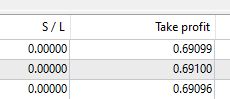
                          @paiz @jstap Unfortunately the trailing stop is not good because it continues to move the tp. It seems absurd to me that a TP cannot be set for all trades from the price of the new trade (opened thanks to pips away) and not from the market price, which can change in an instant, in fact the TP is not always the same for all trades opened. As you can see from the photo in this case the values are different, sometimes it changes even by 1 pips, it can happen that one of the trades takes the Tp and others don't, it doesn't have to happen.
                          0_1650901224597_Cattura.JPG

                          jstap 2 Replies Last reply Reply Quote 0
                          • jstap
                            jstap @Crisfx last edited by

                            @cri760 The add to volume block will use original TP etc, I only use trail under a if trade block, under pink will only work when true and only if a dark pink for each block is on top.

                            Learn fxDreema Without the Wait!

                            My comprehensive book, available on Amazon, is packed with examples and invaluable insights to help you fast-track your learning journey.

                            The paperback and hardback editions include MT4 & MT5 QR codes for easy access to all prebuilt projects and robots, including my latest gold trading robot!

                            Don’t miss out

                            Click here➡️ https://mybook.to/fxDreema to get your copy today!

                            Enjoy! 😊

                            C 1 Reply Last reply Reply Quote 0
                            • C
                              Crisfx @jstap last edited by

                              @jstap Since I can't find a solution, how should I follow my first screenshot posted to close the 2 trades when X pips profits from the second trade? (The old is negative and the new is positive)

                              1 Reply Last reply Reply Quote 0
                              • jstap
                                jstap @Crisfx last edited by

                                @cri760 Never used group of trades but in single trades you have option to turn off moving tp, this block is also set to move sl back, if you use each trade then the SL for each trade will catch the last when distance permits.

                                Learn fxDreema Without the Wait!

                                My comprehensive book, available on Amazon, is packed with examples and invaluable insights to help you fast-track your learning journey.

                                The paperback and hardback editions include MT4 & MT5 QR codes for easy access to all prebuilt projects and robots, including my latest gold trading robot!

                                Don’t miss out

                                Click here➡️ https://mybook.to/fxDreema to get your copy today!

                                Enjoy! 😊

                                C 1 Reply Last reply Reply Quote 0
                                • C
                                  Crisfx @jstap last edited by

                                  @jstap In the same chart, when one operation is negative and one positive, how do I set up a closing of both with average profit?

                                  jstap 1 Reply Last reply Reply Quote 0
                                  • jstap
                                    jstap @Crisfx last edited by

                                    @cri760 You need to use bucket of trades saving profit into a variable, in a separate tree have a condition block with variable => a chosen number, connected to a close trades block.

                                    Learn fxDreema Without the Wait!

                                    My comprehensive book, available on Amazon, is packed with examples and invaluable insights to help you fast-track your learning journey.

                                    The paperback and hardback editions include MT4 & MT5 QR codes for easy access to all prebuilt projects and robots, including my latest gold trading robot!

                                    Don’t miss out

                                    Click here➡️ https://mybook.to/fxDreema to get your copy today!

                                    Enjoy! 😊

                                    C 1 Reply Last reply Reply Quote 0
                                    • C
                                      Crisfx @jstap last edited by

                                      @jstap I also tried to use the average profit but by setting a negative value, the operations are closed immediately (as a loss), as the first operation is negative for ex. 50 pips opens the second trade and when it is +30 pips it should close both trades.

                                      A 1 Reply Last reply Reply Quote 0
                                      • fxDreema
                                        fxDreema last edited by

                                        I didn't read the whole topic, so someone may already have given a good answer, but I will add mine just in case.

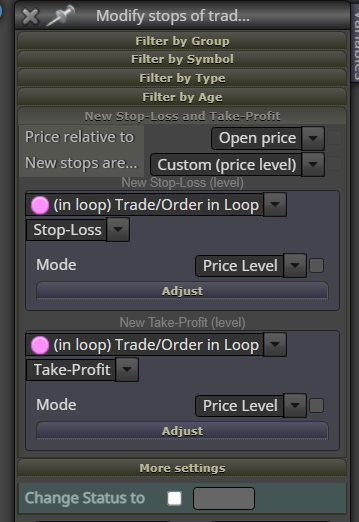
                                        Those blue blocks, such as "Modify stops of trades" or the trailing stop block - they do the same action on multiple trades, but not exactly at the same time. This block would modify one trade, then after this is done it will go to modify the second trade... and do this while all are modified. But meanwhile the price is moving, which I think is the problem, because "Price relative to" refers to the current market price, which is Ask or Bid.

                                        So I think the question is how to use more stable price. I think what you can do is to have some "double" variable, in which you can store the value of the price above the blue block, and then use that variable in the block.

                                        Also, try this. I'm not exactly sure that it's working, but...
                                        0_1652093749683_0db33e10-816d-4740-a340-250bbc0d7915-image.png

                                        1 Reply Last reply Reply Quote 2
                                        • fxbam
                                          fxbam @Crisfx last edited by

                                          @Cri760 I see you were trying to figure out the same issue I'm trying to figure out right now. Have you found a way to change all older open TP trades to match the most recent one and increase volume to cover it all?

                                          1 Reply Last reply Reply Quote 0
                                          • A
                                            alok @Crisfx last edited by

                                            @Cri760 said in Same TP multiple trades:

                                            @jstap I also tried to use the average profit but by setting a negative value, the operations are closed immediately (as a loss), as the first operation is negative for ex. 50 pips opens the second trade and when it is +30 pips it should close both trades.
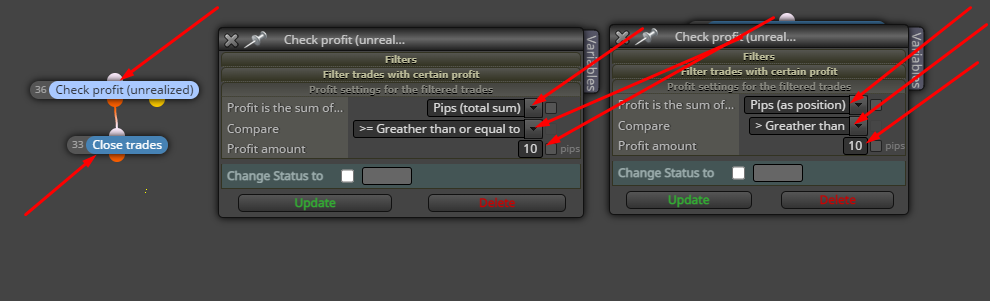
                                            95c98ac3-9ec7-4710-b993-a0d7cb92d11e-image.png
                                            Maybe you've already solved the problem, but for people who are having the same difficulty see, try this

                                            1 Reply Last reply Reply Quote 0
                                            • 1
                                            • 2
                                            • 1 / 2
                                            • First post
                                              Last post

                                            Online Users

                                            K
                                            M
                                            M
                                            C

                                            11
                                            Online

                                            146.7k
                                            Users

                                            22.4k
                                            Topics

                                            122.6k
                                            Posts

                                            Powered by NodeBB Forums | Contributors