My EA compiled without issue, but won't run any tests (Edit: allow dll imports for kernel32.dll)
-
It will run through thousands of tasks in seconds, saying busy/finished rapidly. thousands of tasks, yet none pass. 0. I am using custom indicators, and I may have modified an indicator mid programming without updating the indicator in fxDreema's "My Indicators". Would that cause an issue? That's the only thing I can think. It does have a lot of blocks. over 800..
-
i'm having the same issue
-
so I deleted and re-uploaded the indicators, stripped down a lot of options blocks and created the bare essentials, it's still not making any passes in the back tester. I've been fxDreemin' for the past few months, so Idk if there's something I'm missing, or what. I'm probably going to use formula blocks and combine the elements to recreate the indicators within fxDreema, and hope that works. I've used custom indicators before without issue. I'm not saying there is, but it's either a bug in the server files, or more than likely, my error. Anyone want to look at my project and call me a moron?
 (under the condition you solve the error.. you can call me a moron all you like!)
 -
-
Yep, I recreated the environment using stock indicators in the builder, but it's still racking up tasks super fast, but passed for all remain at 0. Curious. There must be an error in the FxDreema database now after the hack.
-
@nicholas86 try running a single backtest in visual mode, check if the EA sends error messages.
It is also handy to put "draw line" blocks at random points of the flow, to see if those blocks are executed
-
Ok, so I uploaded an old project that had results calculate in the backtester and re-saved the mql file and compiled it. and it's doing the same thing. Not calculating. So this is an FxDreema error, not a me error.
-
It seems to be an issue with Metatrader having updated and causing issues with fxdreema code. non-fxdreema EAs seem to function ok. Is anyone else having this issues, or is it just me?
-
Hi
Having the same. Getting this error message in journal:
2022.12.29 20:21:38.459 2022.10.13 16:03:04 786--Try-(c)AlbakryForexLtd GOLD,M1: zero divide in '30667-57674.mq4' (15421,31)
2022.12.29 20:21:38.459 2022.10.13 16:03:04 Testing pass stopped due to a critical error in the EA
2022.12.29 20:21:38.474 GOLD,M1: 246 tick events (2 bars, 13761199 bar states) processed in 0:00:00.577 (total time 0:00:16.068)
@fxdreema please help??!!
Thanks
-
So the visual is telling me
2022.12.29 13:52:19.714 2022.09.01 00:00:00 DLL loading is not allowed
2022.12.29 13:52:19.714 global initialization failed
2022.12.29 13:52:19.714 global initialization critical error
2022.12.29 13:52:19.714 tester stopped because expert initialization failedI searched the mql code and it's loading kernel32.dll
I guess I needed to accept dll imports in the MT5 settings. oops! I did recently re-install MT5. FALSE alarm y'all. DOH!
-
My new concern is what if you load an ea requiring DLL imports onto a VPS, which you may have no control over that setting, and you can NEVER get your EAs to function after compiling from the current model of FxDreema code? is this gonna be an issue @FXDREEMA
-
@nicholas86 allowing DLL concerns all EAs regardless if its made in Fxdreema or not.
Many VPS providers probably wont allow DLLs, because they cause security risks to the servers.
-
@FXDREEMA Please remove the addition of Kernel32.dll being exported in the mql5 file. this never happened before the hack.. I feel like the kernel32 is not necessary.
-
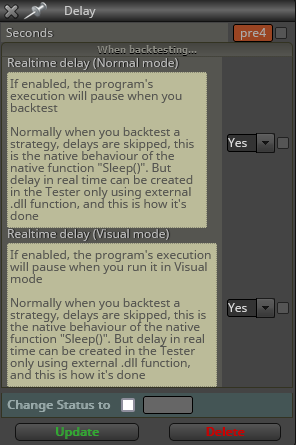
The "DELAY" blocks call a Sleep() Function. This is the issue you're having.