fxDreema

    • Register
    • Login
    • Search
    • Back to the main page
    • Categories
    • Recent
    • Tags
    • Popular
    • Search
    1. Home
    2. nicholas86
    N
    • Profile
    • Following 0
    • Followers 0
    • Topics 8
    • Posts 14
    • Best 1
    • Controversial 0
    • Groups 0

    nicholas86

    @nicholas86

    3
    Reputation
    67
    Profile views
    14
    Posts
    0
    Followers
    0
    Following
    Joined Last Online

    nicholas86 Unfollow Follow

    Best posts made by nicholas86

    • I created an On Init Template for Damage Control

      https://fxdreema.com/shared/8B1uo9qzc

      Check it out. Just some ideas I had.

      The constants are missing, but it wouldn't be too hard to replace those and rename them and target them as you'd like.
      *Turn on Trailing Stop Loss, or off if you want the default Stop Loss made with each order to be 0.
      *Turn on Close after X Consecutive Losses to prevent your account tanking and potentially violating an evaluation or challenge. I like to think that this would allow you to save stress if the markets change and give you time to Re-Optimize the settings before restarting it.
      *Turn on Time out timer to re-enable the EA after a set amount of minutes after Consecutive Losses disables it. (just in case that's something you want)
      *Turn on Close on Profit Target if you're leaving it on overnight and don't want to lose anything before you wake up.

      I had to trouble shoot for a few hours to get my EA to work and it was buggin the Buy and Sell blocks, so I think I fixed it and if you see an error or a better option, PLEASE feel free to post them on this thread.

      Thanks, and hope this helps.

      P.S. What other On Init ideas could I put in this for utility purposes?

      It would be cool to put a pip to currency amount calculator inside the parameters settings. Is that possible?

      EDIT: Plz remove the pass once blocks if you want to change the setting after the EA has started. I left the pass once blocks going to email block, though.
      posted in General Discussions
      N
      nicholas86

    Latest posts made by nicholas86

    • RE: I created an On Init Template for Damage Control

      @l-andorrà you're right, the pass once blocks actually hindered it if I wanted to change it after it started.

      posted in General Discussions
      N
      nicholas86
    • Change an indicator's value with drop down menu based on pair

      Is it possible to create a drop down menu that shows you available pairs and changes an indicator's values depending on what pair you pick from the EA settings drop down menu?

      Would that be variables? I haven't even tried messing with variables yet as I don't understand what that's about. I only messed with Constants so far. But logically, I can see how this could be done if I knew how to do it. IF it even is possible.

      posted in Questions & Answers
      N
      nicholas86
    • EA not working on other pairs, no symbol specified in the blocks

      So I've been testing my EA on the XAUUSD pair and got good results finally and went to another pair and it didn't work. I went back into fxDreema and shut off all non vital blocks and retried then removed group numbers and retried and then just triple checked to make sure no symbols were designated as specific or anything was written in the boxes.

      What the heck is going on? :0

      Ok, I figured it out. ATR is WAAAAY different on pairs other than gold. It goes from 2-5 on XAUUSD to 0.1-0.5 on XAGUSD. I have to re-optimize ATR for each pair.

      posted in Questions & Answers
      N
      nicholas86
    • RE: How does the email block work?

      @l-andorrà Ok. Thanks! So that email function won't work if you don't have an fxDreema account?

      posted in Questions & Answers
      N
      nicholas86
    • I created an On Init Template for Damage Control

      https://fxdreema.com/shared/8B1uo9qzc

      Check it out. Just some ideas I had.

      The constants are missing, but it wouldn't be too hard to replace those and rename them and target them as you'd like.
      *Turn on Trailing Stop Loss, or off if you want the default Stop Loss made with each order to be 0.
      *Turn on Close after X Consecutive Losses to prevent your account tanking and potentially violating an evaluation or challenge. I like to think that this would allow you to save stress if the markets change and give you time to Re-Optimize the settings before restarting it.
      *Turn on Time out timer to re-enable the EA after a set amount of minutes after Consecutive Losses disables it. (just in case that's something you want)
      *Turn on Close on Profit Target if you're leaving it on overnight and don't want to lose anything before you wake up.

      I had to trouble shoot for a few hours to get my EA to work and it was buggin the Buy and Sell blocks, so I think I fixed it and if you see an error or a better option, PLEASE feel free to post them on this thread.

      Thanks, and hope this helps.

      P.S. What other On Init ideas could I put in this for utility purposes?

      It would be cool to put a pip to currency amount calculator inside the parameters settings. Is that possible?

      EDIT: Plz remove the pass once blocks if you want to change the setting after the EA has started. I left the pass once blocks going to email block, though.

      posted in General Discussions
      N
      nicholas86
    • RE: Making The EA look nice? Settings block IDs

      @jstap How do I add the fancy Title bars with this:
      ==== Text goes here ====
      ?
      I tried entering
      string = [blank] = description: the text I wanted
      But it didn't work.

      EDIT: Never mind, I made a mistake. I forgot to update the Constants before closing the Constants window. Oops!

      posted in Questions & Answers
      N
      nicholas86
    • How does the email block work?

      I don't see an area where the user can insert their email. how does that work? How does it know what email address to send to if you can't enter an email address into the EA? Maybe I'm looking in the wrong place.

      posted in Questions & Answers
      N
      nicholas86
    • RE: Making The EA look nice? Settings block IDs

      @jstap Yeah, the option is probably not even gonna make a difference in this particular indicator, a moving average. The period is probably more important.

      I am grateful for your help. The ENUM thing works!

      posted in Questions & Answers
      N
      nicholas86
    • RE: Making The EA look nice? Settings block IDs

      @jstap So I guess I would put
      string == Typical price (HCL/3)
      if I want to have a constant be able to change the applied price of an indicator block from the drop down menu? Or is there a specific code I need to enter.

      Thank you!

      edit: that string didn't work. It shows up in the tester parameters but it doesn't drop down a menu. just shows the text.

      posted in Questions & Answers
      N
      nicholas86
    • RE: Making The EA look nice? Settings block IDs

      Ok, I see that.
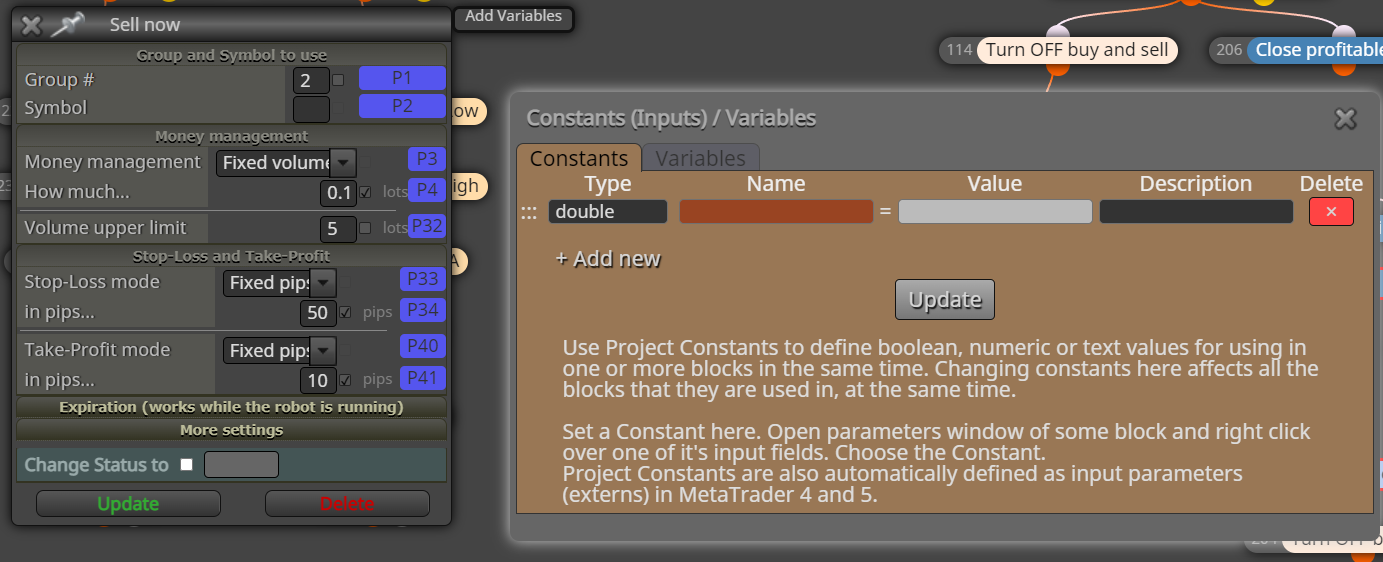
      0_1656438914600_Screenshot 2022-06-28 12.53.45.png

      Do the P#s go under "Name" or "Value"?
      what equals what? Is P# the name or the value?
      Also how do I add a row that's just a description as seen in the example in my first post?

      Ok, searching the forums, thanks.

      posted in Questions & Answers
      N
      nicholas86