fxDreema

    • Register
    • Login
    • Search
    • Back to the main page
    • Categories
    • Recent
    • Tags
    • Popular
    • Search

    ICustom problem

    Questions & Answers
    3
    10
    1478
    Loading More Posts
    • Oldest to Newest
    • Newest to Oldest
    • Most Votes
    Reply
    • Reply as topic
    Log in to reply
    This topic has been deleted. Only users with topic management privileges can see it.
    • AlphaOmega
      AlphaOmega last edited by

      Re: 4108 Error: Invalid ticket/order close error
      Thanks GeoFX for your time and explanation, excellent study!
      It says the topic is old and I have to start a new one, so here goes nothing:

      My problem is that I want to use the object on chart as Miro1360 tutorial 07 but:
      The expert backtest super, super slow. I compiled the expert in mql5 platform and it gave this error information.

      0_1621400019707_2455b45c-5b10-4b3c-b805-c0b7e6d358c6-image.png

      I do not know what this means. Also why loading the indicator Horrick Prescot channel as it is not even part of the expert?
      If I load the expert with the original indicator shved_supply_and_demand_v1.2 everything works perfect again.. I am confuse?

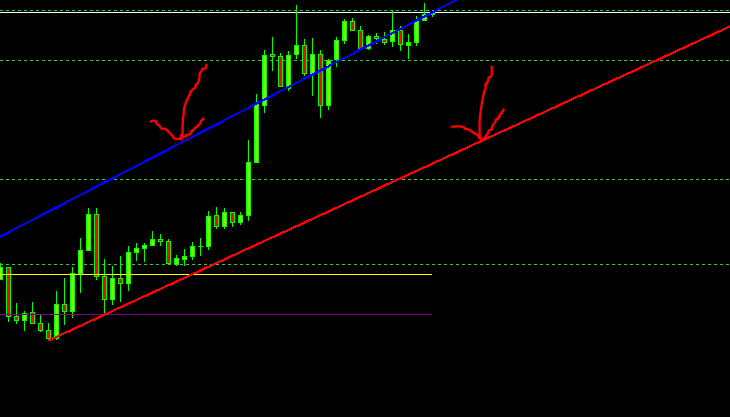
      My idea is to find the trend line of the Auto Trend Line indicator... so now I am stuck
      0_1621400596829_fb798e51-3007-4902-9969-79a4dbf49731-image.png

      Please can somebody help me out here, much appreciated!!
      https://fxdreema.com/shared/EZU5NQXbe
      0_1621400823284_1617820654778-autotrendlines-3.mq5

      l'andorrà 1 Reply Last reply Reply Quote 0
      • l'andorrà
        l'andorrà @AlphaOmega last edited by

        @alphaomega I guess the only one that can reply properly is miro himself, man! This is ultra advanced fxDreema for me! 😞

        (English) I will try to help everyone in these fxDreema forums. But if you want to learn how to use the platform in depth or more quickly, I can help you with my introductory fxDreema course in English at https://www.theandorraninvestor.eu.

        (Català) Miraré d’ajudar tothom en aquests fòrums d’fxDreema. Tanmateix, si vols aprendre a fer servir la plataforma amb més profunditat o més de pressa, t’hi puc ajudar amb el meu curs d’introducció a fxDeema en català a https://www.theandorraninvestor.eu/ca.

        (Español) Intentaré ayudar a todo el mundo en estos foros de fxDreema. Sin embargo, si quieres aprender a usar la plataforma en profundidad o más deprisa, te puedo ayudar con mi curso de introducción a fxDreema en español en https://www.theandorraninvestor.eu/es.

        1 Reply Last reply Reply Quote 1
        • AlphaOmega
          AlphaOmega last edited by

          Thx for the reply l'andorrà I have always thought highly of you and the work you put in Fxdreema so freely..

          AlphaOmega calling @miro1360 @roar and any other advanced users for help please.. Thank you in advance!!

          1 Reply Last reply Reply Quote 0
          • AlphaOmega
            AlphaOmega last edited by AlphaOmega

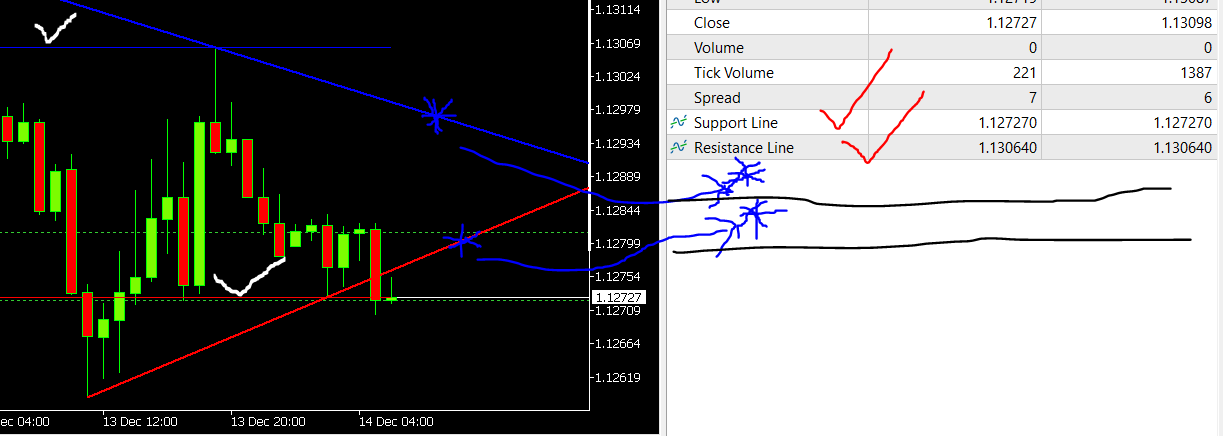
            @fxdreema I know you are a busy but while you moved this topic to the correct section, you maybe did not get the urge to change something inside the indicator so I could use the angled red and blue sup/res lines? Please and thank you!
            Edit: The problem is .. there is no buffer in the indicator showing to those angle lines.. maybe some coder can add it?
            0_1639456126063_32770099-ac0b-4677-ac0f-4f161e2aac10-image.png

            1 Reply Last reply Reply Quote 0
            • fxDreema
              fxDreema last edited by

              Yes, these lines are printed like lines from the indicator, here is the function:
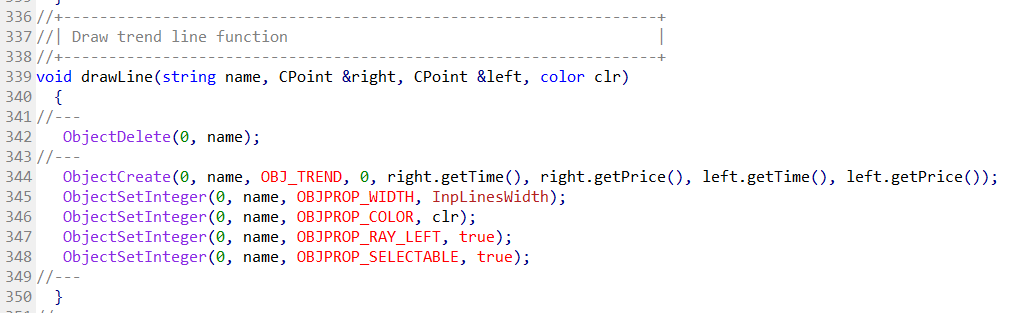
              0_1639476568473_a07906c1-534d-4c34-95de-1b1234006c94-image.png

              The red line has name Current_Support, the blue line has name Current_Resistance. You can deal with them as objects.

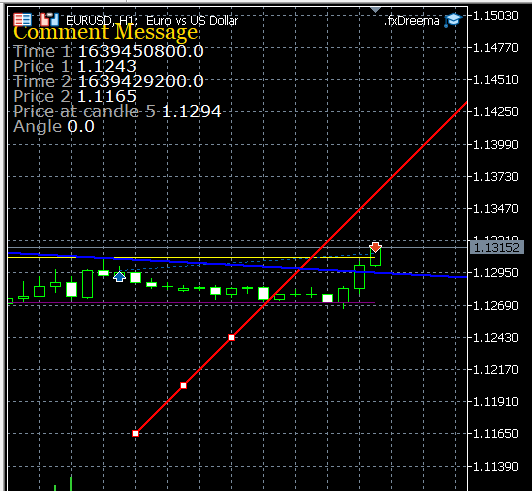
              Here is something I just did: https://fxdreema.com/shared/mQVcuDd8d
              Here are the results:
              0_1639478775607_153791db-9e06-434a-ac5f-b2b3f27a7eb1-image.png

              Unfortunately the times are nor very appealing, it's because they are converted to "double" values.
              The angle is 0, I guess this is the case for trend lines.
              I tried to get the value from candle in the future, but it gives me an error... I'm not sure if it's not possible or there is a bug.

              AlphaOmega 2 Replies Last reply Reply Quote 1
              • AlphaOmega
                AlphaOmega @fxDreema last edited by AlphaOmega

                @fxdreema I am grateful to you taking the time to check this out. I have not look into what you did but read there is a timing issue.
                You do know that the two angled trend lines does move as PA move right? So I do not think the timing will work quite well but what would work is if you can change the code for the angled trend line will look back at the candles already printed and then look into the future projected candles?

                This is an example of what I am talking about.. You could just copy the code and paste into the correct space at Autotrendlines? (maybe.. I don't know what you people eat to understand code because I don't .. lol)
                This is something roar did but never finished although I think is has big potential
                https://fxdreema.com/shared/dQjckUy3b
                Please take a look.
                edit:: 0_1639494269457_0515dba6-23b5-4a02-a1e4-5f832caf4e7f-image.png
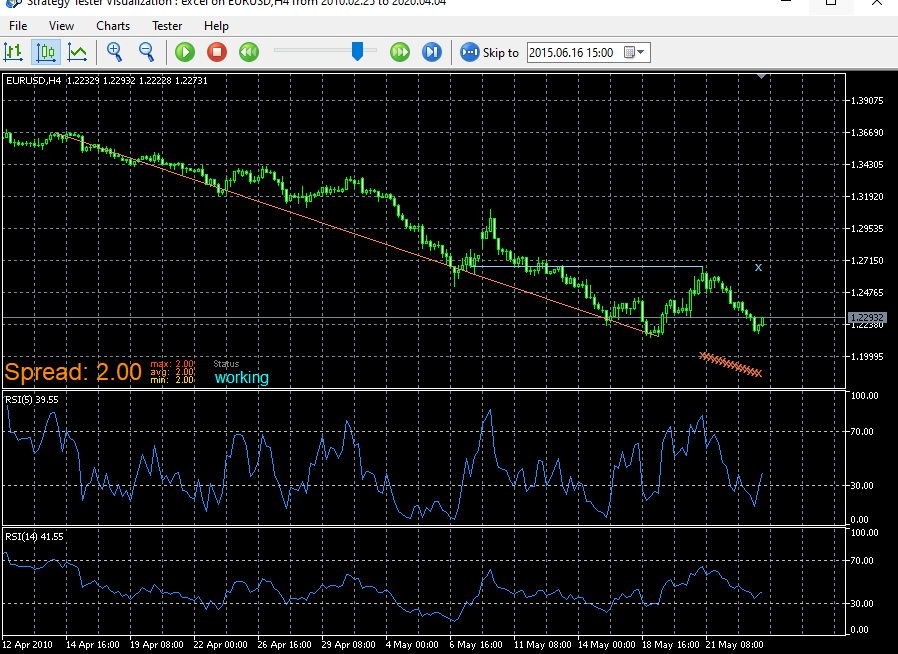
                1 Reply Last reply Reply Quote 0
                • AlphaOmega
                  AlphaOmega @fxDreema last edited by

                  @fxdreema Wow you guys think alike... I just looked at your link... It looks like exactly the same roar did!! Thank you..

                  fxDreema 1 Reply Last reply Reply Quote 0
                  • fxDreema
                    fxDreema @AlphaOmega last edited by

                    @alphaomega I think you clicked the same link twice 🙂

                    I didn't know that the trendlines are moving. But they are just trendlines, what can you do with them? In my example I'm showing how to get some information from them.

                    AlphaOmega 1 Reply Last reply Reply Quote 0
                    • AlphaOmega
                      AlphaOmega @fxDreema last edited by

                      @fxdreema Thanks so much for your patience and valuable time! I looked at your new creation.. but do not know how to implement it into my project and utilize the information. I am real sorry that I am to daft to understand, but I have attached my project for you to see that I am not getting anywhere with this new information.
                      https://fxdreema.com/shared/lJjGNehHc

                      1 Reply Last reply Reply Quote 0
                      • AlphaOmega
                        AlphaOmega last edited by

                        I forgot to answer your question... What can I do with them... check picture:
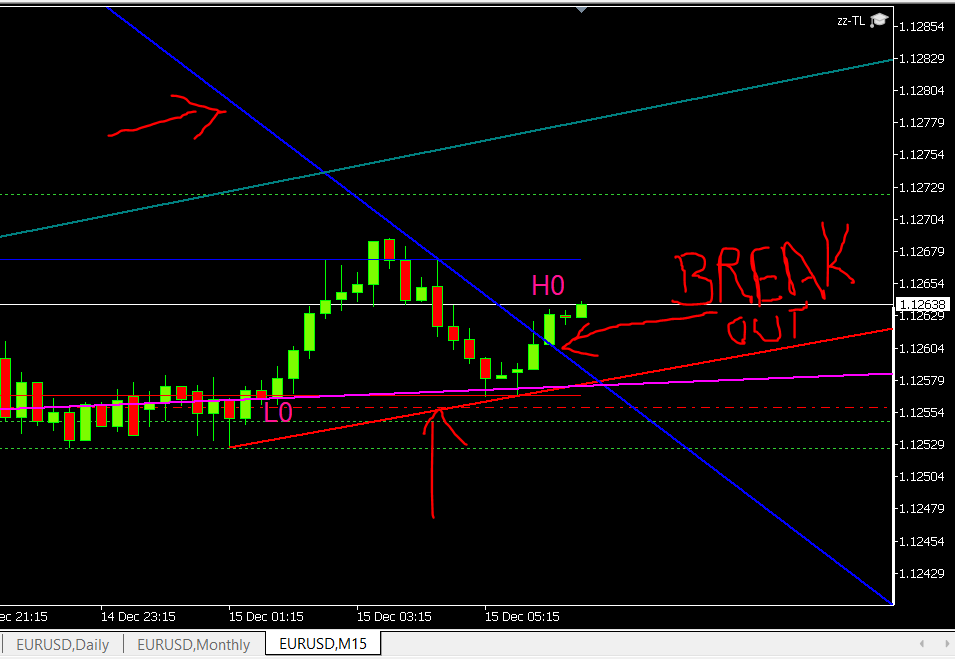
                        0_1639544418493_cb62caa0-c8ce-4bba-8126-60c639bcea42-image.png eurusd M5
                        Problem is I cannot see that angled trend-lines to use in the expert?

                        1 Reply Last reply Reply Quote 0
                        • 1 / 1
                        • First post
                          Last post

                        Online Users

                        M
                        P
                        S
                        A
                        E
                        M
                        F

                        22
                        Online

                        146.6k
                        Users

                        22.4k
                        Topics

                        122.6k
                        Posts

                        Powered by NodeBB Forums | Contributors