Tutorial 02 - EMA cross, part 2 [beginners]
-
In tutorial 01 I showed how to create easiest counter cross EA, in this tutorial you will see how to add inputs into EA with fxdreema.
Click on this link with EA for more details:
https://fxdreema.com/shared/G8goTenZbWhen you will directly import that EA without creating block after block, do this:
-
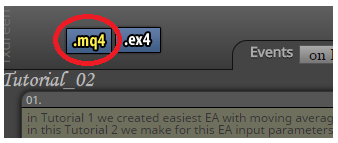
generate mql code and save it somewhere:
-
import this generated file into projects:
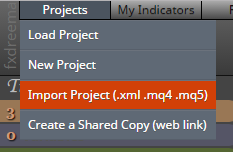
Now is EA imported in projects and you can start work with them.
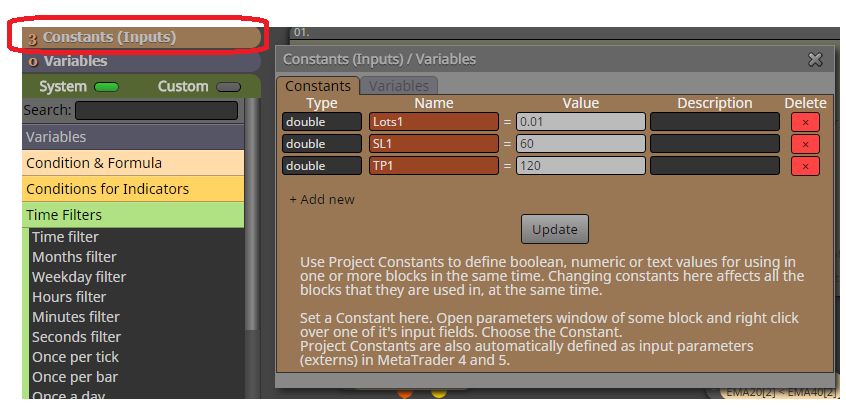
See step 1. (description in EA). where I am talking about constants, constants in fxdreema:
For adding constant into block parameter, do this with mouse right-click in field where you will add constant and select this constant. Now is this constant as Input parameter. But when you use constant as input parameter, leave input check-box unchecked:
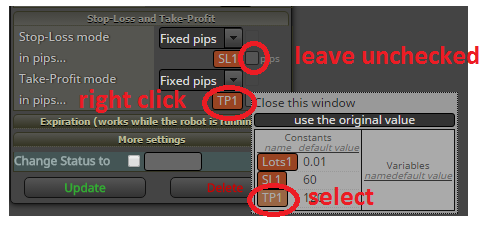
Why to use constants in fxdreema instead input check box? Because you can add the same constant into more blocks.
You have successfully created input parameters for EA. Values are changeable in tester.
Hope it was fast and clear.
Next tutorial will be about buttons for this EA.
-
-
@miro1360 said in Tutorial 02 - EMA cross, part 2 [beginners]:
For adding constant into block parameter, do this with mouse right-click in field where you will add constant and select this constant. Now is this constant as Input parameter. But when you use constant as input parameter, leave input check-box unchecked:
where to get this box????



