Tutorial 07 - Read prices from indicator objects
-
We are going read values from Objects on the chart which are controlled by indicator, not values from buffers, that means, we dont need indicator in My Indicators because we are not going work with indicator directly.
Indicator must be inserted into chart manually (into same chart with EA).here is indicator (note, is renamed, you can rename it as you wish)
0_1480901745242_Shved Supply and Demand (e600) length.ex4and here is shared link to this strategy:
https://fxdreema.com/shared/JyxzKfdwdnow look how is this indicator working:
-
is ploting dynamic zones:
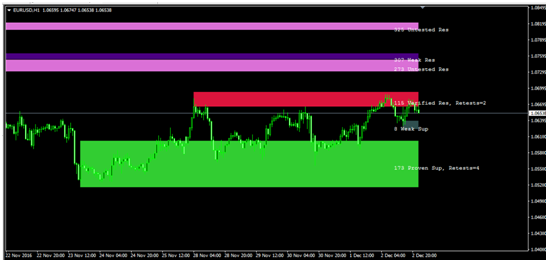
-
these zones are not from buffers, but from objects, so look how they are named:
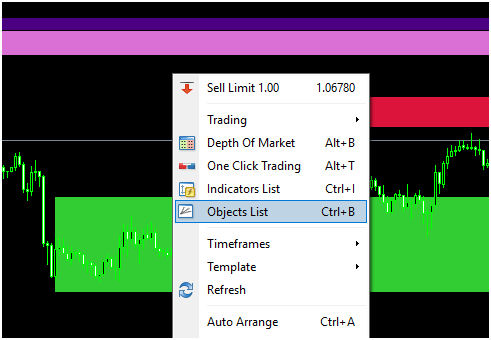
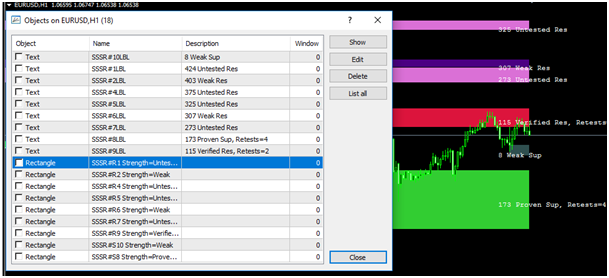
See, Rectangle type with name begins as "SSSR" and than some incrementation with "R" or "S" and next info like "Weak", "Proven" ...
Our strategy can be (you can create another):
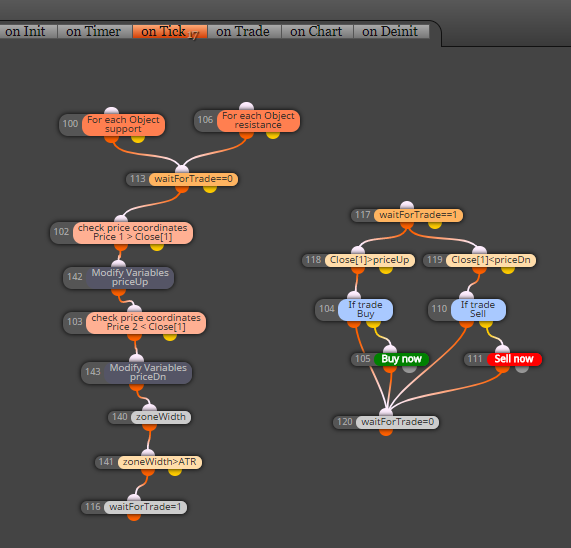
- when candle 1 closed inside zone, we leave EA waiting for next conditions
- when price go outside (next candle 1 closed outside) zone Up, EA open Buy, when outside zone Dn, EA open Sell
- zone width must be at least 1xATR
- SL and TP is some multiplicator from ATR indicator
- Lot size is risk percento from balance depending on SL
First we need 2 blocks which are selecting objects (rectangles) based on criteria:
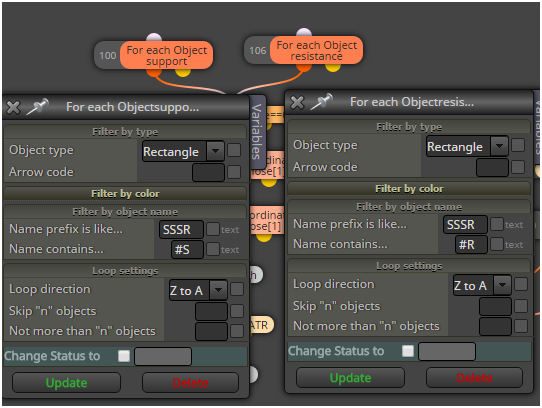
next is switch which control if was price inside rectangle before and if EA is waiting for trade
after this are blocks which are working with selected rectangles
these blocks make some comparison with candle price and variable blocks save price from selected object into variables priceUp and price Dn for next comparison:
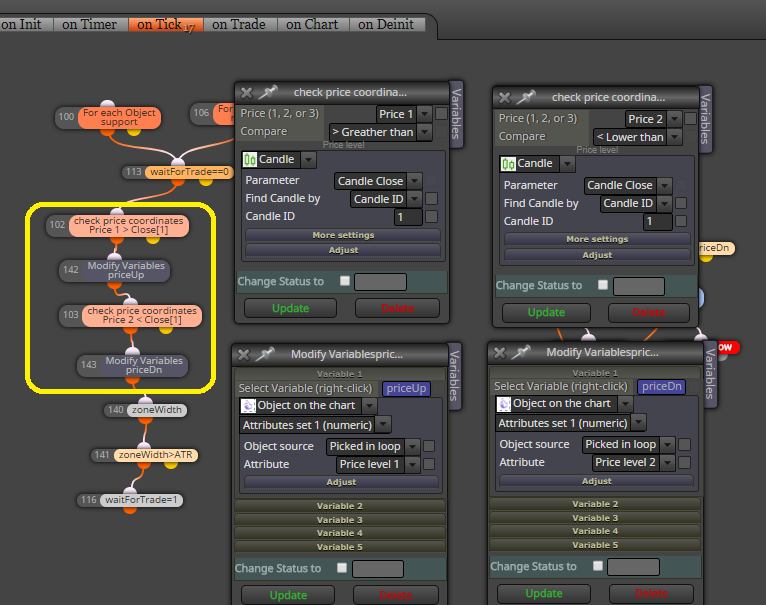
here are all blocks together needed for this strategy:
and this is result:
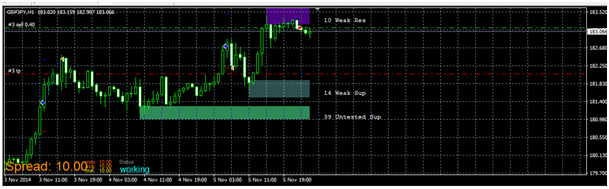
note: this is not profitable EA and is not for your real account, this tutorial shows only way, how to work with object from some indicators
note:
- with this way you can working with any object on the chart, also with own objects placed manually
- better if you give them name in chart and for selecting object you use block: "Select Object by Name"
- or you can read or compare values from objects also with other blocks:
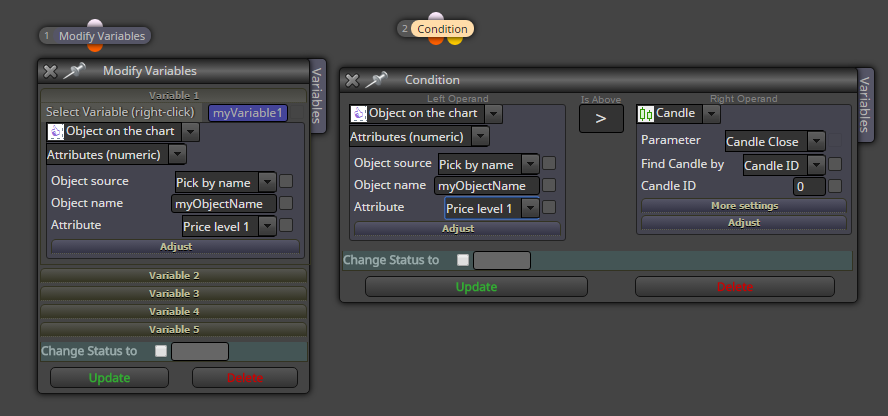
that is all ...
Between trading and gambling is a very small gap, be careful.
-
-
@miro1360 THANK YOU... VERY INFORMATIVE
-
Many, many thanks.
Very useful. -
Thank you
I need it exactly for this indicator. -
Why, when I copy thiss tutorial to my project I get this error..... I have both ATR and Shved indicators installed
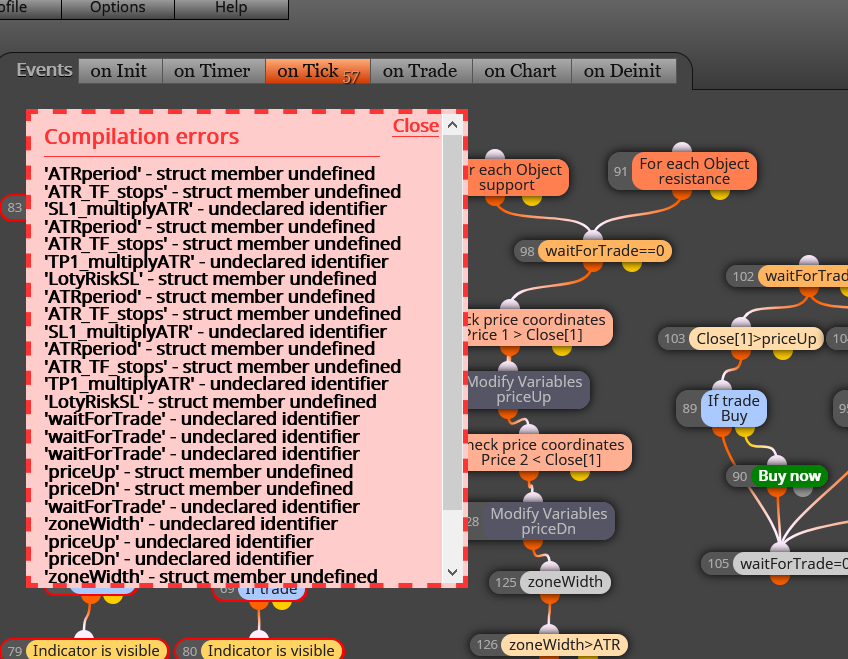
Here is the link to my project
https://fxdreema.com/shared/ySd0wIT9e -
@alphaomega you also have to import all the constants and variables from the shared project
-
@ambrogio ... Thanks for the reply. This is what I did.. I first compiled the Tutorial... then ssave it in my mt4... then import the ea to my project... but it did,nt work... can you give me a step by step to import the constants and variables.. or is it somewhere in a tutorial?....... Thank you brother
-
@alphaomega the file of miro has five constant and four variables, when you copy and past the blocks btween project, you lost this value
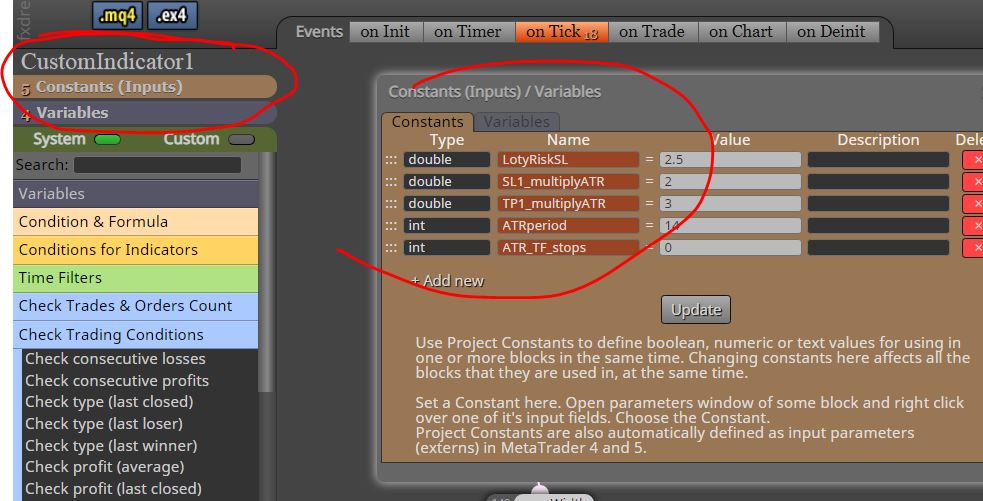
this is your project: you don't have anything

You can : write manually this constant and variables into your project, otherwise do the reverse : copy your blocks in the miro's project and save
-
@ambrogio Thank you.... I did the latter
-
FYI: There is something wrong with the logic of the code reading the indicator. The coding itself seems fine but the EA takes orders where there is gaps, it is suppose to take an order after a full candle has left the square. Also in low volatility the EA take orders with candles that's not even close to the square. I did set the indicator to only show verified squares but I wondering if the squares are not still in the background invisible maybe and now the EA is reading those squaress aswell? Any ideas why and how to eliminate this problems?
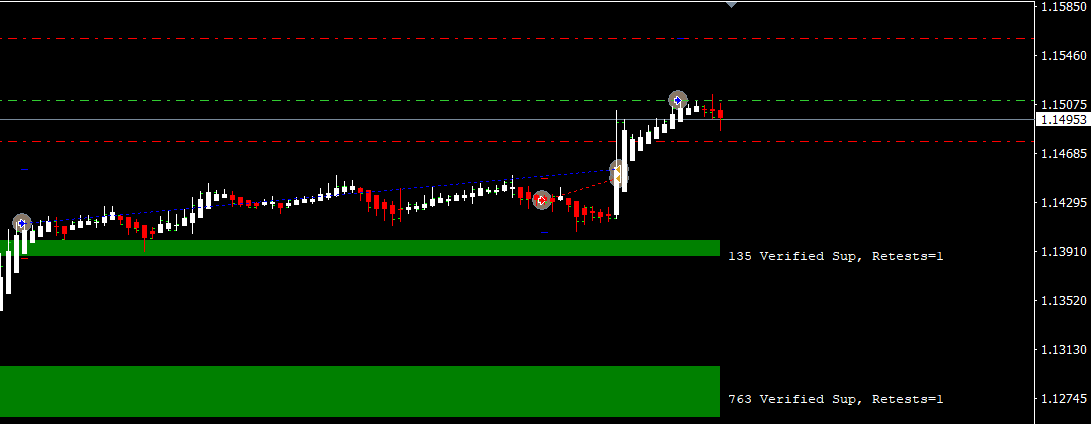
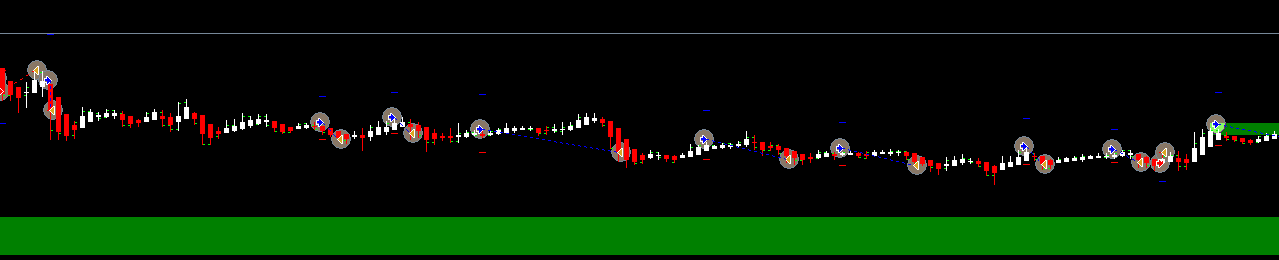
-
@alphaomega share your example project
Between trading and gambling is a very small gap, be careful.
-
@miro1360
https://fxdreema.com/shared/RwHGYVL4e
Thank you miro for taking the time to looking at this. Also so could you remove the Buy and sell ATR .. to fixed pips please.,, I tried myself but then the EA have errorsThank you again
-
try this, I added the option for enabling or disabling the untested, also the ATR is removed from buy sell blocks
https://fxdreema.com/shared/arhx2dkU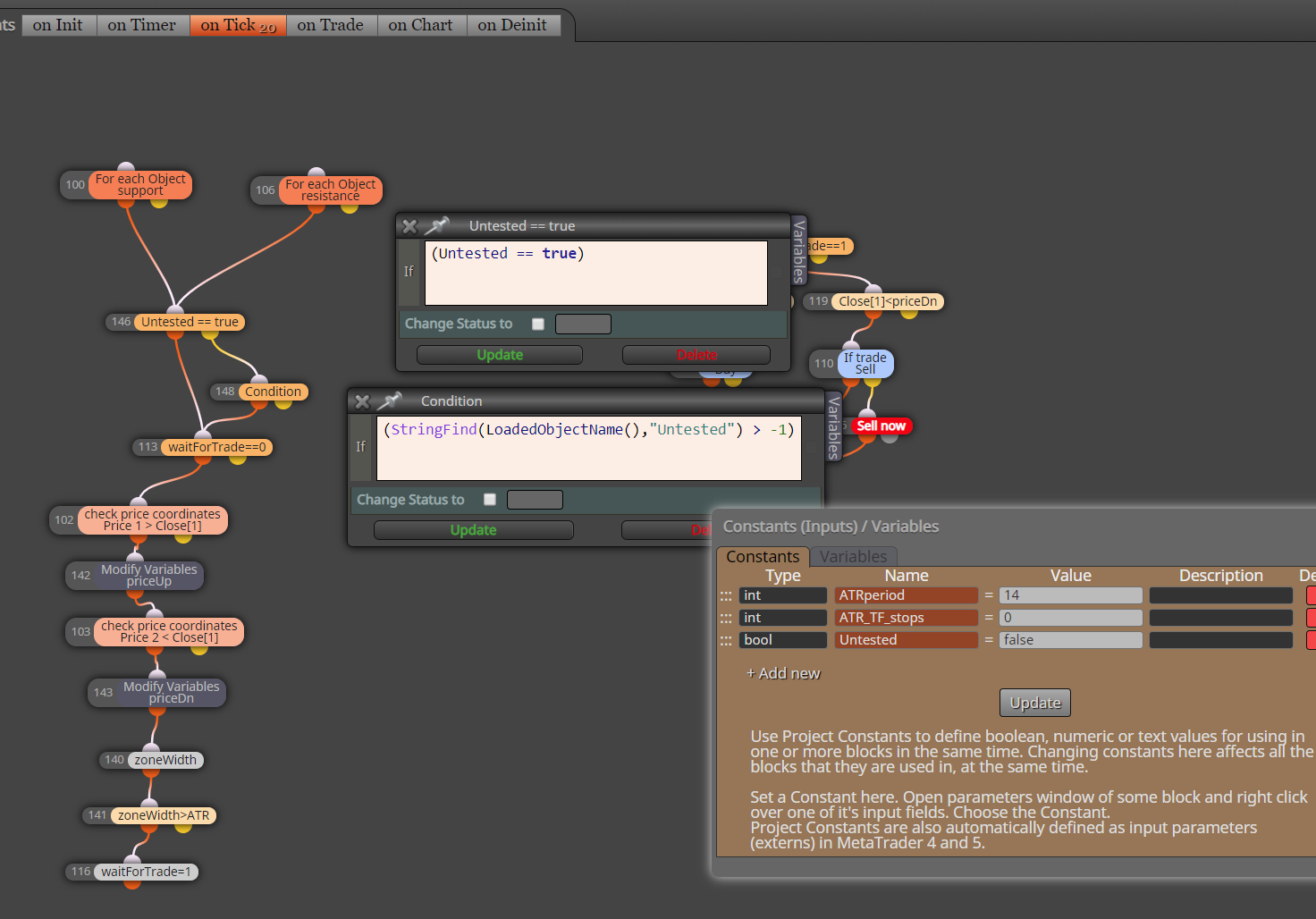
note: the project it is also untested

-
I think there may be other problems ... if a trade zone appears, the price is inside, and if the zone disappears the trade will be opened
but I'm not sure this was a long time ago when I created it
it was just a demonstration of how to load and check indicator objects with fxdreema, there is still a lot to be done for a logic bulletproof EABetween trading and gambling is a very small gap, be careful.
-
@miro1360 Thank you for replying! I totally understand this is a Tutorial and to be a good reliable EA still needs a lot of work BUT, it is a great privilege to have you guys teach us noobs at FXdreema .. I have no programming knowledge and also very little trading experience, so Thank you once again.
I like the idea of support and resistance trading and would really like to incorporate such indicator to my strategy.. I before tried manually to work with this Shved Supply and Demand, needless to say: it did not work for me. There is another Supply and Demand indicator which is working better but have no Mql4 file.. It feels more reliable and I had better success working with it manually. I have an idea to change Shved Supply and Demand in your tutorial to the SupDem:
0_1587967862568_supDem v2.ex4
Anyway, I am learning a lot and for now, and I am just happy to drag my feet through the mud and maybe, who knows, one day I will make a successful EA which I can contribute here
I know I am not talking only for myself but many people here appreciate your great tutorials, Thank you miro! -
This EA is not the complete strategy or settings it is just an ongoing idea where I want to add the support and resistance Indicator to get more orders and then will work on more accuracy. This is EURUSD H1over 12/2019 till today
https://fxdreema.com/shared/7WGootlsb


-
@alphaomega
the logic is similar for reading prices from that supDem indicator, just change the object name, try itBetween trading and gambling is a very small gap, be careful.
-
@miro1360 ... Yes I saw... Thank you!!
-
@miro1360 Hi miro1360...
Hope you are still good? I found another Shved Sup&Res with the buffers already installed. My problem is that I am confused to which no. buffer goes to which square. I tried all of them separately but for some reason they open the order incorrectly. Could you be a doll and help me out by checking which buffers is going with which level/rectangular pretty please!! As always we much respect and appreciate your input!
https://fxdreema.com/shared/pOuJLUfXd
0_1588430048733_shved_supply_and_demand.mq4 -
these buffers are useless for your purpose, because anyway the objects creation is based on it ... you will have to work with objects, or transform the whole logic of creating those objects into EA (which is many times more complicated) ...
Between trading and gambling is a very small gap, be careful.