Help wanted, please!
-
Dear Miro,
I can finally confirm that your block structure works perfectly. You're a great programmer!
 Now I would like to add an additional layer of complexity to the EA and I would appreciate your suggestions again.
Due to my broker's MT4 platfom, different charts use different pip counting. For example, if I want to get 20 pips from a Forex chart, I need to put a 200 in the EA. The problem comes when I want to combine Forex, metals and indexes, as all use different counting systems. In my example, 20 pips mean that I should put a 2000 in gold and 20000 in Dax, for example.
This means that I need a way to translate different pip counts to a single one in order to specify a single target i the EA. What hints could you offer me?
Thank you very much in advance.
-
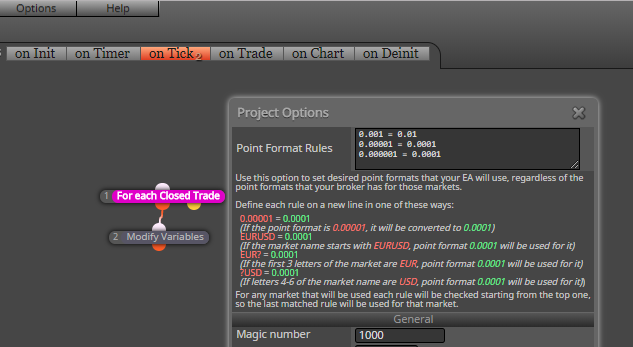
have you tried to play with point format in Project Settings?
-
No, I didn't. I think this is exactly what I'm looking for. Once again, thank you very much.
-
Hi again Miro. I found a problem with the project options and I would like to ask for your help (again) if possible.
I found the correct combinations for point format rules. The EA works perfect on each chart individually but it fails when combined. Let me explain. These are my initial rules:

As you can see I added gold and two indexes. Let's begin with any forex chart. This is what I get:

Just forget the closed pips. We can check that the open trade is correctly counted in pips. Now the same with gold:

Once again, it is correct. And now let's test it with DAX:

All is ok so far. The problem comes now when I put the EA in a fourth chart in order to calculate all open pips from the three previous charts simultaneously:

Where do those numbers come from? it doesn't even resemble a pip counter! Suddenly there are more than 15000 pips open right now!! :O. For some reason I don't understand, I cannot combine several charts at the same time.
Could you please give me any hint?
Once again, thank you very much in advance.
-
interesting, how your blocks from fourth EA looks like?
-
It is the same exact EA in all of them! The blocks are those shown at the first image in my previous message.
-
have all EAs the same magic number?
-
The test of my example was made with manual trades, so I put 0 as a magic number in the EA in this case. On the other hand, when I use other EAs to open trades, yes, I use the same magic number for all of them and in this one.
-
@fxDreema can check it for possible bug

... -
Well, my EA is moving forward! Now the pip counter has been embedded into the trade launcher. This way I will not need to add two separate EAs (launcher and pip counter). So this is it:
And here begin my new problems. My first one is that none of the information requested at the "Comment (ugly)" block is shown at the chart. I need to see it in order to check if all formulae are correct. Could someone take a look at it, please?
Miro, are you here?
-
I simply can't understand it. Why does it work fine here...
...and not in its embedded version?
-
Reading at the block info I can't see any limit for it to be positioned wherever is wanted. I tried to put it below different bloks but it doesn't work anyway. Could it be a bug?
-
@isp00rt It's funny, this seems to work when it wants.
I first backtested the shared project - no ugly Comment on the chart.
Then I imported that project into my projects, so I can investigate it more. Still, no Comment and I found that block 11 probably doesn't pass. I used "Draw arrow" and block 11 was when it all breaks.After few more checks the Comment started to show. And now I can't un-show it, now I can download the untouched shared project and I can see the Comment every time. It just shows every time now, as it should. There is some magic here, I don't know how this happened
-
Are you sure? I tried it again at three different MT4 platforms and it doesn't work.
 Could you please tell me what problem did you identify in block 11?
 -
I tried to do exactly what you did. I exported it, then I imported it again with a different name and reexported, but to no avail. Are you sure you didn't modify any block or element?
-
Yes, I just opened this link now https://fxdreema.com/shared/YGCxbQKOd (note that when someone opens a shared link, a temporary copy of the project is created for him, and after a while this copy is automatically deleted) and I have this: http://prntscr.com/ibgnoa
Because it works for me at the moment, I can't really tell what was the problem and whether it is in MetaTrader or in the EA. What I can suggest, just in case if the problem is in the EA, do remove those blocks and connect them again... but I don't see why this would work, because the output code should be the same...
-
It doesn't work for me :(. I erased all blocks and remade them from scratch, including all connection as you suggested. This is the "new" one:
https://fxdreema.com/shared/Xt1wf9Ryc
Nothing happens. Could you please tell me what MT4 build are you using? Mine is version 4.0, Build 1090. Tested at three different brokers. Could you also tell me what broker did you use to test it?
-
Ok. I finally got it! This is what I had to do in order for it to work:
- Export the pip counter alone as a mq4 file. Then change it name.
- Import it to FxDreema with this new name.
- Copy the trade launcher blocks from another project within FxDreema.
- Then paste oll blocks to the new pip counter project.
I don't know why, but now it works fine!!!! :). Obviously I deleted the wrong one forever.
-
Now that my pipcounter EA works fine for single charts I want to implement its final step: doing it multichart. This is the group of blocks that will do it:
https://fxdreema.com/shared/xTQsbKU4b
And this is my final probelm found. Once solved it will be finally done!!!
I don't know how the "terminal Variables" block work exactly. What I want is that all pips got from one chart (from open and closed trades) is added/substracted to the same terminal variable that is to be shared by all other charts. That way I will set a globat pip target that is to be achieved by all charts simultaneously.My current structure can count all pips on a single chart correctly, but I don't know why it doesn't communicate to other charts. Could someone please take a look on it to check what's is going wrong?
Thank you very much in advance.
-
Terminal variables are called Global Variables in MetaTrader, because they are obviously variables that are global (can be accessed from all EAs). I called them Terminal, because the term "global variable" already has meaning for the EA itself. They are values written in some file I think, pretty much like the cookies in the browser, that's why they does not disappear for some time.
In MQL there are 2 general functions that are used to get and set them - GlobalVariableSet() and GlobalVariableGet(). Very, very basic. You can actually use those functions directly if you have to do something a little bit more complex. Otherwise there is a block to set them and also you can get and check their values somewhere in Condition (search for Terminal Variables).

