how to declare parameters for custom blocks
-
Hi
i declare the parameters in the box top right. then it seems I have to declare them at the source again.
At compile time i get this warning:
declaration of 'myvar' hides member declaration at line 540could you please explain how to define parameters and what is the meaning of the yellow arrow?
thx
-
Parameters are only defined in that box top right, not in the code. In the code you only use them. Here is something that I did:

At the end the code looks like this:
``
// "test" model
template<typename T1>
class MDL__3066: public BlockCalls
{
public: /* Input Parameters */
T1 Parameter;
virtual void callback(int r) {return;}public: /* Constructor */ MDL__3066() { Parameter = (int)123; } public: /* The main method */ virtual void _execute_() { Print(Parameter); }};
``
_3066 is the id of the custom block, this is automatically generated and you can change it from here:
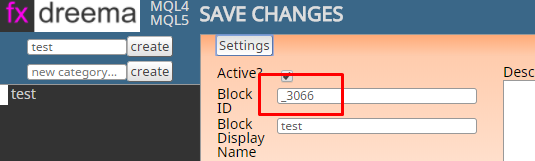
As you can see in the code, the parameter is defined just below that line with /* Input Parameters */
The code of the block is simply Print(Parameter); and you can see where this is located. So the variable Parameter comes from above, it is a public member of the class and it is automatically placed there. -
If you have one of those "Custom" parameters, in the code you should use them like this:

This is actual code of the "Indicator is visible" block.
That ~datatype:Indicator~ thing is not necessary, you can use double or whatever you have. I think I use it that way only to remove some warning message. People are a little bit scared of those warnings
Why ~Indicator~? While in the previous example Parameter is just a variable name, here ~Indicator~ is replaced with an automatically generated function call, it links to another method somewhere in the code.
-
Thanks a lot for clarifying
