fxDreema

    • Register
    • Login
    • Search
    • Back to the main page
    • Categories
    • Recent
    • Tags
    • Popular
    • Search
    1. Home
    2. MetaTrader
    M
    • Profile
    • Following 1
    • Followers 0
    • Topics 20
    • Posts 72
    • Best 1
    • Controversial 0
    • Groups 0

    MetaTrader

    @MetaTrader

    1
    Reputation
    2236
    Profile views
    72
    Posts
    0
    Followers
    1
    Following
    Joined Last Online
    Website www.brainfinder.eu Location London Age 21

    MetaTrader Unfollow Follow

    Best posts made by MetaTrader

    • RE: how to prevent slippage

      Just for understanding:
      Slippage is the difference between the quote you get with last tick and the price you pay with next tick, when you place the order. Some brokers offer to execute without slippage but I would never trade there.It would be suicide for the broker if he sell at quote price if the market prices moves away very fast. It will open the door for arbitrage trading.

      What can you do?

      1. At first there is a slippage allowance in the buy and sell blocks. That mention you can limit the slippage on order execution. If the market is more away than ... your order will not become executed.
      2. Place pending orders and allow a small slippage. You can look for brokers who guarantie to execute pending orders at the given price (maybe on some conditions)

      No slippage will only work on slow market movements, thats why lets say you place pending order at 1.11111 and one tick the market is at 1.11110 so the order is not triggered yet. One tick later the price is at 1.11112 and without slippage the order will not be triggered because the price is away. In fast moveing markets (the only markets to make profit) its hard to hit exactly your price.
      posted in Questions & Answers
      M
      MetaTrader

    Latest posts made by MetaTrader

    • How to get the TicketNumber or select the trade which triggered OnTrade

      I want to do some logging on open and close of Orders.
      OnTrade triggers with TradeClose for example but how can I select exactly the one that triggered the event?

      posted in Questions & Answers
      M
      MetaTrader
    • Ugly behaviour on accidently scrolling

      The Online-Builder has an ugly behaviour:
      Upfront I must say I use a MacMagic Mouse with my Windows PC but it happens also with my touchpad and I guess with a wheelmouse as well.

      When I scroll a little bit with an open input Dialog of a box or with the variables pop-out open a random number in one of the input areas is increased or decreased or if there is none it creates a number in a random input field.

      That often happens when I accidently scroll a little bit on updating the Block-Dialog and caused random errors.

      Please could you fix that or tell us how to disable?

      posted in Questions & Answers
      M
      MetaTrader
    • RE: how to declare parameters for custom blocks

      Thanks a lot for clarifying

      posted in Questions & Answers
      M
      MetaTrader
    • how to declare parameters for custom blocks

      Hi

      i declare the parameters in the box top right. then it seems I have to declare them at the source again.
      At compile time i get this warning:
      declaration of 'myvar' hides member declaration at line 540

      could you please explain how to define parameters and what is the meaning of the yellow arrow?

      thx

      posted in Questions & Answers
      M
      MetaTrader
    • RE: Custom Block Help -> TypeError : Cannot read property 'trim' of undefined

      Hi any Idea how to solve this?

      posted in Questions & Answers
      M
      MetaTrader
    • RE: How to stop FXdreema from automatically updating my expert in local computer

      Its never updating locally if you do not press the Buttons for generating ex4 or mql4

      posted in Questions & Answers
      M
      MetaTrader
    • RE: Custom blocks seem to be disabled

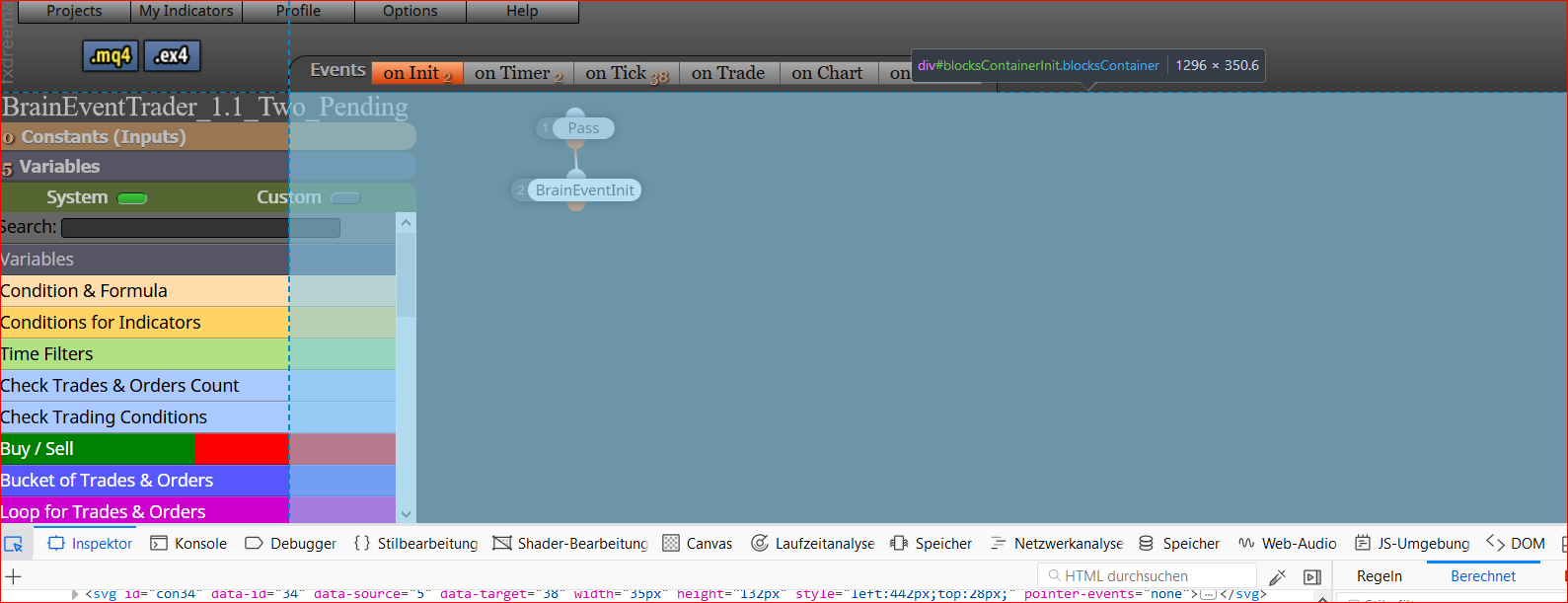
      Ok I "fixed" it: Its because the Name of my EA was longer than ... so the left menu is extended and overlayed by the center div
      Shortening the name helps me out

      posted in Bug Reports
      M
      MetaTrader
    • RE: Custom blocks seem to be disabled

      Ok I found the reason, the div #blocksContainerInit.blocksContainer is overlaying the button.
      I use full hd 1920*1080 resolution on 24" monitors

      Thats what the Inspector shows me when I try inspect the button.

      0_1516831472483_74c3646d-7d32-42a5-a3e9-2391ec4577a5-grafik.png

      So the button is ok but the container is wrong

      when i remove the section with id="content-center" for testing fom DOM then the button is free and working

      posted in Bug Reports
      M
      MetaTrader
    • RE: Custom blocks seem to be disabled

      Addidtionally I disabled all Addons with FF and its still not working. It was working and since a couple of days its not. It is broken since you restored the lost projects. Or maybe 1 or 2 days later.
      I didn't change anything on my side, no modification to VirusScanner or Firewall no modification to my browser tools. Must be on Serverside.

      posted in Bug Reports
      M
      MetaTrader
    • RE: Custom Block Help -> TypeError : Cannot read property 'trim' of undefined

      Yes thats it
      When i tried to submit an image fxdreema was down

      posted in Questions & Answers
      M
      MetaTrader